Easy Piano – Learn, Play & Compose (Europe) (En,Fr,De,Es,It)
0 1 0
Easy Piano – Learn, Play & Compose (Europe) (En,Fr,De,Es,It) is a classic Nintendo DS game that gives a simple introduction to playing and understanding piano music. It’s well-suited for beginners, casual players, or anyone curious about exploring music interactively. As a product from the Nintendo DS era, it combines educational elements with light gameplay, making it accessible and engaging for all ages. Fans of music, learning new skills, or just trying out a virtual piano will find this title interesting.
Getting Into Easy Piano – Learn, Play & Compose
The core of this game involves teaching players how to read sheet music and play basic melodies. When you start, you choose between modes like learning, playing, or composing. In learning mode, the game guides you through scales, simple songs, and techniques step-by-step, often using visual cues on the screen to show which keys to press. Playing mode lets you pick familiar tunes or practice pieces, offering a fun way to build confidence with the instrument.
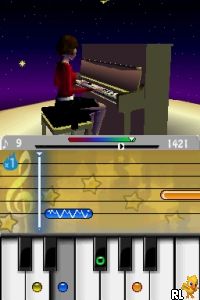
A typical session involves following on-screen instructions that mimic real piano playing. You’ll see virtual keys light up as you press the corresponding buttons on the Nintendo DS, matching notes and rhythms. The game tracks your accuracy and timing, giving feedback and encouraging improvement. Its simple interface makes it easy to jump into a session without any prior musical knowledge, which is perfect for newcomers or casual players interested in experimenting with music. The structured approach helps users gradually develop their skills, whether they’re just starting out or aiming to refine their playing.
The game also includes a composition mode, where players can create melodies by placing notes on a virtual staff. This feature offers a creative outlet and encourages experimentation with musical ideas at your own pace. Overall, gameplay focuses on guided learning, practice, and small creative projects that keep things fresh and motivating.
Standout Features
Visually, the game uses simple graphics that prioritize clarity. The virtual piano keyboard and sheet music are easy to read, with colorful highlights guiding players through each note. This minimal design supports quick learning without distractions, making it accessible even for those new to digital music tools. The interface is clean, and the menus are intuitive, so switching modes or selecting songs is straightforward.
Progression is organized around increasing difficulty and complexity of exercises. Starting with basic scales and simple melodies, players can gradually take on more challenging pieces, helping to build confidence step by step. The inclusion of multiple languages broadens its accessibility, making it suitable for players across Europe. Replay value comes from practicing different songs, experimenting with composition, or revisiting lessons to improve timing and accuracy. Since it emphasizes skill-building at your own pace, many find themselves returning to refine their abilities.
While the visuals are simple, they serve their purpose well, keeping focus on musical progress. The modular structure encourages repeated play, as players can choose different songs or focus on creating new melodies, making it a versatile tool for musical exploration.
Strategy and Tips
Getting the most out of this game involves patience and regular practice. Start with beginner exercises to master the basics before moving to more complex pieces. Use the composition mode to experiment with melodies once you’re comfortable reading notes. Keep an eye on your accuracy scores, and don’t rush; improving timing and note recognition takes consistent effort.
- Focus on accuracy first, then gradually increase your speed to improve rhythm and timing.
- Repeat lessons or songs multiple times to build muscle memory and confidence.
- Use the in-game feedback to identify tricky sections and practice them separately.
- Try creating your own melodies as a fun way to reinforce what you’ve learned.
- Adjust the difficulty settings if available, to match your skill level.
Quick Questions
How do I start learning on this game?
Select the learning mode from the main menu and follow the onscreen instructions for beginner exercises.
What is a common mistake for beginners?
Many press the wrong keys because they’re rushing; focus on accuracy before speed.
Can I play this game on mobile or touch devices?
While it runs in your browser, the game is designed for the Nintendo DS interface, but it can be played with a mouse or touchscreen on compatible devices.
This Nintendo DS classic offers a simple and accessible way to start learning piano skills. With clear visuals, a gradual progression, and creative features, Easy Piano – Learn, Play & Compose provides a practical entry into music. You can even play it free in your browser.
Related games: you can also try Alice in Wonderland (Europe) (En,Fr,De,Es,It,Nl) (NDSi Enhanced) and Donkey Kong – Jungle Climber (Europe) (En,Fr,De,Es,It), or browse all other games in the Nintendo DS category.
How to Play Easy Piano – Learn, Play & Compose (Europe) (En,Fr,De,Es,It)?
Follow on-screen prompts to press virtual piano keys, practice melodies, and create your own tunes. The game guides you through learning, playing, and composing music step-by-step.
Game Controls
Arrow keys navigate; specific keys select and play notes; use on-screen prompts for actions.
You may be interested in:
-
 Nintendo DS
♥ 1
Casper’s Scare School – Classroom Capers (USA)
Nintendo DS
♥ 1
Casper’s Scare School – Classroom Capers (USA) -
 Nintendo DS
♥ 1
Zunou Nouryoku Koujou Machine – Touch de Zunoo DS (Japan)
Nintendo DS
♥ 1
Zunou Nouryoku Koujou Machine – Touch de Zunoo DS (Japan) -
 Nintendo DS
♥ 1
Zunou ni Asekaku Game Series! Vol. 1 – Cool 104 Joker & Setline (Japan)
Nintendo DS
♥ 1
Zunou ni Asekaku Game Series! Vol. 1 – Cool 104 Joker & Setline (Japan) -
 Nintendo DS
♥ 9
Zuma’s Revenge (USA)
Nintendo DS
♥ 9
Zuma’s Revenge (USA) -
 Nintendo DS
♥ 1
Zubo (USA) (En,Fr,Es)
Nintendo DS
♥ 1
Zubo (USA) (En,Fr,Es) -
 Nintendo DS
♥ 1
Zubo (Europe) (En,Fr,De,Es,It,Nl,Sv)
Nintendo DS
♥ 1
Zubo (Europe) (En,Fr,De,Es,It,Nl,Sv) -
 Nintendo DS
♥ 1
Zorro – Quest for Justice (USA) (En,Fr,De,Es,It)
Nintendo DS
♥ 1
Zorro – Quest for Justice (USA) (En,Fr,De,Es,It) -
 Nintendo DS
♥ 1
Zorro – Quest for Justice (Europe) (En,Fr,De,Es,It)
Nintendo DS
♥ 1
Zorro – Quest for Justice (Europe) (En,Fr,De,Es,It)
Comments (0)
No comments yet. Be the first to comment!