Elfaria – The Isle of the Blest (Japan)
0 1 0
Elfaria – The Isle of the Blest (Japan) is a classic SNES game that plays right in your browser through an emulator, so you can jump into this nostalgic adventure without downloading anything. As a well-loved title from the 16-bit era, it offers a straightforward experience suited for both newcomers and fans of retro RPGs. Its simple controls and familiar gameplay mechanics make it an easy choice for those interested in SNES-era role-playing games.
What Is Elfaria – The Isle of the Blest?
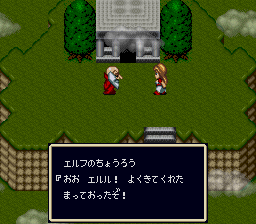
Elfaria – The Isle of the Blest is a role-playing game set in a colorful fantasy world on the SNES. The main idea involves exploring the island, completing quests, and battling enemies in turn-based combat. The focus on exploration and story progression gives players a chance to enjoy a light adventure with a manageable scope.
The game’s mechanics are typical of early RPGs, with menus used to manage items, spells, and character stats. It’s designed with simplicity in mind, so new players can pick it up easily, while RPG fans can find enough depth to keep things interesting. Patience and curiosity are rewarded, and each session is short enough for a quick play or a longer exploration if you want to find all the secrets.
What Keeps You Coming Back
One of the main attractions is its charming presentation and accessible gameplay. The pixel art captures the feel of SNES adventures, and the soundtrack adds to the whimsical tone. There are enough side quests and hidden areas to encourage replaying, especially if you want different story outcomes or to discover all the secrets.
Replayability also comes from its simple mechanics. Since it doesn’t require complex strategies or grinding, you can revisit it for quick sessions or to explore areas you might have missed. Its straightforward combat and exploration make it suitable for players of all ages, whether they’re after a nostalgic trip or just a casual RPG experience on their browser.
Handy Tips
When starting out, it’s a good idea to keep an eye on your inventory and save often. Managing resources early on can make battles easier. Be thorough in exploring each area—hidden items and shortcuts often reward curious players.
- Talk to every NPC; many will give useful hints or side quests.
- Save your game regularly to avoid losing progress after tough fights.
- Pay attention to clues about item and spell use—some puzzles need specific tools or magic.
- Explore the map carefully; the game’s non-linear approach rewards thorough investigation.
- If you get stuck, go back to earlier areas; sometimes the answer comes from new items or knowledge gained along the way.
Player FAQ
Is Elfaria – The Isle of the Blest easy for beginners?
Yes, its simple mechanics and gentle difficulty make it a good starting point for new RPG players. It’s a relaxed way to get familiar with the genre.
Can younger players enjoy Elfaria – The Isle of the Blest?
Definitely. Its bright visuals and non-violent story make it suitable for kids. Just keep in mind that some reading might be needed for quests, so basic reading skills help.
Do I need an internet connection to play Elfaria – The Isle of the Blest?
Nope. You can play directly in your browser without needing to connect online. It runs as a browser-based emulator, so you can start playing anytime you want.
Elfaria – The Isle of the Blest offers a charming, straightforward RPG experience perfect for quick sessions or longer adventures. Its nostalgic feel and easy gameplay make it a good pick for fans of retro gaming, and it’s available to play free in your browser whenever you want a bit of SNES magic.
Related games: you can also try Bounty Sword (Japan) and Chou Makaimura (Japan), or browse all other games in the SNES category.
How to Play Elfaria – The Isle of the Blest (Japan)?
Explore the island, talk to NPCs, complete quests, and battle enemies in turn-based combat to uncover secrets and progress through the story.
Game Controls
Arrow keys move; Enter or Confirm button interacts; other keys handle menu and actions.








Comments (0)
No comments yet. Be the first to comment!