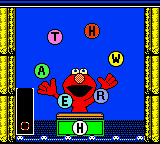
Elmo’s ABCs (USA)
0 3 0
Elmo’s ABCs (USA) is a charming Game Boy Color game that helps young players get familiar with the alphabet through interactive play. Its simple setup and friendly characters make it a good choice for beginners or kids just starting to learn their letters. As a classic from the Game Boy Color era, it offers a nostalgic look at early educational gaming, and now it can be played directly in your browser without any hassle.
What Is Elmo’s ABCs?
This game falls into the educational category, focusing on helping children recognize and learn the alphabet. It offers a series of activities where kids identify letters, sounds, and words, all within a colorful, kid-friendly interface. The aim is to strengthen early literacy skills through engaging tasks that are easy for young children to understand.
The gameplay is simple and straightforward, with controls and visuals tailored to preschoolers. It doesn’t have levels or scores but instead features mini-games or puzzles that keep the learning fun and light. The emphasis is on familiarization rather than challenge, making it suitable for casual, educational play sessions.
What Keeps You Coming Back
The game features a variety of activities centered around recognizing letters, matching sounds, and forming basic words. Its bright animations and friendly character of Elmo make learning feel like play. Since the activities are simple, kids can repeat them to build confidence and improve familiarity with the alphabet at their own pace.
Replayability comes from the different mini-games and the chance to practice various skills in one platform. Designed with young learners in mind, there’s no frustration or penalties for mistakes, which encourages repeated play. Parents and educators appreciate the gentle educational focus, making it a useful tool for reinforcing early literacy over multiple sessions.
Handy Tips
Start with familiar activities to help build confidence, encouraging kids to repeat their favorite mini-games. Use visuals and sounds outside the game to reinforce letter sounds for better retention. Keep sessions short to match attention spans, especially for younger children. Patience helps—repetition makes learning stick without causing frustration.
- Highlight a letter or word from the game during daily activities to boost recognition.
- Use the activities as a warm-up or cool-down for reading practice.
- Repeat favorite mini-games to build confidence and mastery.
- Pause after each activity to discuss what was learned.
- Adjust your pace; let the child explore at their own speed instead of rushing through.
Player FAQ
Is Elmo’s ABCs easy enough for very young children to play?
Yes, it’s designed with young learners in mind, featuring simple controls and colorful visuals that are easy for preschoolers to understand.
Can I play Elmo’s ABCs offline or on any device?
This version runs in your browser, so it works on most devices with internet access—no downloads needed once it’s loaded.
Is Elmo’s ABCs suitable for kids who don’t speak English?
While mainly in English, visual cues and sounds can help non-native speakers recognize letters and words, though full understanding depends on their language skills.
Elmo’s ABCs provides a straightforward, engaging way for children to learn the alphabet through familiar characters and simple tasks. It’s great for casual learning and remains easy enough for young kids to enjoy without frustration. Playing it here makes it accessible and fun, bringing a nostalgic educational classic right to your browser.
Related games: you can also try Burger Burger Pocket (Japan) and Dragon Ball Z – Densetsu no Chou Senshi-tachi (Japan), or browse all other games in the Game Boy Color category.
How to Play Elmo’s ABCs (USA)?
Help Elmo teach children the alphabet by completing simple mini-games that involve recognizing letters, sounds, and words. Repeat activities to build confidence and improve early literacy skills.
Game Controls
Arrow keys for movement; Enter to select and confirm actions.
You may be interested in:
-
 Game Boy Color
♥ 43
Zook Hero Z
Game Boy Color
♥ 43
Zook Hero Z -
 Game Boy Color
♥ 1
Zok Zok Heroes (Japan)
Game Boy Color
♥ 1
Zok Zok Heroes (Japan) -
 Game Boy Color
♥ 1
Zoids – Shirogane no Juukishin Liger Zero (Japan)
Game Boy Color
♥ 1
Zoids – Shirogane no Juukishin Liger Zero (Japan) -
 Game Boy Color
♥ 1
Zoids – Jashin Fukkatsu! Genobreaker Hen (Japan)
Game Boy Color
♥ 1
Zoids – Jashin Fukkatsu! Genobreaker Hen (Japan) -
 Game Boy Color
♥ 2
Zoboomafoo – Playtime in Zobooland (USA)
Game Boy Color
♥ 2
Zoboomafoo – Playtime in Zobooland (USA) -
 Game Boy Color
♥ 1
Zidane Football Generation (Europe) (En,Fr,De,Es,It)
Game Boy Color
♥ 1
Zidane Football Generation (Europe) (En,Fr,De,Es,It) -
 Game Boy Color
♥ 1
Zen-Nihon Shounen Soccer Taikai – Mezase Nihon Ichi! (Japan)
Game Boy Color
♥ 1
Zen-Nihon Shounen Soccer Taikai – Mezase Nihon Ichi! (Japan) -
 Game Boy Color
♥ 1
Zebco Fishing! (USA)
Game Boy Color
♥ 1
Zebco Fishing! (USA)
Comments (0)
No comments yet. Be the first to comment!