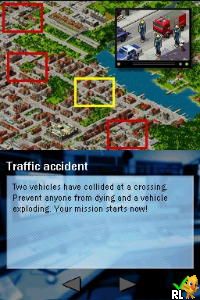
Emergency (Europe) (En,Fr,Es,It,Nl)
0 1 0
Emergency (Europe) (En,Fr,Es,It,Nl) is a classic Nintendo DS game that puts players into the role of emergency responders managing urgent situations. Its straightforward gameplay and accessible controls make it easy for newcomers to pick up and enjoy. As a Nintendo DS title from the era of handheld gaming, it offers a nostalgic experience with simple, yet engaging, mechanics suitable for players of all ages. Playing it directly in your browser means instant access to a vintage gaming challenge without needing downloads or installations.
What Is Emergency?
This Nintendo DS classic belongs to the simulation genre, focusing on emergency response scenarios. The game tasks players with coordinating rescue operations, managing resources, and making quick decisions to save lives. Its core experience revolves around handling multiple emergencies, from fires to accidents, in a limited timeframe. The gameplay emphasizes quick thinking and strategic planning, providing a puzzle-like challenge wrapped in a straightforward interface.
The game is designed for short, intense sessions that test your ability to prioritize tasks under pressure. Its mechanics are simple enough for casual players but offer enough depth to keep veterans interested. The top-down perspective and touch-based controls emulate the handheld feel, making it intuitive to navigate through various crisis situations. Overall, Emergency offers a focused, no-nonsense emergency management experience that’s easy to learn but hard to master.
What Keeps You Coming Back
What makes Emergency appealing is its variety of scenarios and the challenge of balancing speed with accuracy. Each emergency situation presents different obstacles, requiring adaptive strategies to resolve effectively. The game features a scoring system that encourages players to improve their response times and decision-making, adding replay value. Additionally, the game’s minimalistic approach means players can jump into a new crisis at any moment, making it suitable for quick gaming sessions.
Replayability is further enhanced by the different types of emergencies and the need to optimize responses. As you get more familiar with the mechanics, you’ll find better ways to handle multiple crises at once. The game’s straightforward design and instant browser play make it easy to return for a quick challenge or to beat your previous best. Overall, it’s a game that rewards quick reflexes, strategic thinking, and learning from past responses.
Handy Tips
If you want to improve your emergency response skills, keep these tips in mind:
- Prioritize emergencies based on severity to respond more efficiently.
- Use quick gestures or taps to assign resources faster during crises.
- Watch your available resources carefully; running out can end your game early.
- Pay attention to the emergency timers, as rushing can sometimes cause mistakes.
- Practice different scenarios to learn the best response patterns for each emergency.
- Stay calm and focused even in chaotic situations to make better decisions under pressure.
Player FAQ
Is Emergency easy to pick up for new players?
Yes, the game’s simple controls and straightforward mechanics make Emergency accessible for players of all ages and skill levels.
Can younger players enjoy Emergency without difficulty?
Most likely, yes. Its minimal complexity and clear objectives make it suitable for younger audiences, though some emergencies may require quick reflexes.
Do I need an internet connection to play Emergency?
No, you can play Emergency directly in your browser without an internet connection, making it convenient for quick sessions anywhere.
Emergency remains a compact, engaging simulation that challenges your ability to respond swiftly and effectively. Its easy-to-understand gameplay makes it a perfect choice for a quick emergency in your browser, capturing the essence of classic handheld gaming.
Related games: you can also try Bejeweled Twist (USA) (NDSi Enhanced) and Dragon Ball – Origins 2 (Europe) (En,Fr,De,Es,It), or browse all other games in the Nintendo DS category.
How to Play Emergency (Europe) (En,Fr,Es,It,Nl)?
Manage emergency situations by quickly selecting actions to rescue people and control hazards. Prioritize tasks, respond fast, and improve your score with each attempt.
Game Controls
Arrow keys or WASD move; Enter or Space confirm actions; mouse or keyboard for menu navigation.
You may be interested in:
-
 Nintendo DS
♥ 1
Casper’s Scare School – Classroom Capers (USA)
Nintendo DS
♥ 1
Casper’s Scare School – Classroom Capers (USA) -
 Nintendo DS
♥ 1
Zunou Nouryoku Koujou Machine – Touch de Zunoo DS (Japan)
Nintendo DS
♥ 1
Zunou Nouryoku Koujou Machine – Touch de Zunoo DS (Japan) -
 Nintendo DS
♥ 1
Zunou ni Asekaku Game Series! Vol. 1 – Cool 104 Joker & Setline (Japan)
Nintendo DS
♥ 1
Zunou ni Asekaku Game Series! Vol. 1 – Cool 104 Joker & Setline (Japan) -
 Nintendo DS
♥ 9
Zuma’s Revenge (USA)
Nintendo DS
♥ 9
Zuma’s Revenge (USA) -
 Nintendo DS
♥ 1
Zubo (USA) (En,Fr,Es)
Nintendo DS
♥ 1
Zubo (USA) (En,Fr,Es) -
 Nintendo DS
♥ 1
Zubo (Europe) (En,Fr,De,Es,It,Nl,Sv)
Nintendo DS
♥ 1
Zubo (Europe) (En,Fr,De,Es,It,Nl,Sv) -
 Nintendo DS
♥ 1
Zorro – Quest for Justice (USA) (En,Fr,De,Es,It)
Nintendo DS
♥ 1
Zorro – Quest for Justice (USA) (En,Fr,De,Es,It) -
 Nintendo DS
♥ 1
Zorro – Quest for Justice (Europe) (En,Fr,De,Es,It)
Nintendo DS
♥ 1
Zorro – Quest for Justice (Europe) (En,Fr,De,Es,It)
Comments (0)
No comments yet. Be the first to comment!