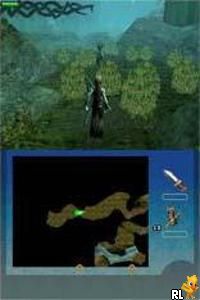
Eragon (Europe) (En,Fr,De,Es,It)
0 1 0
Eragon (Europe) (En,Fr,De,Es,It) is a classic Nintendo DS game that combines role-playing and action elements within a handheld format. Players get to explore a fantasy world through combat, exploration, and story-driven quests, all tailored for the DS’s dual-screen setup. As a product of the era when the platform was at its height, it offers a nostalgic look back at early 2000s handheld RPGs, with an interface and mechanics made for the touchscreen and dual screens of the device.
Eragon: Gameplay Overview
The game focuses on guiding a protagonist through a fantasy realm filled with enemies, allies, and diverse environments. Gameplay mixes real-time combat with exploration and managing items, requiring players to move through different maps and engage in battles that depend on positioning and timing. The combat system demands quick reflexes and tactical thinking, especially when facing tougher foes.
The touchscreen is used to select actions, items, and spells, making the interface intuitive and fitting for the RPG mechanics. The bottom screen shows the main gameplay, while the top provides strategic or map views, helping with navigation and awareness. The game encourages replaying by rewarding mastery of combat sequences and discovery of hidden areas, fostering a process of improvement and skill development.
Modes, Levels and Progression
The story follows a linear path, with players moving through levels or chapters that unlock new locations, enemies, and story details. As you advance, challenges become more demanding, prompting adjustments in tactics and character upgrades. Different environments and enemy types keep things fresh, and side quests or secret areas add extra depth to the experience.
While straightforward, Eragon offers enough variety to keep players engaged across multiple sessions. Its level design promotes exploration, sometimes requiring specific items or skills to reach certain spots. The pacing balances combat, exploration, and story moments, making it a good choice for those looking for a classic RPG on their Nintendo DS without needing extensive grinding or resource gathering.
Winning Strategies
Prioritize upgrading your character’s abilities early on to better handle tougher enemies later.
- Use the touchscreen to quickly access spells and items during fights.
- Explore every corner to find hidden items and unlock optional content.
- Keep an eye on your health and magic, managing resources carefully to stay prepared.
- Observe enemy attack patterns and adapt your tactics accordingly.
- Take advantage of environmental features like cover or high ground when possible.
Common Questions About Eragon
How does the difficulty change as you progress?
The game gradually gets tougher, with stronger enemies and more complex combat scenarios as you move through the chapters. Playing strategically and managing resources becomes especially important in later parts.
Are there different difficulty modes or levels?
Eragon follows a mostly linear path with a steady difficulty curve, but exploring side content can add optional challenges that extend the game’s replayability.
How long does it usually take to finish?
The time needed depends on how much you explore and how much side content you pursue. Most players finish it in several hours, making it well-suited for portable gaming sessions.
Eragon remains a notable choice for fans of classic handheld RPGs. Its mechanics are straightforward but offer enough depth to keep things interesting, and the use of the DS’s features gives it a distinct feel. It’s a game that can be played multiple times, fitting nicely into any collection of retro titles available for free in your browser.
Related games: you can also try Emma in the Mountains (USA) (En,Fr,Es) and Chou Kantan – Boki Nyuumon DS (Japan), or browse all other games in the Nintendo DS category.
How to Play Eragon (Europe) (En,Fr,De,Es,It)?
Move through levels, fight enemies in real-time combat using touchscreen actions, explore hidden areas, and upgrade your character to progress through the story.
Game Controls
Arrow keys control movement; Enter and other keys select actions and navigate menus.
You may be interested in:
-
 Nintendo DS
♥ 1
Casper’s Scare School – Classroom Capers (USA)
Nintendo DS
♥ 1
Casper’s Scare School – Classroom Capers (USA) -
 Nintendo DS
♥ 1
Zunou Nouryoku Koujou Machine – Touch de Zunoo DS (Japan)
Nintendo DS
♥ 1
Zunou Nouryoku Koujou Machine – Touch de Zunoo DS (Japan) -
 Nintendo DS
♥ 1
Zunou ni Asekaku Game Series! Vol. 1 – Cool 104 Joker & Setline (Japan)
Nintendo DS
♥ 1
Zunou ni Asekaku Game Series! Vol. 1 – Cool 104 Joker & Setline (Japan) -
 Nintendo DS
♥ 9
Zuma’s Revenge (USA)
Nintendo DS
♥ 9
Zuma’s Revenge (USA) -
 Nintendo DS
♥ 1
Zubo (USA) (En,Fr,Es)
Nintendo DS
♥ 1
Zubo (USA) (En,Fr,Es) -
 Nintendo DS
♥ 1
Zubo (Europe) (En,Fr,De,Es,It,Nl,Sv)
Nintendo DS
♥ 1
Zubo (Europe) (En,Fr,De,Es,It,Nl,Sv) -
 Nintendo DS
♥ 1
Zorro – Quest for Justice (USA) (En,Fr,De,Es,It)
Nintendo DS
♥ 1
Zorro – Quest for Justice (USA) (En,Fr,De,Es,It) -
 Nintendo DS
♥ 1
Zorro – Quest for Justice (Europe) (En,Fr,De,Es,It)
Nintendo DS
♥ 1
Zorro – Quest for Justice (Europe) (En,Fr,De,Es,It)
Comments (0)
No comments yet. Be the first to comment!