Estpolis Denki (Japan)
0 3 0
Estpolis Denki (Japan) is a classic SNES role-playing game that offers a simple adventure wrapped in nostalgic pixel art. This game is perfect for fans of traditional RPGs who enjoy turn-based combat and story-driven gameplay. Playing directly in your browser, it gives a real feel of a title from the 16-bit era, with no need to download or set up anything.
Getting Into Estpolis Denki
The main gameplay in Estpolis Denki focuses on exploring a world filled with towns, dungeons, and overworld maps. You control a party of characters, each with unique abilities, as you follow the story. Progress comes from completing quests, battling enemies in turn-based fights, and managing your health and items.
Sessions usually involve traveling from one place to another, with battles happening when enemies appear on the map. The game emphasizes strategic combat, where picking the right moves and using your party’s skills wisely matters. Since it’s a classic RPG, battles are turn-based, giving you time to think through your actions without pressure. Saving your progress typically means visiting save points or towns, making it easy to pick up your game later, whether for a quick session or a longer one.
Standout Features
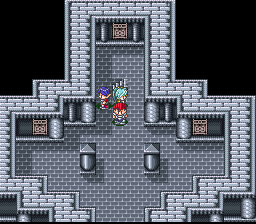
Visually, Estpolis Denki shows the pixel art style typical of the SNES era, with colorful environments, character sprites, and detailed maps. The art supports a nostalgic feel that fans of 16-bit RPGs will appreciate, while still keeping visuals clear and easy to read. Its progression system keeps players interested by gradually unlocking new areas, items, and character upgrades, encouraging replay to explore different strategies or outcomes.
Replay value comes from its straightforward gameplay loop, which invites experimenting with different party setups and tactics. Its pacing and design suit both quick sessions and longer adventures. Exploring every corner of the world and completing side quests can also extend how long you enjoy the game for those who want to get everything out of it.
Strategy and Tips
Getting started is easy, but keeping an eye on your party’s health and resources is crucial for staying alive. Balancing exploration with inventory management helps avoid setbacks.
- Save often at designated save points or towns to keep your progress safe.
- Try different character abilities to find effective strategies against various enemies.
- Watch for enemy weaknesses; exploiting them can make fights easier.
- Manage your items carefully—save healing and buff items for tougher battles or bosses.
- Explore thoroughly; side quests and hidden items can give you a real boost.
- Monitor your party’s status and avoid rushing into dangerous areas without proper preparation.
Quick Questions
How do I get started with Estpolis Denki?
Just start the game on this site; it runs instantly in your browser with no downloads needed. Begin by exploring towns and talking to NPCs to figure out your objectives.
What’s a common mistake for beginners?
Not managing your resources well—especially healing items and magic—can cause early setbacks. Keep an eye on your party’s health and save before tough fights.
Can I play Estpolis Denki on mobile or touch devices?
Since it works in your browser, it adapts to different screen sizes, so you can play on mobile devices with touch controls, though some interface parts might be easier on a computer.
Estpolis Denki remains a good choice for anyone who wants to experience classic RPG gameplay on the SNES, now accessible right in your browser. Its simple mechanics and nostalgic visuals make it a charming trip back to the 16-bit role-playing game era.
Related games: you can also try ActRaiser 2 (Europe) (En,Fr,De) and Donkey Kong Country Hack Advanced God Mode, or browse all other games in the SNES category.
How to Play Estpolis Denki (Japan)?
Explore towns and dungeons, complete quests, and fight turn-based battles using your party's skills. Manage items and save progress at save points to advance through the story and unlock new areas.
Game Controls
Arrow keys for movement; Enter to confirm; action keys mapped to on-screen buttons.








Comments (0)
No comments yet. Be the first to comment!