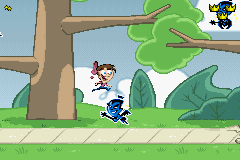
Fairly Oddparents – Clash with the Anti-World (E)(Rising Sun)
0 4 0
Fairly Oddparents – Clash with the Anti-World (E)(Rising Sun) is a classic Game Boy Advance game that captures the quirky charm of the animated series. Its simple gameplay and familiar characters make it easy to pick up, even for newcomers or casual players. The game runs directly in your browser, so you can jump right in without downloads—great for a quick nostalgic moment or a fun distraction.
What Is Fairly Oddparents – Clash with the Anti-World?
This game is a platformer with light puzzle elements, based on the popular cartoon. You control Timmy Turner as he moves through colorful levels, facing off against mischievous Anti-World characters. The main goal involves solving straightforward puzzles, collecting items, and moving through stages while avoiding or defeating enemies. Its familiar cartoon look makes it appealing whether you’re a fan of the show or just looking for a fun adventure.
Made for younger players but with enough challenge to keep things interesting, the game focuses on timing and recognizing patterns. Its simple mechanics let you concentrate on exploring and solving puzzles instead of juggling complicated controls. The game is divided into stages, each offering a new setting and different challenges, encouraging multiple plays to see everything.
What Keeps You Coming Back
The game features different levels with unique visual themes and puzzles, helping keep things fresh. Its straightforward gameplay loop encourages trial and error, making success satisfying without feeling frustrating. Collectibles and hidden secrets encourage revisiting levels to improve scores and find everything.
Replayability comes from the gentle difficulty curve and the desire to master each stage’s layout. The cartoon style and familiar characters create a warm atmosphere. Plus, quick play sessions fit nicely into short breaks or casual gaming moments, making it easy to pick up and put down without losing progress. Since it runs in your browser, you can enjoy it anytime, anywhere.
Handy Tips
If you’re new, pay attention to enemy patterns to avoid damage. Collect every item you find—some are needed to unlock hidden areas. Be patient; rushing can cause mistakes. Use the pause feature to plan your moves in tricky spots. Don’t hesitate to replay levels to improve your score or find hidden goodies.
- Get familiar with level layouts to reduce mistakes on future runs.
- Look for gaps or strange objects that might hide secrets or bonus items.
- Use your character’s abilities wisely to dodge tough enemies or obstacles.
- Watch enemy movements and visual cues for better timing.
- Revisit levels to collect everything and boost your score.
Player FAQ
Is Fairly Oddparents – Clash with the Anti-World suitable for young children?
Yes, its simple controls and gentle difficulty make it good for younger players, especially fans of the show.
Does the game need an internet connection or special devices?
No, it runs right in your browser, so no extra hardware is needed. You can play on any device with a compatible browser.
Can I play Fairly Oddparents – Clash with the Anti-World offline or on mobile?
Once the page loads, you can play offline. It works best on desktops but may work on mobile devices with some controls adapted for touch screens.
Fairly Oddparents – Clash with the Anti-World is a charming, accessible game rooted in the cartoon universe. Its simple gameplay, colorful levels, and light puzzles make it a good pick for casual players or fans looking for a quick, nostalgic browser adventure.
Related games: you can also try Dinotopia – The Timestone Pirates (U)(Mode7) and Charlotte's Web (U)(Rising Sun), or browse all other games in the Game Boy Advance category.
How to Play Fairly Oddparents – Clash with the Anti-World (E)(Rising Sun)?
Move Timmy through colorful levels, solve puzzles, avoid enemies, and collect items to progress and unlock secrets in each stage.
Game Controls
Arrow keys control movement; other keys handle jumping and actions.
You may be interested in:
-
 Game Boy Advance
♥ 2
Zooo (J)(Rising Sun)
Game Boy Advance
♥ 2
Zooo (J)(Rising Sun) -
 Game Boy Advance
♥ 4
Zooo (E)(Trashman)
Game Boy Advance
♥ 4
Zooo (E)(Trashman) -
 Game Boy Advance
♥ 2
ZooCube (U)(Mode7)
Game Boy Advance
♥ 2
ZooCube (U)(Mode7) -
 Game Boy Advance
♥ 1
ZooCube (E)(Blizzard)
Game Boy Advance
♥ 1
ZooCube (E)(Blizzard) -
 Game Boy Advance
♥ 1
Zone of the Enders – The Fist of Mars (U)(Mode7)
Game Boy Advance
♥ 1
Zone of the Enders – The Fist of Mars (U)(Mode7) -
 Game Boy Advance
♥ 1
Zone of the Enders – The Fist of Mars (E)(Cezar)
Game Boy Advance
♥ 1
Zone of the Enders – The Fist of Mars (E)(Cezar) -
 Game Boy Advance
♥ 1
Zoku Bokura no Taiyou – Taiyou Shounen Django (J)(Independent)
Game Boy Advance
♥ 1
Zoku Bokura no Taiyou – Taiyou Shounen Django (J)(Independent) -
 Game Boy Advance
♥ 7
Zoku Bokura no Taiyou – Taiyou Shounen Django (J)(Caravan)
Game Boy Advance
♥ 7
Zoku Bokura no Taiyou – Taiyou Shounen Django (J)(Caravan)
Comments (0)
No comments yet. Be the first to comment!