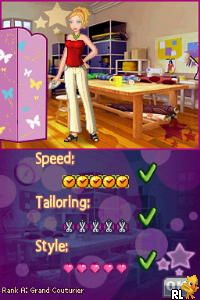
Fashion Designer – Style Icon (Europe) (En,Fr,De,Es,It)
0 3 0
Fashion Designer – Style Icon (Europe) (En,Fr,De,Es,It) is a classic Nintendo DS game that puts you in the role of a fashion enthusiast shaping runway looks and collections. Its simple gameplay makes it accessible for newcomers, combining creative styling with light management. If you’ve ever wanted to experience what it’s like to run a fashion studio, this vintage title offers a straightforward way to do so directly in your browser, no download needed.
What Is Fashion Designer – Style Icon?
This game is a fashion-themed simulation where players act as a stylist, designing outfits and managing a boutique’s reputation. It fits into the simulation and fashion genres, emphasizing creativity through selecting clothing, accessories, and colors to match trends and client preferences. The main focus is on assembling stylish outfits and showcasing your fashion sense to attract more customers and grow your reputation.
The gameplay involves choosing from various clothing options to create appealing looks, then presenting them to a virtual audience or client. The mechanics are simple, focusing on quick decisions and style matching rather than complex controls. It’s made for players who enjoy casual, creative tasks and want to experiment with fashion without the pressure of time limits or difficult puzzles.
What Keeps You Coming Back
One reason players keep returning is the variety of fashion choices. With a wide selection of clothing styles, accessories, and color schemes, each new outfit offers a chance to try something different. The game’s progression system rewards you for creating stylish ensembles, encouraging you to unlock new clothing items and expand your wardrobe.
Replayability also comes from the relaxed gameplay. You can try different combinations or aim for perfect looks, making each session unique. The simple interface makes it easy to start another round, whether you want to quickly style a new outfit or spend time refining a look. Its laid-back pace and variety of options help keep things fresh without feeling overwhelming.
Handy Tips
Getting the most out of Fashion Designer – Style Icon is easy with these tips:
- Begin with basic outfits to see what styles appeal to your virtual clients before trying bolder combinations.
- Use accessories sparingly; they can add to an outfit without overwhelming it.
- Pay attention to color matching to keep your designs looking harmonious and fashionable.
- Save your favorite outfits so you can compare and improve them later, especially if you’re aiming for high scores or reputation boosts.
- Try different clothing categories to keep your styling options fresh and varied.
Player FAQ
Is Fashion Designer – Style Icon easy for beginners?
Yes, the simple mechanics and intuitive interface make it easy for players of all ages and skill levels, especially in this browser version.
Can kids enjoy this game?
Absolutely. Its straightforward gameplay and focus on fashion make it suitable for children and teenagers interested in creative activities.
Do I need an internet connection to play?
No, this game runs directly in your browser, so you can play offline without any extra downloads or setups.
Fashion Designer – Style Icon offers a relaxed, creative experience that’s easy to get into. Its focus on fashion styling, combined with simple gameplay, makes it a fun choice for casual players and fashion fans alike. Playing this game gives a nostalgic look back at the Nintendo DS era while leaving plenty of room for personal expression.
Related games: you can also try Club Penguin – Elite Penguin Force (Europe) and DS Kageyama Method Dennou Hanpuku – Masu x Masu Pre-Hyaku Masu Keisan – Hyaku Masu no Mae ni Kore Da yo! (Japan), or browse all other games in the Nintendo DS category.
How to Play Fashion Designer – Style Icon (Europe) (En,Fr,De,Es,It)?
Create stylish outfits by choosing clothing and accessories, then showcase them to attract clients and grow your reputation. Experiment with different looks to improve and unlock new items.
Game Controls
Arrow keys navigate; Enter selects and confirms; other keys are mapped for actions.
You may be interested in:
-
 Nintendo DS
♥ 1
Casper’s Scare School – Classroom Capers (USA)
Nintendo DS
♥ 1
Casper’s Scare School – Classroom Capers (USA) -
 Nintendo DS
♥ 1
Zunou Nouryoku Koujou Machine – Touch de Zunoo DS (Japan)
Nintendo DS
♥ 1
Zunou Nouryoku Koujou Machine – Touch de Zunoo DS (Japan) -
 Nintendo DS
♥ 1
Zunou ni Asekaku Game Series! Vol. 1 – Cool 104 Joker & Setline (Japan)
Nintendo DS
♥ 1
Zunou ni Asekaku Game Series! Vol. 1 – Cool 104 Joker & Setline (Japan) -
 Nintendo DS
♥ 9
Zuma’s Revenge (USA)
Nintendo DS
♥ 9
Zuma’s Revenge (USA) -
 Nintendo DS
♥ 1
Zubo (USA) (En,Fr,Es)
Nintendo DS
♥ 1
Zubo (USA) (En,Fr,Es) -
 Nintendo DS
♥ 1
Zubo (Europe) (En,Fr,De,Es,It,Nl,Sv)
Nintendo DS
♥ 1
Zubo (Europe) (En,Fr,De,Es,It,Nl,Sv) -
 Nintendo DS
♥ 1
Zorro – Quest for Justice (USA) (En,Fr,De,Es,It)
Nintendo DS
♥ 1
Zorro – Quest for Justice (USA) (En,Fr,De,Es,It) -
 Nintendo DS
♥ 1
Zorro – Quest for Justice (Europe) (En,Fr,De,Es,It)
Nintendo DS
♥ 1
Zorro – Quest for Justice (Europe) (En,Fr,De,Es,It)
Comments (0)
No comments yet. Be the first to comment!