Finding Nemo (E)(Independent)
0 1 1
Finding Nemo (E)(Independent) is a classic game for the Game Boy Advance that captures the spirit of the beloved Pixar film. Built around action gameplay, it provides a simple experience for players who enjoy exploring underwater environments and completing missions. Since it runs directly in your browser, you can play this nostalgic title without any downloads or setups, making it perfect for quick gaming sessions or revisiting a familiar adventure from the GBA era.
Getting Into Finding Nemo
The game focuses on guiding Nemo and other characters through various underwater levels. The main gameplay involves controlling your character to dodge obstacles, complete basic objectives, and explore different areas. It doesn’t have complicated mechanics; instead, it relies on quick reflexes and recognizing patterns. Each level introduces more challenging navigation and timing elements, keeping the gameplay engaging without feeling overwhelming.
Progression is straightforward, with players moving from one stage to the next by completing specific tasks or reaching certain points within each level. The game often involves collecting items, avoiding enemies or hazards, and sometimes solving small puzzles. Because it’s action-based, sessions tend to be short but can be played repeatedly to improve your score or skills. Its design encourages learning enemy and obstacle patterns, making it accessible for casual players while also offering enough challenge for those who want to refine their skills.
Standout Features
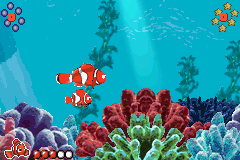
Visually, Finding Nemo benefits from colorful, cartoon-style graphics that match the movie’s look. The underwater scenes are lively, with vibrant backgrounds and character animations that bring the ocean world to life. The sound design is simple but effective, featuring cheerful music that fits the playful tone and sound effects that signal actions like collecting items or avoiding hazards.
Moving through levels is straightforward, with each environment presenting new challenges and layouts. The replay value comes from trying to beat your previous scores or mastering levels for better performance. Since the game is action-focused, players often replay levels to improve timing and reaction skills, which makes it rewarding to get better over time. Its simplicity allows newcomers to pick it up quickly, while experienced players can find ways to improve their performance with practice.
Strategy and Tips
Getting the most out of Finding Nemo comes down to quick reflexes and understanding each level’s layout. Here are some tips:
- Learn the patterns of moving hazards and enemies to avoid mistakes.
- Collect items carefully; rushing can cause errors.
- Explore levels at a steady pace to find the best routes and hidden shortcuts.
- Practice tricky sections repeatedly to develop muscle memory and reaction times.
- If the game allows, pause strategically to plan your next move during difficult parts.
- Keep an eye on the timer if it’s involved; managing your pace helps finish levels faster.
Quick Questions
How do I start playing Finding Nemo?
The game begins right when you load it in your browser; just press start or the relevant button to begin your adventure.
What’s a common mistake for beginners?
Many new players rush through levels without paying attention to enemy patterns, which can lead to unnecessary hits or failures.
Can I play Finding Nemo on mobile or touch devices?
Since it runs directly in your browser, it works on mobile browsers, and the controls are designed to suit touch input, making it easy to play on smartphones and tablets.
Finding Nemo offers a straightforward, fun action experience that appeals to players of all ages. Its bright visuals and simple mechanics make it easy to pick up, but it still offers enough challenge to keep you improving. Feel free to revisit this GBA classic anytime for a quick, nostalgic session.
Related games: you can also try Eitangohen – 2000 Words (J)(Mugs) and Ecks vs. Sever (U)(Mode7), or browse all other games in the Game Boy Advance category.
How to Play Finding Nemo (E)(Independent)?
Guide Nemo through underwater levels by avoiding obstacles, collecting items, and completing simple tasks to progress and improve your score.
Game Controls
Arrow keys control movement; other keys handle actions like jumping or interacting.
You may be interested in:
-
 Game Boy Advance
♥ 2
Zooo (J)(Rising Sun)
Game Boy Advance
♥ 2
Zooo (J)(Rising Sun) -
 Game Boy Advance
♥ 4
Zooo (E)(Trashman)
Game Boy Advance
♥ 4
Zooo (E)(Trashman) -
 Game Boy Advance
♥ 2
ZooCube (U)(Mode7)
Game Boy Advance
♥ 2
ZooCube (U)(Mode7) -
 Game Boy Advance
♥ 1
ZooCube (E)(Blizzard)
Game Boy Advance
♥ 1
ZooCube (E)(Blizzard) -
 Game Boy Advance
♥ 1
Zone of the Enders – The Fist of Mars (U)(Mode7)
Game Boy Advance
♥ 1
Zone of the Enders – The Fist of Mars (U)(Mode7) -
 Game Boy Advance
♥ 1
Zone of the Enders – The Fist of Mars (E)(Cezar)
Game Boy Advance
♥ 1
Zone of the Enders – The Fist of Mars (E)(Cezar) -
 Game Boy Advance
♥ 1
Zoku Bokura no Taiyou – Taiyou Shounen Django (J)(Independent)
Game Boy Advance
♥ 1
Zoku Bokura no Taiyou – Taiyou Shounen Django (J)(Independent) -
 Game Boy Advance
♥ 7
Zoku Bokura no Taiyou – Taiyou Shounen Django (J)(Caravan)
Game Boy Advance
♥ 7
Zoku Bokura no Taiyou – Taiyou Shounen Django (J)(Caravan)
Comments (0)
No comments yet. Be the first to comment!