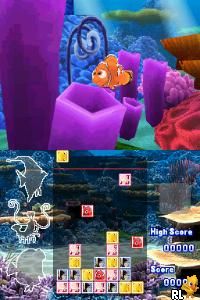
Finding Nemo – Escape to the Big Blue (Europe) (Es,It)
0 1 0
Finding Nemo – Escape to the Big Blue (Europe) (Es,It) is a Nintendo DS game that brings a fun adventure based on the popular Pixar movie. It’s a platformer and action game that focuses on exploration and puzzles, making it a good pick for players who enjoy lighthearted, story-driven gameplay. The visuals are lively, capturing the vibrant underwater world of Nemo, and you can play it right in your browser without needing to download anything.
Finding Nemo – Escape to the Big Blue: Gameplay Overview
In this game, you control Nemo and other characters as they swim through different underwater scenes. The main idea is guiding characters through levels by solving simple puzzles, avoiding dangers, and collecting items that help you progress. The controls are easy to pick up, designed for the Nintendo DS’s dual screens, encouraging you to switch views for puzzle-solving and exploration.
The gameplay involves exploring, platforming, and gathering items. Each level makes you think about your route and timing, focusing more on observation than quick reflexes. As you move forward, you unlock new levels and characters, adding more to the underwater adventure and introducing mechanics like mini-games or character-specific skills.
Modes, Levels and Progression
The game has several levels with different settings, from coral reefs to deep-sea caves. Each one has unique goals, like rescuing friends or finding objects, which encourages replaying to master each part. While the overall flow is linear, there’s enough variety to give a sense of progress and achievement, with some optional challenges for players who want to go further.
Advancement depends on completing levels and reaching goals, with difficulty slowly rising as you unlock new areas. There aren’t multiple modes, but the different levels and characters keep things interesting. The design aims for a steady, manageable challenge that works well for casual players and fans of platformers.
Winning Strategies
Pay attention to enemy patterns and hazards before moving. Patience helps when timing jumps and avoiding obstacles. Collect all items and secrets in each level to unlock bonus content and higher scores.
- Use the dual screens to plan your route and watch for dangers.
- Look around for hidden collectibles to unlock bonus levels or characters.
- Use character abilities to solve puzzles more easily.
- Revisit levels to improve your times or find extra rewards.
- Practice timing to dodge hazards, especially with moving obstacles.
Common Questions About Finding Nemo – Escape to the Big Blue
What’s the difficulty like?
The game begins with simple puzzles and easy navigation, then gradually introduces more complex challenges. It’s accessible but still offers enough variation to keep experienced players interested.
Are there different modes or multiplayer options?
This game focuses on single-player exploration and puzzles. There are no multiplayer features, but the variety of levels and characters add replay value.
How long does it take to finish?
Depending on how much you explore and your familiarity with the game, it might take a few hours. Replaying levels for better scores or hidden items can add to the experience for those who enjoy going back for more.
Finding Nemo – Escape to the Big Blue is a charming platformer that captures the spirit of the film while offering a manageable challenge. Its simple gameplay and colorful levels make it a fun choice for anyone looking for a family-friendly adventure you can play directly in your browser.
Related games: you can also try Cahier de Vacances pour Adultes 2 (France) and Devil Survivor 2 (Japan), or browse all other games in the Nintendo DS category.
How to Play Finding Nemo – Escape to the Big Blue (Europe) (Es,It)?
Guide Nemo and friends through underwater levels by solving puzzles, avoiding dangers, and collecting items to unlock new areas and characters in this exploration-based platformer.
Game Controls
Arrow keys control movement; buttons handle jumping, interacting, and switching views.
You may be interested in:
-
 Nintendo DS
♥ 1
Casper’s Scare School – Classroom Capers (USA)
Nintendo DS
♥ 1
Casper’s Scare School – Classroom Capers (USA) -
 Nintendo DS
♥ 1
Zunou Nouryoku Koujou Machine – Touch de Zunoo DS (Japan)
Nintendo DS
♥ 1
Zunou Nouryoku Koujou Machine – Touch de Zunoo DS (Japan) -
 Nintendo DS
♥ 1
Zunou ni Asekaku Game Series! Vol. 1 – Cool 104 Joker & Setline (Japan)
Nintendo DS
♥ 1
Zunou ni Asekaku Game Series! Vol. 1 – Cool 104 Joker & Setline (Japan) -
 Nintendo DS
♥ 9
Zuma’s Revenge (USA)
Nintendo DS
♥ 9
Zuma’s Revenge (USA) -
 Nintendo DS
♥ 1
Zubo (USA) (En,Fr,Es)
Nintendo DS
♥ 1
Zubo (USA) (En,Fr,Es) -
 Nintendo DS
♥ 1
Zubo (Europe) (En,Fr,De,Es,It,Nl,Sv)
Nintendo DS
♥ 1
Zubo (Europe) (En,Fr,De,Es,It,Nl,Sv) -
 Nintendo DS
♥ 1
Zorro – Quest for Justice (USA) (En,Fr,De,Es,It)
Nintendo DS
♥ 1
Zorro – Quest for Justice (USA) (En,Fr,De,Es,It) -
 Nintendo DS
♥ 1
Zorro – Quest for Justice (Europe) (En,Fr,De,Es,It)
Nintendo DS
♥ 1
Zorro – Quest for Justice (Europe) (En,Fr,De,Es,It)
Comments (0)
No comments yet. Be the first to comment!