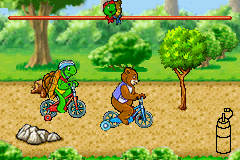
Franklin the Turtle (E)(Cezar)
0 2 1
Franklin the Turtle (E)(Cezar) is a classic Game Boy Advance game that brings the beloved character to a handheld platform from the early 2000s. Perfect for fans of simple, character-driven gameplay, it offers a gentle experience suited for younger players or those seeking a nostalgic, straightforward game. This title runs directly in your browser through an emulator, so you can enjoy it without any downloads or installations.
Getting Into Franklin the Turtle
The game focuses on guiding Franklin through various activities that reflect his everyday adventures. The gameplay involves completing mini-games or simple tasks that test your timing, pattern recognition, and exploration skills. Sessions are quick, making it easy to fit a few minutes of play into your day. Franklin interacts with friends and family across different scenes that mirror his typical day, with each activity designed to be accessible and easy to pick up.
You’ll move through different environments—like the park or helping out at home—and the controls are simple, with no complicated mechanics. The game follows a straightforward progression: finish one activity, unlock the next, and enjoy Franklin’s story along the way. Since there’s no multiplayer mode, it’s best enjoyed solo, focusing on completing tasks and following Franklin’s daily routine.
Standout Features
The visuals capture the charm of the original cartoons, with colorful sprites and simple animations that remind you of early 2000s handheld games. The graphics are bright and clear, making it easy for players of all ages to follow along. The cheerful soundtrack complements the lighthearted activities without being intrusive.
The progression system is simple—completing mini-games feels rewarding, and you can try to beat your own scores or finish activities more quickly. Replaying tasks helps improve your timing or accuracy and keeps the game interesting. Its straightforward layout makes it suitable for quick sessions, but it also invites revisiting to improve performance or explore all the different activities Franklin can do.
Strategy and Tips
To get the most out of Franklin the Turtle, take your time and pay attention to what’s happening on the screen. The mini-games are easy to learn but can need precise timing for better scores.
- Watch visual cues to know when to act, especially in timing-based tasks.
- Stay relaxed and avoid rushing for more accurate results.
- If you’re stuck, go back to earlier tasks to practice and better understand how mechanics work.
- Try completing activities in different orders—some might be quicker or easier for you.
- Replay activities to improve your scores and unlock extra content if available.
- Focus on consistent performance rather than rushing through tasks, for better results overall.
Quick Questions
How do I start playing Franklin the Turtle in my browser?
The game loads right in your browser, with no downloads needed. Just click and start playing whenever you like.
What’s a common mistake beginners make?
Many try rushing through activities, which can lead to mistakes. Taking your time and watching for cues usually results in better scores and a smoother experience.
Can I play Franklin the Turtle on my mobile device?
Yes, since it runs in a browser, it works on mobile browsers that support the emulator. Touch controls make it easy to play on phones and tablets.
Franklin the Turtle offers a simple, charming experience based on familiar characters and settings. Its straightforward gameplay makes it a good pick for young players or anyone looking for a relaxed, nostalgic game you can play directly in your browser.
Related games: you can also try Disney's Extreme Skate Adventure (U)(Hyperion) and Barbie – 12 Dancing Princesses (U)(Sir VG), or browse all other games in the Game Boy Advance category.
How to Play Franklin the Turtle (E)(Cezar)?
Guide Franklin through simple mini-games by completing tasks that test your timing and recognition. Finish activities to unlock new scenes and enjoy his daily adventures at your own pace.
Game Controls
Arrow keys control movement; other keys handle actions and selections.
You may be interested in:
-
 Game Boy Advance
♥ 2
Zooo (J)(Rising Sun)
Game Boy Advance
♥ 2
Zooo (J)(Rising Sun) -
 Game Boy Advance
♥ 4
Zooo (E)(Trashman)
Game Boy Advance
♥ 4
Zooo (E)(Trashman) -
 Game Boy Advance
♥ 2
ZooCube (U)(Mode7)
Game Boy Advance
♥ 2
ZooCube (U)(Mode7) -
 Game Boy Advance
♥ 1
ZooCube (E)(Blizzard)
Game Boy Advance
♥ 1
ZooCube (E)(Blizzard) -
 Game Boy Advance
♥ 1
Zone of the Enders – The Fist of Mars (U)(Mode7)
Game Boy Advance
♥ 1
Zone of the Enders – The Fist of Mars (U)(Mode7) -
 Game Boy Advance
♥ 1
Zone of the Enders – The Fist of Mars (E)(Cezar)
Game Boy Advance
♥ 1
Zone of the Enders – The Fist of Mars (E)(Cezar) -
 Game Boy Advance
♥ 1
Zoku Bokura no Taiyou – Taiyou Shounen Django (J)(Independent)
Game Boy Advance
♥ 1
Zoku Bokura no Taiyou – Taiyou Shounen Django (J)(Independent) -
 Game Boy Advance
♥ 7
Zoku Bokura no Taiyou – Taiyou Shounen Django (J)(Caravan)
Game Boy Advance
♥ 7
Zoku Bokura no Taiyou – Taiyou Shounen Django (J)(Caravan)
Comments (0)
No comments yet. Be the first to comment!