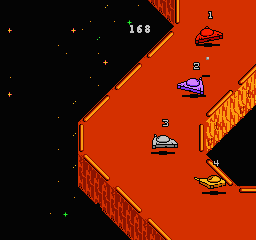
Galaxy 5000 (USA)
0 1 1
Galaxy 5000 (USA) is a classic NES game that combines action with driving and racing elements, providing a simple yet fun experience. This vintage title puts players behind the wheel of a space-age vehicle, racing across alien terrains and avoiding obstacles, all set against retro-futuristic visuals and chiptune sounds. Its straightforward gameplay makes it a nostalgic choice for fans of early console action and racing games, and you can play it directly in your browser without any downloads.
Step Into the World of Galaxy 5000
From the moment you start Galaxy 5000, you’re greeted with a colorful, pixelated universe filled with vibrant planets and starry backgrounds. The visuals reflect the NES style—sharp, blocky sprites and a limited color palette that still create a sense of alien wonder. The soundtrack features looping chiptune melodies and effects that heighten the feeling of speed, pulling you further into its sci-fi setting. The atmosphere is energetic and minimalistic, focusing on quick action and immediate feedback as you race through different levels.
The game’s design favors clarity over complexity, with obstacles like asteroids, space debris, and enemy craft that test your reflexes. Despite its simplicity, Galaxy 5000 offers a sense of motion and tension, making each race a test of speed, timing, and maneuvering. The pixel art and sound work together to evoke nostalgia for NES players, while still providing a clean, accessible interface that’s easy to pick up and enjoy.
How the Gameplay Hooks You
The main loop of Galaxy 5000 involves racing through different tracks, each more challenging and complex than the last. The game emphasizes quick decisions and precise steering, with the goal of avoiding obstacles while maintaining high speed. As you advance, new hazards appear, and the pace picks up, requiring sharper reflexes and better timing. The gameplay feels immediate and satisfying, with each successful dodge or boost giving a little sense of achievement.
Progressing is simple: finish each race, unlock the next level, and try to beat your best times or scores. Short sessions and increasing difficulty make it perfect for quick bursts of play, ideal if you’re after a fast-paced, action-filled experience you can enjoy in small chunks. Its straightforward mechanics and focus on speed keep the game engaging without feeling repetitive, even after multiple tries.
Pro Tips for Galaxy 5000
Get comfortable with steering early on to avoid crashes. Timing your boosts during straight sections can save you seconds. Keep an eye on upcoming obstacles so you can react in time. Practice each level to learn the layout and improve your reactions. Patience helps—rushing often leads to crashes. If the game has a fuel or energy mechanic, conserve it for critical moments to stay in control longer.
Frequently Asked Questions
How long does a typical session last?
Most races are just a few minutes, making it perfect for quick gaming sessions or short breaks.
Does the game feel repetitive after a while?
The increasing difficulty and variety of obstacles help keep things interesting, but the core gameplay loop stays simple and might feel a bit repetitive over time.
Can I play Galaxy 5000 offline or on mobile devices?
This version runs directly in your browser, so you can play it on any device with internet access and a compatible browser, without downloads or installations.
Galaxy 5000 captures the essence of early NES racing and action games, offering a quick, challenging experience full of pixel charm. Its straightforward design makes it a great choice for some nostalgic gaming that keeps you hooked from start to finish.
Related games: you can also try Boogerman II (Unl) and Championship Bowling (USA), or browse all other games in the NES category.
How to Play Galaxy 5000 (USA)?
Race your space vehicle across alien terrains, avoiding obstacles like asteroids and debris, to finish each level quickly and beat your best score. Focus on steering and timing to stay ahead.
Game Controls
Arrow keys control steering; other keys handle acceleration and actions.
You may be interested in:
-
![Zombie Hunter (Japan) [En by KingMike v1.01]](https://www.playf2p.com/wp-content/uploads/zombie-hunter-japan-en-by-kingmike-v1-01-200x120.png) NES
♥ 2
Zombie Hunter (Japan) [En by KingMike v1.01]
NES
♥ 2
Zombie Hunter (Japan) [En by KingMike v1.01] -
 NES
♥ 1
Zombie Hunter (Japan)
NES
♥ 1
Zombie Hunter (Japan) -
 NES
♥ 1
Zoids Mokushiroku (Japan)
NES
♥ 1
Zoids Mokushiroku (Japan) -
 NES
♥ 2
Zoids 2 – Zenebas no Gyakushuu (Japan)
NES
♥ 2
Zoids 2 – Zenebas no Gyakushuu (Japan) -
 NES
♥ 1
Zoids – Chuuou Tairiku no Tatakai (Japan)
NES
♥ 1
Zoids – Chuuou Tairiku no Tatakai (Japan) -
 NES
♥ 11
Zippy Race (Japan)
NES
♥ 11
Zippy Race (Japan) -
 NES
♥ 1
Zhen Ben Xi You Ji (Asia) (Unl)
NES
♥ 1
Zhen Ben Xi You Ji (Asia) (Unl) -
 NES
♥ 1
Zenbei!! Pro Basket (Japan)
NES
♥ 1
Zenbei!! Pro Basket (Japan)
Comments (0)
No comments yet. Be the first to comment!