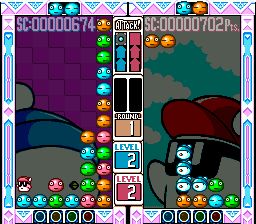
Hebereke’s Popoon (Europe)
0 2 0
Hebereke’s Popoon (Europe) is a classic SNES puzzle game that provides an easy-to-understand yet engaging experience for fans of the genre. Originally released during the SNES era, this game invites players to test their spatial reasoning and quick thinking in a colorful, competitive setting. If you enjoy puzzle games with simple mechanics and a challenge, Hebereke’s Popoon is worth trying—especially since it runs instantly in your browser without any downloads.
Getting Into Hebereke’s Popoon
At its core, Hebereke’s Popoon is about matching and clearing blocks in a fast-paced environment. The gameplay involves controlling falling shapes, which need to be positioned to complete lines, much like other classic puzzle games. You can play solo or against an opponent, with the main aim being to outlast or outscore your rival by clearing blocks more efficiently. Each game starts with shapes dropping into a playfield, and quick movement and rotation are key to fitting them into tight spaces.
The game relies on quick decision-making and reflexes, especially in multiplayer mode where players compete to prevent their playfields from filling up. The game continues until one player reaches a losing condition—either by overflowing their playfield or not clearing lines fast enough. Improving timing and spatial awareness is part of the challenge, making each match a test of speed and strategy.
Standout Features
Graphically, Hebereke’s Popoon features bright, cartoon-style visuals typical of the SNES. The colorful sprites and simple backgrounds keep focus on gameplay while evoking nostalgic feelings. As you clear lines, the pace picks up, increasing difficulty and encouraging sharper focus. This steady increase in speed keeps players engaged without feeling overwhelmed early on.
Replay value comes from multiplayer elements and mechanics that are easy to learn but hard to master. The game encourages players to improve over time, making it accessible for newcomers while offering enough challenge for seasoned puzzle fans. Mastering timing and placement adds a rewarding layer to the gameplay.
Strategy and Tips
To get the most out of Hebereke’s Popoon, quick thinking and flexibility are key. Here are some tips to help you improve:
- Try to clear multiple lines at once to boost your score and slow the pace down.
- Think a few moves ahead, especially as shapes start falling faster.
- If you’re playing against someone, keep an eye on their playfield—blocking their moves can give you an advantage.
- Practice rotating shapes efficiently to place tricky pieces more quickly.
- Keep calm during fast moments; panicking usually leads to mistakes.
- Use the edges of the playfield to your advantage when fitting difficult shapes.
Quick Questions
How do I start a game in Hebereke’s Popoon?
Just load the game in your browser, choose single-player or multiplayer, and the game begins with the falling shapes.
What’s a common mistake beginners make?
Many try to place shapes without considering the overall layout, which can lead to cramped playfields. Planning ahead makes a big difference.
Can I play Hebereke’s Popoon on mobile or touch devices?
Since it runs in your browser, it works on mobile devices with a touch screen. Using a keyboard or mouse might help with more precise control.
Hebereke’s Popoon offers a simple yet fast-paced puzzle experience rooted in classic SNES gameplay. Its straightforward mechanics and multiplayer options make it a fun choice for puzzle fans. Playing it directly in your browser makes it easy to start a quick session or spend some time battling it out.
Related games: you can also try BS Marvelous Time Athletic Course – Dai-3-shuu (Japan) and Big Ichigeki! Pachi-Slot Daikouryaku (Japan), or browse all other games in the SNES category.
How to Play Hebereke’s Popoon (Europe)?
Drop and rotate shapes to complete and clear lines before your playfield fills up. Compete against the opponent or try to survive the longest by managing your blocks efficiently.
Game Controls
Arrow keys move and rotate shapes; space or specific keys drop shapes faster.








Comments (0)
No comments yet. Be the first to comment!