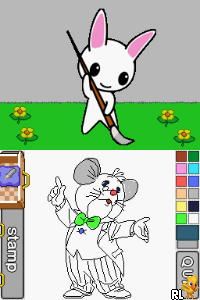
I Did It Mum! – Picture Book (Europe) (En,Fr,De,Es,It)
0 1 0
I Did It Mum! – Picture Book (Europe) (En,Fr,De,Es,It) is a charming Nintendo DS game that offers a simple, storybook-like experience you can enjoy right in your browser. As a throwback to the Nintendo DS days, it features gentle gameplay that appeals to players of all ages. It’s easy to get started and doesn’t require any complicated controls or steep learning curves.
What Is I Did It Mum! – Picture Book?
This game fits into the category of interactive picture books, designed to tell a story through lively visuals and minimal interaction. Its main aim is to encourage young children to follow along with a story, often involving simple tasks or choices that help move the story forward. It feels like flipping through a storybook, with bright illustrations and clear prompts guiding the player.
It’s great for anyone who enjoys a calming, story-focused experience. The game doesn’t depend on quick reflexes or tricky puzzles but instead centers on storytelling and gentle interaction, making it suitable for kids or anyone looking for a peaceful digital read. Kids might want to play it again and again, exploring different story options or just enjoying the pictures.
What Keeps You Coming Back
The charm of this classic lies in its simple and engaging presentation. The colorful artwork and straightforward story make it inviting for young players, while its slow pace encourages patience and curiosity. The design creates a relaxed, focused experience, so it can be revisited multiple times without feeling repetitive.
You can enjoy it again and again, whether exploring different story outcomes or simply admiring the illustrations. Without high scores or timed challenges, there’s no rush—just a calming way to spend time. Plus, with support for multiple languages, it can also be useful for language learning or exposure to new languages.
Handy Tips
Playing in a quiet environment helps children focus on the story and artwork. Use the stylus or your finger to interact gently with the game for a smoother experience.
- Encourage kids to tap on all interactive parts to find hidden details or explore different story paths.
- Pause to talk about the story, which can help with language skills and understanding.
- Play the story more than once to become familiar with the plot, boosting confidence in reading.
- Use it as a calming activity during quiet moments or before bed.
- If your child gets stuck, guide them gently through choices without rushing them.
Player FAQ
Is I Did It Mum! – Picture Book easy for young children to understand?
Yes, it uses simple language and visuals that are accessible for early readers and young kids.
Can I play I Did It Mum! – Picture Book offline or on any device?
It plays directly in your browser, so no downloads or internet connection are needed after the page loads. It works on any device with a browser.
Is the game suitable for players who don’t speak English?
Since it offers multiple language options (En, Fr, De, Es, It), it can be used for language practice or exposure. The visual storytelling helps make the story clear even if language skills are still developing.
Playing I Did It Mum! – Picture Book provides a gentle, storybook-like experience perfect for young children or anyone looking for a quiet, interactive reading moment. Its straightforward style and support for different languages make it a reliable choice for peaceful, thoughtful play.
Related games: you can also try Dawn of Discovery (USA) (En,Fr,De,Es,It) and Dementium II (Europe) (En,Fr,De,Es,It), or browse all other games in the Nintendo DS category.
How to Play I Did It Mum! – Picture Book (Europe) (En,Fr,De,Es,It)?
Follow the story by tapping or clicking on the screen to explore scenes and make simple choices that move the story forward. Enjoy the illustrations and relax as the story unfolds at a gentle pace.
Game Controls
Arrow keys act as the D-pad; Enter is Start; on-screen mapped keys handle the action buttons.
You may be interested in:
-
 Nintendo DS
♥ 1
Casper’s Scare School – Classroom Capers (USA)
Nintendo DS
♥ 1
Casper’s Scare School – Classroom Capers (USA) -
 Nintendo DS
♥ 1
Zunou Nouryoku Koujou Machine – Touch de Zunoo DS (Japan)
Nintendo DS
♥ 1
Zunou Nouryoku Koujou Machine – Touch de Zunoo DS (Japan) -
 Nintendo DS
♥ 1
Zunou ni Asekaku Game Series! Vol. 1 – Cool 104 Joker & Setline (Japan)
Nintendo DS
♥ 1
Zunou ni Asekaku Game Series! Vol. 1 – Cool 104 Joker & Setline (Japan) -
 Nintendo DS
♥ 9
Zuma’s Revenge (USA)
Nintendo DS
♥ 9
Zuma’s Revenge (USA) -
 Nintendo DS
♥ 1
Zubo (USA) (En,Fr,Es)
Nintendo DS
♥ 1
Zubo (USA) (En,Fr,Es) -
 Nintendo DS
♥ 1
Zubo (Europe) (En,Fr,De,Es,It,Nl,Sv)
Nintendo DS
♥ 1
Zubo (Europe) (En,Fr,De,Es,It,Nl,Sv) -
 Nintendo DS
♥ 1
Zorro – Quest for Justice (USA) (En,Fr,De,Es,It)
Nintendo DS
♥ 1
Zorro – Quest for Justice (USA) (En,Fr,De,Es,It) -
 Nintendo DS
♥ 1
Zorro – Quest for Justice (Europe) (En,Fr,De,Es,It)
Nintendo DS
♥ 1
Zorro – Quest for Justice (Europe) (En,Fr,De,Es,It)
Comments (0)
No comments yet. Be the first to comment!