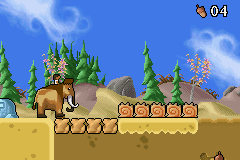
Ice Age (J)(Chakky)
0 1 0
Ice Age (J)(Chakky) is a classic Game Boy Advance game emulated here and ready to play right in your browser. If you’re a fan of the film series or enjoy straightforward platforming and puzzle-solving, this game offers a familiar experience based on the GBA’s simple mechanics. It’s a good choice for anyone looking for a quick, casual adventure without the need for complicated setups or downloads.
Getting Into Ice Age
The game centers on guiding characters through levels filled with obstacles, enemies, and puzzles. The main gameplay involves moving through side-scrolling environments, collecting items, and tackling challenges that get trickier as you go along. Each play session focuses on completing individual levels or sections, with timing and accuracy playing key roles. There are different modes, including a standard campaign that takes you through a series of levels, so it’s easy to pick up and play for short or longer sessions.
Control your characters to jump, dodge, or interact with objects, aiming to reach the end of each level while avoiding hazards. The gameplay is straightforward: learn the level layout, memorize obstacle patterns, and perform precise movements. It’s accessible for newcomers but still offers enough challenge to hold your interest. Since it runs on this site through an emulator, you can jump into the action instantly—great for quick gaming breaks or longer play sessions.
Standout Features
Visually, Ice Age captures the charm of early 2000s handheld games with colorful sprites and simple backgrounds that keep the focus on gameplay. The animation is smooth enough to keep the pacing lively, and character designs stay true to the source material, adding a nostalgic touch. Levels introduce new mechanics or enemies gradually, encouraging players to adapt their strategies as they progress.
You can replay levels to master your timing, discover hidden paths, or improve your scores. Because the game is fairly short, many players go back to beat their previous times or find secrets. Its straightforward design makes it accessible to all ages, and quick sessions are perfect if you’re looking for some fun without a long commitment. Even after finishing the main campaign, trying to perfect each level can be a satisfying challenge, especially when aiming for high scores or fast completions.
Strategy and Tips
Getting started is simple, but focusing on memorizing levels can help you move through them more smoothly. Here are some tips:
- Observe enemy patterns early on to avoid unnecessary damage.
- Practice your timing for jumps to get past tricky sections without losing progress.
- Explore each level carefully to spot hidden items or shortcuts.
- Pay attention to your character’s movement speed; rushing can cause mistakes.
- If possible, pause strategically to plan your next move.
- When stuck, replay previous sections to better understand enemy placements and level flow.
Quick Questions
How do I get started with Ice Age?
Just click to load the game, and it begins immediately, letting you control the characters and start levels right away.
What’s a common mistake beginners make?
Many rush through levels without studying enemy patterns or the layout, which often leads to unnecessary deaths or retries.
Does this game work well on mobile or touch devices?
Since it runs directly in your browser, it works well on touch screens, making it easy to control on mobile devices without extra setup.
Ice Age provides a simple, nostalgic platforming experience rooted in the GBA’s era. Its easy mechanics and colorful visuals make it accessible, and the challenge keeps players coming back for more.
Related games: you can also try Arthur and the Invisibles (U)(Sir VG) and Gameboy Wars Advance 1+2 (J)(Caravan), or browse all other games in the Game Boy Advance category.
How to Play Ice Age (J)(Chakky)?
Guide characters through side-scrolling levels, avoiding hazards, collecting items, and solving puzzles to reach the end. Complete each stage by mastering timing and precise movements.
Game Controls
Arrow keys control movement; action buttons are mapped to specific keys for jumping and interacting.
You may be interested in:
-
 Game Boy Advance
♥ 2
Zooo (J)(Rising Sun)
Game Boy Advance
♥ 2
Zooo (J)(Rising Sun) -
 Game Boy Advance
♥ 4
Zooo (E)(Trashman)
Game Boy Advance
♥ 4
Zooo (E)(Trashman) -
 Game Boy Advance
♥ 2
ZooCube (U)(Mode7)
Game Boy Advance
♥ 2
ZooCube (U)(Mode7) -
 Game Boy Advance
♥ 1
ZooCube (E)(Blizzard)
Game Boy Advance
♥ 1
ZooCube (E)(Blizzard) -
 Game Boy Advance
♥ 1
Zone of the Enders – The Fist of Mars (U)(Mode7)
Game Boy Advance
♥ 1
Zone of the Enders – The Fist of Mars (U)(Mode7) -
 Game Boy Advance
♥ 1
Zone of the Enders – The Fist of Mars (E)(Cezar)
Game Boy Advance
♥ 1
Zone of the Enders – The Fist of Mars (E)(Cezar) -
 Game Boy Advance
♥ 1
Zoku Bokura no Taiyou – Taiyou Shounen Django (J)(Independent)
Game Boy Advance
♥ 1
Zoku Bokura no Taiyou – Taiyou Shounen Django (J)(Independent) -
 Game Boy Advance
♥ 7
Zoku Bokura no Taiyou – Taiyou Shounen Django (J)(Caravan)
Game Boy Advance
♥ 7
Zoku Bokura no Taiyou – Taiyou Shounen Django (J)(Caravan)
Comments (0)
No comments yet. Be the first to comment!