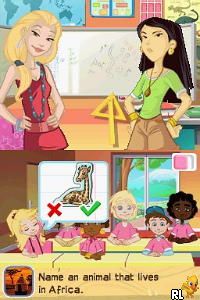
Imagine – Teacher – School Trip (Europe) (En,Fr,De,Es,It,Nl)
0 1 0
Getting Into Imagine – Teacher – School Trip
The main idea of this game is planning and running a school trip across different European spots. You play as the teacher, handling transportation, places to stay, and activities for your students. Throughout the game, you make decisions based on your budget, timing, and what your students want. You’ll face choices that test your ability to coordinate everything smoothly.
Most sessions start with goals like visiting landmarks or sticking to a budget. As the trip goes on, unexpected things happen—like disputes among students or delays—and you need to respond quickly. The game encourages you to think strategically in a calm, turn-based setting. Success depends on how satisfied your students are and how smoothly the trip goes. You can play single sessions, and each one can turn out differently depending on your choices.
Playing involves navigating menus with simple controls, making it easy for players of all ages. Since it’s a browser-based version of a Nintendo DS classic, the gameplay feels familiar. You can jump in for short sessions or spend more time refining your plans, which makes it good for casual gaming or trying out different routes.
Standout Features
The visuals have a cute, cartoonish style typical of Nintendo DS games. The graphics are simple, with clear sprites and menus that are easy to understand. The interface focuses on function, helping you make decisions without confusion. The lighthearted look fits well with the travel planning theme.
The game’s progress depends on completing trips of varying complexity. Each successful journey can unlock new routes or scenarios, encouraging you to try different options. This variety makes replaying the game interesting, as outcomes change based on your choices. While it’s straightforward, the different destinations and decision points keep it engaging over multiple tries.
Design-wise, the mechanics are easy to grasp, making it suitable for younger players or anyone looking for a relaxing experience. Its simplicity and short play sessions mean you can enjoy several trips without feeling overwhelmed, perfect for quick gaming breaks.
Strategy and Tips
To get the most out of this game, try balancing your plans and thinking ahead. Here are some helpful tips:
- Manage your budget early to avoid restrictions later on.
- Pay attention to what your students prefer to keep everyone happy.
- Stay on top of the schedule to prevent delays that could mess things up.
- Use your resources wisely—sometimes spending a little more upfront saves headaches later.
- Experiment with different routes and options to find the most enjoyable or efficient trips.
- Don’t rush your decisions; take your time to review options carefully for better results.
Quick Questions
How do I start organizing a trip in this game?
Just select the “Start Trip” button from the main menu, then follow the prompts to choose destinations, accommodations, and activities.
What’s a common mistake new players make?
Many overlook their budget constraints, which can limit choices later. Planning with some flexibility helps avoid that problem.
Can I play this game comfortably on mobile or touch screens?
Yes. Since it runs in your browser with simple menus, it works well on mobile devices, making navigation and decision-making easy.
This game offers a charming, straightforward way to simulate school trip planning. Its simple design and decision-based gameplay make it suitable for quick sessions or longer planning runs. If you enjoy managing small projects or exploring European destinations, imagine – teacher – school trip provides an enjoyable, relaxing experience you can try directly in your browser.
Related games: you can also try Disney Friends (USA) and Driver License Trainer Italia (Italy), or browse all other games in the Nintendo DS category.
How to Play Imagine – Teacher – School Trip (Europe) (En,Fr,De,Es,It,Nl)?
Plan and manage a school trip across Europe by choosing transportation, accommodations, and activities. Make quick decisions to handle surprises and keep students satisfied for a successful journey.
Game Controls
Arrow keys for navigation; Enter to select; other keys for actions as shown on screen.
You may be interested in:
-
 Nintendo DS
♥ 1
Casper’s Scare School – Classroom Capers (USA)
Nintendo DS
♥ 1
Casper’s Scare School – Classroom Capers (USA) -
 Nintendo DS
♥ 1
Zunou Nouryoku Koujou Machine – Touch de Zunoo DS (Japan)
Nintendo DS
♥ 1
Zunou Nouryoku Koujou Machine – Touch de Zunoo DS (Japan) -
 Nintendo DS
♥ 1
Zunou ni Asekaku Game Series! Vol. 1 – Cool 104 Joker & Setline (Japan)
Nintendo DS
♥ 1
Zunou ni Asekaku Game Series! Vol. 1 – Cool 104 Joker & Setline (Japan) -
 Nintendo DS
♥ 9
Zuma’s Revenge (USA)
Nintendo DS
♥ 9
Zuma’s Revenge (USA) -
 Nintendo DS
♥ 1
Zubo (USA) (En,Fr,Es)
Nintendo DS
♥ 1
Zubo (USA) (En,Fr,Es) -
 Nintendo DS
♥ 1
Zubo (Europe) (En,Fr,De,Es,It,Nl,Sv)
Nintendo DS
♥ 1
Zubo (Europe) (En,Fr,De,Es,It,Nl,Sv) -
 Nintendo DS
♥ 1
Zorro – Quest for Justice (USA) (En,Fr,De,Es,It)
Nintendo DS
♥ 1
Zorro – Quest for Justice (USA) (En,Fr,De,Es,It) -
 Nintendo DS
♥ 1
Zorro – Quest for Justice (Europe) (En,Fr,De,Es,It)
Nintendo DS
♥ 1
Zorro – Quest for Justice (Europe) (En,Fr,De,Es,It)
Comments (0)
No comments yet. Be the first to comment!