Incollables CE1-CE2, Les (France)
0 1 0
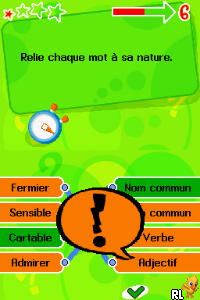
Incollables CE1-CE2, Les (France) is a Nintendo DS game that puts a fresh spin on educational quizzes, made with young learners in mind. It offers a nostalgic look at handheld titles from the early 2000s, combining bright visuals with simple mechanics that keep children interested without confusing them. Its familiar interface and easy gameplay make it a good pick for parents wanting to mix learning with fun, and you can play it right in your browser here — no downloads needed. The gentle challenge and colorful style encourage kids to explore and learn at their own pace.
Step Into the World of Incollables CE1-CE2, Les
The visual style echoes the charm of early 2000s educational games, with cheerful colors and clear, simple icons that appeal to young children. The interface is intuitive, guiding players through different quiz categories smoothly without clutter or confusion. Soft background music and cheerful sound effects create a friendly atmosphere that’s neither distracting nor dull. The game mimics a classroom environment, with questions presented in a bright, accessible way. Its cartoon-inspired look helps keep focus, making every session feel like a fun classroom game that’s easy to pause and pick up again whenever you like.
How the Gameplay Hooks You
Incollables CE1-CE2, Les uses a straightforward loop: answer questions correctly to move forward. The pace is steady but not slow, with each right answer giving a little boost of achievement that keeps players motivated. The game allows for short sessions—great for quick breaks or focused practice—and gradually gets more challenging without frustrating young learners. The questions cover topics like math, language, and general knowledge, which helps kids develop multiple skills at once. This balance of challenge and reward keeps the game engaging, making it easy to pick up and put down without losing momentum.
Pro Tips for Incollables CE1-CE2, Les
Take your time with each quiz category, and don’t rush answering questions. Use wrong answers as chances to learn more about the topic later.
- Try focusing on one category at a time to build confidence before moving forward.
- Watch out for visual clues and listen to sounds—they often give helpful hints or reinforce correct answers.
- If you want to practice certain sections again, use the quick restart options.
- Encourage kids to say answers out loud; it can help reinforce what they’ve learned.
- Set small goals, like finishing one category, so longer sessions don’t feel overwhelming.
Frequently Asked Questions
Will Incollables CE1-CE2, Les get repetitive after a while?
While the main gameplay stays simple, the different question categories help keep things fresh, especially during short play sessions.
Can I play this in short bursts, or does it need long sessions?
It’s designed for quick, focused play, making it perfect for quick breaks or daily practice, with enough variety to stay interesting in shorter sessions.
Is this suitable for children outside the CE1-CE2 age range?
Yes, the questions are aimed at early elementary students, but older kids or curious learners can still find it fun as a light review or a gentle challenge.
Incollables CE1-CE2, Les offers a straightforward, friendly way to learn through play. Its simple design and step-by-step difficulty make it a good choice for young children, offering both education and entertainment. Playing it directly in your browser makes it easy to introduce young learners to different topics while enjoying the familiar charm of a Nintendo DS-era game.
Related games: you can also try Bella Sara (USA) (En,Fr,De,Es,It) and Hollands Supermodel – Win de Strijd op de Catwalk! (Netherlands), or browse all other games in the Nintendo DS category.
How to Play Incollables CE1-CE2, Les (France)?
Answer quiz questions correctly to progress through topics like math and language. Take your time, learn from mistakes, and try to complete categories at your own pace.
Game Controls
Arrow keys for navigation; Enter to select answers; use keyboard to interact with the game.
You may be interested in:
-
 Nintendo DS
♥ 1
Casper’s Scare School – Classroom Capers (USA)
Nintendo DS
♥ 1
Casper’s Scare School – Classroom Capers (USA) -
 Nintendo DS
♥ 1
Zunou Nouryoku Koujou Machine – Touch de Zunoo DS (Japan)
Nintendo DS
♥ 1
Zunou Nouryoku Koujou Machine – Touch de Zunoo DS (Japan) -
 Nintendo DS
♥ 1
Zunou ni Asekaku Game Series! Vol. 1 – Cool 104 Joker & Setline (Japan)
Nintendo DS
♥ 1
Zunou ni Asekaku Game Series! Vol. 1 – Cool 104 Joker & Setline (Japan) -
 Nintendo DS
♥ 9
Zuma’s Revenge (USA)
Nintendo DS
♥ 9
Zuma’s Revenge (USA) -
 Nintendo DS
♥ 1
Zubo (USA) (En,Fr,Es)
Nintendo DS
♥ 1
Zubo (USA) (En,Fr,Es) -
 Nintendo DS
♥ 1
Zubo (Europe) (En,Fr,De,Es,It,Nl,Sv)
Nintendo DS
♥ 1
Zubo (Europe) (En,Fr,De,Es,It,Nl,Sv) -
 Nintendo DS
♥ 1
Zorro – Quest for Justice (USA) (En,Fr,De,Es,It)
Nintendo DS
♥ 1
Zorro – Quest for Justice (USA) (En,Fr,De,Es,It) -
 Nintendo DS
♥ 1
Zorro – Quest for Justice (Europe) (En,Fr,De,Es,It)
Nintendo DS
♥ 1
Zorro – Quest for Justice (Europe) (En,Fr,De,Es,It)
Comments (0)
No comments yet. Be the first to comment!