InfoGenius Systems – Frommer’s Travel Guide (USA)
0 1 0
InfoGenius Systems – Frommer’s Travel Guide (USA) is a classic Game Boy game that presents travel information in a straightforward way, wrapped in the simple graphics of a portable console from the late ’80s and early ’90s. It combines educational content with light interactive elements, making it a nice choice for players interested in exploring different parts of the United States through a nostalgic lens. Designed for short sessions, it now runs smoothly in your browser, bringing back the era of monochrome screens and pixelated maps.
Why InfoGenius Systems – Frommer’s Travel Guide Is Worth Playing
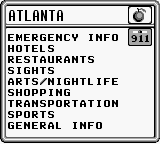
The visual style stays true to the typical Game Boy look—black-and-white graphics, simple menus, and minimal animations. Its charm comes from its clean, functional interface that focuses on delivering information rather than flashy visuals. It’s not about high scores or rapid reflexes; it’s about learning and discovery. The atmosphere is relaxed, emphasizing informative content about U.S. travel destinations, offering a nice change from more intense games. The interface is easy to navigate, making it good for casual players or anyone interested in American geography and travel tips.
What keeps players coming back is the quick, bite-sized travel snippets that can be revisited in just a few minutes. The game encourages browsing and discovery, appealing to those who enjoy educational content in a familiar, nostalgic package. Since it’s emulated directly in your browser, you can start playing instantly without any setup or hardware worries. Its simplicity means it’s accessible for all ages, especially people interested in travel, geography, or vintage gaming history.
Tips to Get Ahead
To get the most out of your experience, try exploring destinations in a logical order—starting from your home state or region. Use the menu options to focus on areas you’re most curious about. Pay attention to the details under each location—these often contain useful travel tips or fun facts. Take your time reading the descriptions to get the most out of the information. If you get stuck, go back to previous sections for more context before moving on. The pace of the game is gentle, so enjoy the process of discovery without feeling rushed.
- Navigate between states or regions easily to explore further.
- Take notes or mental snapshots of interesting destinations for later.
- Focus on small regions or cities at a time to avoid feeling overwhelmed.
- Look out for hidden tips or lesser-known attractions in the descriptions.
- Pause between sections to absorb the information, especially if you’re planning a trip.
Things to Know Before You Start
Question?
Is InfoGenius Systems – Frommer’s Travel Guide hard to play?
It’s quite easy, with a simple interface and minimal mechanics, making it suitable for casual players and those new to educational games.
Question?
How long does a typical session last?
Most sessions take around 10 to 20 minutes, depending on how much you explore each area or read all the descriptions.
Question?
Can I learn about travel destinations in detail?
Yes, it offers concise, informative snapshots of various locations, perfect for casual learning or quick reference.
Question?
Is this version available offline?
Since it runs directly in your browser, you can access it anytime once loaded, without needing an internet connection.
Give this lightweight, informative experience a try and explore the United States through a classic Game Boy lens. Its simplicity and nostalgic charm make it a surprisingly engaging way to brush up on American geography or just enjoy some vintage educational content right in your browser.
Related games: you can also try Alien 3 (Japan) and FIFA Soccer '96 (USA, Europe) (En,Fr,De,Es), or browse all other games in the Game Boy category.
How to Play InfoGenius Systems – Frommer’s Travel Guide (USA)?
Explore different U.S. states and cities by browsing travel info, reading descriptions, and discovering tips. Use menus to navigate and learn about destinations at your own pace.
Game Controls
Arrow keys move through menus and selections; Enter confirms choices; other keys handle navigation and menu access.








Comments (0)
No comments yet. Be the first to comment!