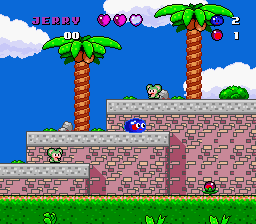
Jerry Boy (Japan)
0 3 0
Jerry Boy (Japan) is a classic SNES adventure and platformer that captures the charm of 16-bit gaming. Its colorful sprites, lively sound effects, and straightforward design evoke the warmth of that era, making it a great choice for players looking for a retro experience in their browser. The game combines exploration, jumping challenges, and light puzzle elements, all packed into an engaging package.
Step Into the World of Jerry Boy
Bright, pixelated worlds unfold with whimsical landscapes and charming character animations. The visuals lean toward a cheerful, cartoon-like style, complemented by lively music and sound effects that create a joyful, upbeat atmosphere. While not overly complex, the game’s design invites players into a vibrant universe filled with lush forests, colorful towns, and mysterious caves—all in a style that screams SNES nostalgia.
Playing this classic directly in your browser means instant access to its pixel-perfect charm without downloads or emulator setup. The familiar SNES control feel stays intact, making it easy for fans of the console to jump right in. The soundtrack, full of catchy tunes and simple melodies, keeps the mood light and the pace lively during exploration and platforming. Despite its simplicity, the game feels cheerful and inviting, capturing the innocence and fun of early 90s gaming.
How the Gameplay Hooks You
The game follows a straightforward path typical of platform adventures: move through levels, avoid obstacles, and solve mild puzzles. Its pacing balances quick reflex jumps with short moments of exploration, encouraging players to keep moving without feeling overwhelmed. The gameplay loop rewards discovery—finding hidden paths, collecting items, or unlocking new areas—making each session satisfying.
Difficulty is balanced to appeal to a broad audience, offering enough challenge to stay interesting without becoming frustrating. The structure supports short play sessions, with each level feeling contained enough to finish or pause easily. Its focus on precise platforming combined with light adventure elements creates a steady flow that keeps players engaged, whether they have a few minutes or longer blocks of free time.
Pro Tips for Jerry Boy
Getting the most out of the game means paying attention to hidden areas and collectibles. Here are some tips:
- Explore each level thoroughly to find secret paths or items that could help later.
- Practice your jumping timing to avoid falling or hitting enemies efficiently.
- Use the environment—like moving platforms or destructible objects—to your advantage.
- Take your time in tricky sections; rushing often leads to mistakes.
- Some puzzles or obstacles might require backtracking after getting new items.
- Look for safe spots to rest or save your progress if available.
Frequently Asked Questions
Is Jerry Boy good for short gaming sessions?
Yes, each level can be completed in a few minutes, making it perfect for quick play or casual exploration.
Does the game become repetitive over time?
While the core gameplay is simple and consistent, exploring different levels and finding secrets keeps things fresh, especially for fans of retro platformers.
Can I play it on mobile devices or only in the browser?
This version runs directly in your browser, so it works on any device with a modern web browser—PC, tablet, or smartphone—without needing downloads.
Playing Jerry Boy offers a glimpse into the charming simplicity of SNES adventures. Its straightforward gameplay and cheerful atmosphere make it a solid choice for fans of retro platformers, all playable right in your browser for free. Enjoy revisiting this classic and see how it holds up alongside quick gaming sessions and nostalgic journeys.
Related games: you can also try BS Wizardry V – Saika no Chuushin (Japan) and BS 3-ji no Wide Shou – 98-06 Gatsugou (Japan), or browse all other games in the SNES category.
How to Play Jerry Boy (Japan)?
Move through levels, jump over obstacles, and find hidden items to complete each stage. Explore thoroughly and practice jumping to avoid enemies and reach new areas.
Game Controls
Arrow keys act as the D-pad; Enter is Start; action buttons are mapped to other keys.








Comments (0)
No comments yet. Be the first to comment!