Jewel Quest – Expeditions (Europe) (En,Fr,Nl)
0 1 0
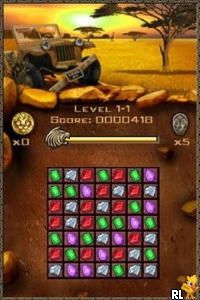
Jewel Quest – Expeditions (Europe) (En,Fr,Nl) is a classic Nintendo DS game that takes players on a puzzle adventure focused on matching and recognizing patterns. The game reflects the handheld’s tradition of engaging, straightforward gameplay, wrapped in a colorful, tile-based look that encourages exploration and planning. Its visual style echoes early 2000s puzzle titles, with bright gems and detailed tile arrangements, complemented by a soundtrack that maintains a calm, focused mood. Playing Jewel Quest – Expeditions on this browser-based emulator offers a nostalgic feeling, giving access to a beloved game without needing a physical console or extra downloads.
Step Into the World of Jewel Quest – Expeditions
This Nintendo DS game drops players into a series of archaeological-themed puzzle stages, each with a grid of colorful tiles, mostly featuring sparkling jewels and ancient symbols. The visual style emphasizes clarity and vibrancy, making it easy to spot matching patterns while keeping a relaxing, almost meditative vibe. The sound design features gentle, melodic tunes that stay in the background, helping players concentrate on their tile-matching tasks. As you move through the game, the scenery remains consistent but becomes subtly more challenging, giving a sense of uncovering hidden treasures beneath layers of ancient earth. The atmosphere feels like quiet discovery, with each solved puzzle feeling like unearthing a piece of history.
How the Gameplay Hooks You
Jewel Quest – Expeditions’s gameplay centers on swapping adjacent tiles to create lines of three or more matching items, mainly jewels. The mechanic is simple and intuitive, encouraging quick decisions, but it also offers enough complexity to keep things interesting over longer play sessions. The pacing is steady, with difficulty gradually increasing and testing pattern recognition and planning without feeling overwhelming. Progress flows smoothly, with each puzzle unlocking the next, making it easy to enjoy short bursts or longer sessions depending on what you prefer. The core activity—matching, clearing, and strategizing—feels satisfying, especially for puzzle fans who enjoy a calm, thoughtful challenge that rewards careful observation.
Pro Tips for Jewel Quest – Expeditions
To get the most out of this game, here are some helpful strategies:
- Try to create longer chains; these often give bigger scores and clear more tiles at once.
- Look ahead and plan matches that set up future moves, avoiding dead-ends.
- Keep an eye on the entire grid—sometimes moving a less obvious tile can open up new options.
- If the undo feature is available, use it wisely, especially on tricky puzzles where a wrong move can stall progress.
- Take your time; pausing to scan the grid before making a move can help prevent mistakes.
Frequently Asked Questions
Can I play Jewel Quest – Expeditions in short sessions?
Yes. The game’s puzzle style makes it perfect for quick plays, with each stage taking just a few minutes, great for short breaks or longer playtimes.
Does it get repetitive after a while?
While the core mechanics are simple, the increasing difficulty and variety of tile setups help keep the game interesting over time.
Is this game suitable for all ages?
Yes. Its gentle difficulty and non-violent puzzle solving make it accessible and fun for players of all ages, especially those who enjoy relaxing, brain-teasing challenges.
This browser-based version of Jewel Quest – Expeditions offers a straightforward, nostalgic experience that captures the charm of the original Nintendo DS game. Its calm atmosphere and satisfying puzzles make it a good choice for puzzle fans seeking a quiet, rewarding challenge.
Related games: you can also try Ghostbusters – The Video Game (Europe) (En,Fr,De,Es,It,Nl) and Cheetah Girls, The – Pop Star Sensations (USA), or browse all other games in the Nintendo DS category.
How to Play Jewel Quest – Expeditions (Europe) (En,Fr,Nl)?
Swap adjacent tiles to match three or more jewels in a row or column. Clear tiles, score points, and solve puzzles to progress through the levels.
Game Controls
Arrow keys navigate; space or Enter selects and swaps tiles.
You may be interested in:
-
 Nintendo DS
♥ 1
Casper’s Scare School – Classroom Capers (USA)
Nintendo DS
♥ 1
Casper’s Scare School – Classroom Capers (USA) -
 Nintendo DS
♥ 1
Zunou Nouryoku Koujou Machine – Touch de Zunoo DS (Japan)
Nintendo DS
♥ 1
Zunou Nouryoku Koujou Machine – Touch de Zunoo DS (Japan) -
 Nintendo DS
♥ 1
Zunou ni Asekaku Game Series! Vol. 1 – Cool 104 Joker & Setline (Japan)
Nintendo DS
♥ 1
Zunou ni Asekaku Game Series! Vol. 1 – Cool 104 Joker & Setline (Japan) -
 Nintendo DS
♥ 9
Zuma’s Revenge (USA)
Nintendo DS
♥ 9
Zuma’s Revenge (USA) -
 Nintendo DS
♥ 1
Zubo (USA) (En,Fr,Es)
Nintendo DS
♥ 1
Zubo (USA) (En,Fr,Es) -
 Nintendo DS
♥ 1
Zubo (Europe) (En,Fr,De,Es,It,Nl,Sv)
Nintendo DS
♥ 1
Zubo (Europe) (En,Fr,De,Es,It,Nl,Sv) -
 Nintendo DS
♥ 1
Zorro – Quest for Justice (USA) (En,Fr,De,Es,It)
Nintendo DS
♥ 1
Zorro – Quest for Justice (USA) (En,Fr,De,Es,It) -
 Nintendo DS
♥ 1
Zorro – Quest for Justice (Europe) (En,Fr,De,Es,It)
Nintendo DS
♥ 1
Zorro – Quest for Justice (Europe) (En,Fr,De,Es,It)
Comments (0)
No comments yet. Be the first to comment!