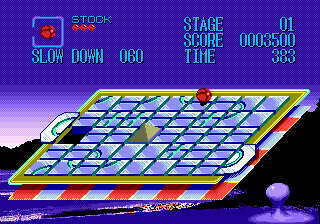
Junction (Japan, USA)
0 1 0
Junction (Japan, USA) is a classic Genesis game you can play directly in your browser. This action-puzzle game is simple but tough enough to keep you engaged. Fans of retro platformers and puzzle mechanics will find it enjoyable. Its straightforward design and fast-paced gameplay make it good for short sessions or longer plays when you’re up for a challenge against tougher levels.
Getting Into Junction
The main idea is guiding a character through maze-like environments that get more complicated as you go. The game is viewed from the side, with you moving the character left or right, dodging obstacles and solving puzzles to move forward. Each level has a different layout, and your goal is usually to reach the exit while avoiding hazards and managing your timing.
Most games start with a quick look at the level’s layout, and you need quick reflexes and puzzle-solving skills to progress. There aren’t branching paths or multiplayer modes here; it’s all about moving through levels on your own. The challenge gets tougher as you advance, requiring faster decisions and better planning. The controls are simple but need precision, especially in later stages where timing is everything.
Standout Features
Visually, Junction keeps the charm of late-80s/early-90s Genesis games, with pixel art that’s clear and easy to read. The color choices help distinguish hazards, pathways, and interactive objects, making navigation easier even as the levels get more complex. The animations are minimal but effective, keeping things smooth and responsive.
Progression is straightforward: once you finish a level, the next unlocks. There aren’t hidden areas or branching choices. You can replay levels to improve your times or avoid mistakes. The difficulty increases gradually, encouraging players to sharpen their skills. The mechanics are simple enough that casual players can pick it up and keep trying to beat their best times or reach new stages.
Strategy and Tips
To do well in Junction, focus on timing your movements and watching obstacle patterns before rushing in. Patience often helps you avoid mistakes.
- Pay attention to moving hazards and plan your route around them.
- Memorize level layouts after a few tries to reduce trial-and-error.
- Make small, precise moves rather than rushing recklessly.
- Try to clear levels efficiently to improve your best times.
- If you find yourself making lots of mistakes, take a break to reset your focus.
- If certain paths are risky, experiment with different routes.
Quick Questions
How do I get started with Junction?
The game starts immediately after it loads. Use arrow keys or your device’s controls to move the character left or right and navigate the levels.
What’s a common mistake beginners make?
Many rush ahead without observing hazards, which causes unnecessary deaths and resets. Patience and watching carefully tend to lead to better results.
Can I play Junction on mobile or touch devices?
Yes. Since it runs directly in your browser, it works well with touchscreens—just tap or swipe to control the character. No extra downloads needed, so it’s easy to play on different devices.
Junction offers a clear but engaging challenge that rewards careful planning and quick reflexes. Its simplicity makes it easy to pick up but tough to master, especially as the levels get harder. Have fun working through this classic Genesis game and see how fast you can solve each junction you face.
Related games: you can also try ESWAT – City Under Siege (USA) and Dynamite Headdy (Japan) [En by MIJET v20070428], or browse all other games in the Genesis category.
How to Play Junction (Japan, USA)?
Guide your character through maze-like levels by moving left or right, avoiding hazards, and solving puzzles to reach the exit. Each level gets more challenging, requiring quick reflexes and careful planning.
Game Controls
Arrow keys control movement; other keys handle actions as mapped on the emulator.
You may be interested in:
-
 Genesis
♥ 2
Phantasy Star II (USA, Europe) (v1.1)
Genesis
♥ 2
Phantasy Star II (USA, Europe) (v1.1) -
![Phantasy Star II (USA, Europe) (Rev A) [En by Naflign v1.0]](https://www.playf2p.com/wp-content/uploads/phantasy-star-ii-usa-europe-rev-a-en-by-naflign-v1-0-200x120.png) Genesis
♥ 1
Phantasy Star II (USA, Europe) (Rev A) [En by Naflign v1.0]
Genesis
♥ 1
Phantasy Star II (USA, Europe) (Rev A) [En by Naflign v1.0] -
 Genesis
♥ 7
Phantasy Star II (Brazil)
Genesis
♥ 7
Phantasy Star II (Brazil) -
![Phantasy Star II – Shilka’s Adventure (Japan) (SegaNet) [En by MIJET v20080628]](https://www.playf2p.com/wp-content/uploads/phantasy-star-ii-shilkas-adventure-japan-seganet-en-by-mijet-v20080628-200x120.jpg) Genesis
♥ 1
Phantasy Star II – Shilka’s Adventure (Japan) (SegaNet) [En by MIJET v20080628]
Genesis
♥ 1
Phantasy Star II – Shilka’s Adventure (Japan) (SegaNet) [En by MIJET v20080628] -
![Phantasy Star II – Kinds’s Adventure (Japan) (SegaNet) [En by MIJET v20081213]](https://www.playf2p.com/wp-content/uploads/phantasy-star-ii-kindss-adventure-japan-seganet-en-by-mijet-v20081213-200x120.jpg) Genesis
♥ 1
Phantasy Star II – Kinds’s Adventure (Japan) (SegaNet) [En by MIJET v20081213]
Genesis
♥ 1
Phantasy Star II – Kinds’s Adventure (Japan) (SegaNet) [En by MIJET v20081213] -
 Genesis
♥ 1
Phantasy Star II – Kaerazaru Toki no Owari ni (Japan)
Genesis
♥ 1
Phantasy Star II – Kaerazaru Toki no Owari ni (Japan) -
![Phantasy Star II – Huey’s Adventure (Japan) (SegaNet) [En by MIJET v20081106]](https://www.playf2p.com/wp-content/uploads/phantasy-star-ii-hueys-adventure-japan-seganet-en-by-mijet-v20081106-200x120.jpg) Genesis
♥ 1
Phantasy Star II – Huey’s Adventure (Japan) (SegaNet) [En by MIJET v20081106]
Genesis
♥ 1
Phantasy Star II – Huey’s Adventure (Japan) (SegaNet) [En by MIJET v20081106] -
![Phantasy Star II – Anne’s Adventure (Japan) (SegaNet) [En by MIJET v20071024]](https://www.playf2p.com/wp-content/uploads/phantasy-star-ii-annes-adventure-japan-seganet-en-by-mijet-v20071024-200x120.png) Genesis
♥ 2
Phantasy Star II – Anne’s Adventure (Japan) (SegaNet) [En by MIJET v20071024]
Genesis
♥ 2
Phantasy Star II – Anne’s Adventure (Japan) (SegaNet) [En by MIJET v20071024]
Comments (0)
No comments yet. Be the first to comment!