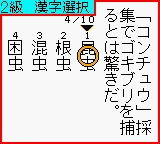
Kanji Boy (Japan)
0 1 0
Kanji Boy (Japan) is a rare find from the Game Boy Color era that offers a unique challenge rooted in language and pattern recognition. As a classic Nintendo handheld game, it takes players to a pixelated universe where characters and symbols blend with educational elements, all wrapped in simple gameplay. Its design is straightforward but engaging, capturing the feel of early portable gaming—easy to start, challenging to master, and suitable for quick sessions or longer playthroughs on your browser.
Step Into the World of Kanji Boy
Visually, Kanji Boy features a minimalistic, pixel-art style typical of the Game Boy Color. Its monochrome backgrounds and blocky characters evoke the nostalgic charm of late 90s handheld gaming. The soundtrack is made up of chiptune melodies that keep a steady rhythm, creating a focused atmosphere without overwhelming the senses. The interface is clean, with clear prompts guiding you through puzzles involving Japanese characters, making it accessible despite the language’s complexity.
Set against simple, colorful levels, the game emphasizes clarity and quick recognition. The sound effects are sparse but effective, signaling right or wrong moves. This straightforward presentation pulls players into a world where pattern and symbol mastery matter, with a tone that feels educational yet playful. Even when playing through a browser, the game runs smoothly and responsively, keeping the experience authentic and engaging from start to finish.
How the Gameplay Hooks You
Kanji Boy’s charm comes from its core mechanic: matching or recognizing patterns of Japanese characters within a limited time. The game encourages quick thinking and pattern recognition, rewarding accuracy and speed rather than prolonged exploration. Its pace is brisk, with each level presenting new challenges that get tougher as you go, helping you stay focused without feeling stretched out.
The progression is designed to be accessible but gradually more demanding, making it suitable for short bursts or longer sessions. The cycle of recognizing, matching, and advancing creates a satisfying rhythm. Its simplicity means you can jump in at any moment, making it a good choice for quick mental exercises or casual play without a steep learning curve.
Pro Tips for Kanji Boy
If you want to improve your performance, keep these tips in mind:
- Focus on common patterns and radicals to recognize characters faster.
- Stay calm during fast-paced levels—getting nervous can slow you down.
- Practice identifying characters outside the game to build familiarity.
- Use visual cues and mnemonic devices to remember complex symbols.
- Don’t rush blindly—sometimes taking a split second to double-check can prevent mistakes.
Frequently Asked Questions
Is Kanji Boy suitable for quick gaming sessions?
Yes, the game’s short levels and straightforward mechanics are perfect for quick, focused play.
Does the game become repetitive after a while?
While the core mechanic is simple, increasing difficulty keeps the challenge interesting, especially if you’re working on your Japanese character skills.
Is this game accessible for players who don’t speak Japanese?
Knowing some basic kanji or radicals can help, but the game mainly tests visual pattern recognition and quick reflexes. It’s approachable even if you’re not fluent.
This browser version of Kanji Boy captures the feel of the original handheld game, offering a focused, educational puzzle that’s easy to pick up but hard to put down. Its straightforward gameplay and nostalgic visuals make it a treat for fans of classic Game Boy Color titles, especially those interested in language puzzles with a retro touch.
Related games: you can also try FIFA 2000 (USA) and Bibi Blocksberg – Im Bann der Hexenkugel (Germany), or browse all other games in the Game Boy Color category.
How to Play Kanji Boy (Japan)?
Match and recognize Japanese characters quickly to clear each level. Focus on pattern recognition and speed to improve your score as the game gets more challenging.
Game Controls
Arrow keys move; Enter or space confirm selections; other keys handle actions.
You may be interested in:
-
 Game Boy Color
♥ 43
Zook Hero Z
Game Boy Color
♥ 43
Zook Hero Z -
 Game Boy Color
♥ 1
Zok Zok Heroes (Japan)
Game Boy Color
♥ 1
Zok Zok Heroes (Japan) -
 Game Boy Color
♥ 1
Zoids – Shirogane no Juukishin Liger Zero (Japan)
Game Boy Color
♥ 1
Zoids – Shirogane no Juukishin Liger Zero (Japan) -
 Game Boy Color
♥ 1
Zoids – Jashin Fukkatsu! Genobreaker Hen (Japan)
Game Boy Color
♥ 1
Zoids – Jashin Fukkatsu! Genobreaker Hen (Japan) -
 Game Boy Color
♥ 2
Zoboomafoo – Playtime in Zobooland (USA)
Game Boy Color
♥ 2
Zoboomafoo – Playtime in Zobooland (USA) -
 Game Boy Color
♥ 1
Zidane Football Generation (Europe) (En,Fr,De,Es,It)
Game Boy Color
♥ 1
Zidane Football Generation (Europe) (En,Fr,De,Es,It) -
 Game Boy Color
♥ 1
Zen-Nihon Shounen Soccer Taikai – Mezase Nihon Ichi! (Japan)
Game Boy Color
♥ 1
Zen-Nihon Shounen Soccer Taikai – Mezase Nihon Ichi! (Japan) -
 Game Boy Color
♥ 1
Zebco Fishing! (USA)
Game Boy Color
♥ 1
Zebco Fishing! (USA)
Comments (0)
No comments yet. Be the first to comment!