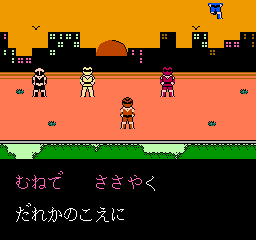
Karaoke Studio (Japan)
0 1 1
Karaoke Studio (Japan) is a classic NES game that offers a simple way to enjoy music and rhythm gameplay. As a title from the NES era, it’s easy to pick up and play, suitable for players of all ages and experience levels. Its controls are straightforward, and the focus on timing makes it a nostalgic pick for those who appreciate light-hearted musical challenges. You can try out this game directly through your browser, with no downloads or installations needed, making it great for quick sessions or casual fun.
What Is Karaoke Studio?
This NES game belongs to the music and rhythm genre, with gameplay centered around singing along or matching musical cues. The goal is to hit the right notes or stay in time, usually by pressing buttons or matching prompts to the music. It aims to mimic a karaoke experience, encouraging players to sing or press buttons at the right moments while watching on-screen cues. The gameplay is simple, with clear visuals guiding you through each challenge.
During play, you’ll encounter various songs and rhythmic tasks. The interface is minimal but effective, emphasizing timing over complexity. Though it doesn’t have all the features of a dedicated karaoke machine, it offers enough rhythm-based fun to keep things interesting. Its straightforward format makes it easy to jump in for quick sessions, and the focus on timing helps sharpen musical sense while having a good time.
What Keeps You Coming Back
One of Karaoke Studio’s strengths is how easy it is to replay. Trying to match notes and stay in rhythm encourages you to improve with each round. The variety of songs and challenges helps keep the game feeling fresh, even after multiple tries. Its simple scoring system offers quick feedback, motivating you to beat your previous scores or get better accuracy.
Plus, the game’s accessibility makes it fun for casual players or groups looking for light entertainment. You can play alone or with friends, turning each game into a friendly challenge. Since it runs directly in your browser, you can jump into a game whenever you feel like it. The straightforward gameplay and nostalgic feel make it a nice choice for quick, repeated musical fun.
Handy Tips
Here are a few tips to get the most out of Karaoke Studio:
- Start on the easiest difficulty to familiarize yourself with the rhythm cues before trying harder levels.
- Listen closely to the music to better anticipate when prompts will appear.
- Respond quickly and smoothly; rushing might cause mistakes, but hesitating can lead to missed cues.
- Stay relaxed and don’t overthink, especially during longer songs or complex rhythms.
- Use the visual cues as your main guide, but also pay attention to the music’s timing for better accuracy.
- If playing with friends, take turns or compete for the top score to add a bit of friendly rivalry.
Player FAQ
Is Karaoke Studio easy for beginners?
Yes, the game’s simple mechanics make it accessible for new players, including children, even if they haven’t played rhythm games before.
Can I play Karaoke Studio offline?
This version runs right in your browser, so you can play anytime without needing an internet connection. It’s convenient for quick entertainment whenever you want.
Is Karaoke Studio suitable for young players or non-English speakers?
If it’s a Japanese release, there might be some Japanese text, but the gameplay relies more on timing than language. That makes it still fun for younger players or those who don’t speak English but enjoy rhythm challenges.
Closing: Playing Karaoke Studio gives you a chance to enjoy classic NES rhythm gaming right in your browser. Its simple style and nostalgic feel make it a fun choice for anyone interested in musical challenges.
Related games: you can also try Contra Force (USA) and Kaiketsu Yanchamaru 2 – Karakuri Land (Japan), or browse all other games in the NES category.
How to Play Karaoke Studio (Japan)?
Match the on-screen prompts by pressing the correct buttons in time with the music to score points and improve your rhythm skills.
Game Controls
Arrow keys and other keyboard buttons are used to hit notes and control the game.
You may be interested in:
-
![Zombie Hunter (Japan) [En by KingMike v1.01]](https://www.playf2p.com/wp-content/uploads/zombie-hunter-japan-en-by-kingmike-v1-01-200x120.png) NES
♥ 2
Zombie Hunter (Japan) [En by KingMike v1.01]
NES
♥ 2
Zombie Hunter (Japan) [En by KingMike v1.01] -
 NES
♥ 1
Zombie Hunter (Japan)
NES
♥ 1
Zombie Hunter (Japan) -
 NES
♥ 1
Zoids Mokushiroku (Japan)
NES
♥ 1
Zoids Mokushiroku (Japan) -
 NES
♥ 2
Zoids 2 – Zenebas no Gyakushuu (Japan)
NES
♥ 2
Zoids 2 – Zenebas no Gyakushuu (Japan) -
 NES
♥ 1
Zoids – Chuuou Tairiku no Tatakai (Japan)
NES
♥ 1
Zoids – Chuuou Tairiku no Tatakai (Japan) -
 NES
♥ 11
Zippy Race (Japan)
NES
♥ 11
Zippy Race (Japan) -
 NES
♥ 1
Zhen Ben Xi You Ji (Asia) (Unl)
NES
♥ 1
Zhen Ben Xi You Ji (Asia) (Unl) -
 NES
♥ 1
Zenbei!! Pro Basket (Japan)
NES
♥ 1
Zenbei!! Pro Basket (Japan)
Comments (0)
No comments yet. Be the first to comment!