Kawaii Pet Game Gallery 2 (J)(Independent)
0 1 0
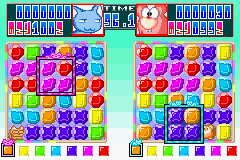
Kawaii Pet Game Gallery 2 (J)(Independent) is a charming collection of pixel-art mini-games originally made for the Game Boy Advance. This classic handheld game has been preserved in a browser emulator, so you can enjoy its adorable gameplay without any downloads. Fans of casual simulation titles, especially those who miss GBA-era graphics and mechanics, will find it a fun way to pass the time. Its simple design makes it easy for players of all ages, offering a gentle, stress-free experience centered around caring for virtual pets through various mini-games.
Getting Into Kawaii Pet Game Gallery 2
This game is all about playing different mini-games that simulate taking care of cute virtual pets. Each round involves choosing a pet and taking part in simple activities like grooming, feeding, or playing—often rhythm or timing-based. The main idea is to try out all the mini-games, earn points or rewards, and unlock new pets or customization options as you go. Since it’s made up of small, self-contained activities, you can jump into a mini-game for a few minutes or spend longer building your pet collection and improving your scores.
There’s no complicated story or big objectives—just quick, satisfying bursts of fun. You pick which mini-game to play and follow straightforward mechanics like tapping, timing, or pressing buttons. The interface is minimal, with menus to select pets and mini-games easily, making it perfect for casual play. On this browser version, everything loads instantly, so you can start caring for virtual pets whenever you feel like it.
Standout Features
The pixel art style brings back the charm of early 2000s games, with colorful sprites and animations that emphasize cuteness. The mini-games are simple but thoughtfully made, with clear goals and cheerful sounds that add a playful touch. Progress comes from unlocking new pets and customization options, giving you reasons to replay and complete collections. While it doesn’t have a complex leveling system, the variety of mini-games encourages trying different activities and exploring new ways to play, which keeps things interesting.
The real appeal is in collecting and the quick, varied activities. Each mini-game is short and straightforward, so you can enjoy a few rounds without feeling overwhelmed. The collection system makes you want to come back, unlocking all the pets and features. Its simple mechanics and cute visuals make it ideal for short, casual gaming sessions, and it works smoothly in the browser, giving instant access without fuss.
Strategy and Tips
To get the most out of Kawaii Pet Game Gallery 2, focus on quick, regular play to unlock everything. Here are some tips:
- Pick mini-games that you find easiest to do well in to earn rewards faster.
- Complete each mini-game at least once to unlock new pets and customization options.
- Watch for patterns or cues in rhythm-based mini-games to improve your scores.
- Revisit mini-games regularly to improve your results and find hidden rewards.
- Use the collection list to see which pets or upgrades you still need, so you can focus your efforts.
Quick Questions
How do I start playing Kawaii Pet Game Gallery 2?
Just open the game in your browser, pick your favorite pet, and select a mini-game to get started. No downloads needed.
What’s a common mistake beginners make?
Trying to master every mini-game perfectly right away can slow you down. It’s better to focus on completing activities first, then aim for higher scores later.
Can I play this on mobile or touch devices?
Yes, since it runs in your browser, it works well on mobile browsers. Taps usually replace button presses in most mini-games.
Kawaii Pet Game Gallery 2 offers a cute, casual experience perfect for quick play sessions. Its collection of mini-games and charming visuals make it a relaxing way to enjoy a vintage GBA-style game right in your browser.
Related games: you can also try Fire Emblem – Rekka no Ken (J)(GBATemp) and Hikaru no Go (J)(Independent), or browse all other games in the Game Boy Advance category.
How to Play Kawaii Pet Game Gallery 2 (J)(Independent)?
Choose a mini-game, follow the on-screen prompts to care for your virtual pet by tapping or timing actions, earn points, and unlock new pets and features. Play short sessions to enjoy the cute, simple gameplay.
Game Controls
Arrow keys control movement; other keys for selecting options and actions.
You may be interested in:
-
 Game Boy Advance
♥ 2
Zooo (J)(Rising Sun)
Game Boy Advance
♥ 2
Zooo (J)(Rising Sun) -
 Game Boy Advance
♥ 4
Zooo (E)(Trashman)
Game Boy Advance
♥ 4
Zooo (E)(Trashman) -
 Game Boy Advance
♥ 2
ZooCube (U)(Mode7)
Game Boy Advance
♥ 2
ZooCube (U)(Mode7) -
 Game Boy Advance
♥ 1
ZooCube (E)(Blizzard)
Game Boy Advance
♥ 1
ZooCube (E)(Blizzard) -
 Game Boy Advance
♥ 1
Zone of the Enders – The Fist of Mars (U)(Mode7)
Game Boy Advance
♥ 1
Zone of the Enders – The Fist of Mars (U)(Mode7) -
 Game Boy Advance
♥ 1
Zone of the Enders – The Fist of Mars (E)(Cezar)
Game Boy Advance
♥ 1
Zone of the Enders – The Fist of Mars (E)(Cezar) -
 Game Boy Advance
♥ 1
Zoku Bokura no Taiyou – Taiyou Shounen Django (J)(Independent)
Game Boy Advance
♥ 1
Zoku Bokura no Taiyou – Taiyou Shounen Django (J)(Independent) -
 Game Boy Advance
♥ 7
Zoku Bokura no Taiyou – Taiyou Shounen Django (J)(Caravan)
Game Boy Advance
♥ 7
Zoku Bokura no Taiyou – Taiyou Shounen Django (J)(Caravan)
Comments (0)
No comments yet. Be the first to comment!