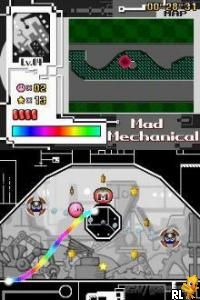
Kirby – Canvas Curse (USA)
0 37 12
Kirby – Canvas Curse (USA) is a distinctive Nintendo DS game that reimagines the pink puffball’s adventures through a drawing-based gameplay mechanic. Unlike most platformers, this game asks players to use the stylus to draw paths that guide Kirby through vibrant, obstacle-filled levels. Its approach makes it stand out among other Nintendo DS titles, blending puzzle-solving with action in a way that feels fresh even years after its release. The colorful visuals and inventive mechanics appeal to longtime Kirby fans and newcomers alike, especially those looking for a different kind of platforming challenge.
Why Kirby – Canvas Curse Is Worth Playing
This classic from the Nintendo DS era features a visual style that makes good use of the handheld’s touchscreen. The hand-drawn aesthetic adds a playful, sketchbook-like charm, making each level feel like a small piece of art. The core mechanic—drawing lines to control Kirby’s movement—creates a tactile experience that’s intuitive and satisfying. It shifts the typical platforming formula into a puzzle environment, requiring players to think quickly and plan their routes carefully. The pacing balances action and puzzle elements smoothly, keeping things engaging without feeling overwhelming.
What keeps players coming back is the sense of mastery. As you progress, levels get more complex, demanding quick reflexes and clever placement of paths. The soundtrack complements the lively visuals, offering an upbeat and encouraging atmosphere that makes completing each level feel like an accomplishment. Experimentation is rewarded—drawing new routes to solve tricky sections can be surprisingly fun. For those after a casual yet challenging experience, Kirby – Canvas Curse offers just enough difficulty without causing frustration, making it suitable for a broad audience.
Tips to Get Ahead
Start each level with a plan for your route before drawing—this can help reduce retries.
- Use short, controlled strokes to keep your guiding lines precise, especially in tight spots.
- Take advantage of bounce pads and springs—drawing around them can help reach tricky areas.
- If Kirby gets stuck or falls behind, redraw pathways to reroute and regain control quickly.
- Pay attention to environmental cues like moving platforms or enemies to time your routes better.
- Practice levels to memorize tricky sections, which can cut down on trial-and-error over time.
Things to Know Before You Start
How long does a typical session of Kirby – Canvas Curse last?
Levels are usually short enough for quick gaming sessions, making it easy to play during small breaks. Each level takes just a few minutes, but mastering the mechanics can extend your playtime.
Is Kirby – Canvas Curse suitable for newcomers to the series?
Yes, the mechanics are simple—drawing lines and guiding Kirby—rather than complex controls. Some levels might require patience and strategic thinking, so it’s accessible for beginners but still offers a challenge for dedicated players.
Will playing Kirby – Canvas Curse help improve my drawing skills?
Not exactly, but it encourages quick, precise strokes and spatial awareness, which can sharpen your fine motor skills and hand-eye coordination in a fun way.
Try Kirby – Canvas Curse and see how a classic Nintendo DS game turns platforming into a creative drawing puzzle. Its accessible mechanics and charming visuals make it worth a look, especially since it’s available to play for free in your browser with no barriers to trying it out.
Related games: you can also try Ice Age 4 – Continental Drift – Arctic Games (Europe) (En,Sv) and Are You Smarter than a 5th Grader (USA), or browse all other games in the Nintendo DS category.
How to Play Kirby – Canvas Curse (USA)?
Use the mouse or keyboard to draw paths guiding Kirby through obstacle-filled levels, solving puzzles and avoiding enemies to reach the end. Plan your routes carefully and redraw as needed to progress.
Game Controls
Arrow keys move the cursor; draw with the mouse or keyboard to create paths; space or enter to confirm.
You may be interested in:
-
 Nintendo DS
♥ 1
Casper’s Scare School – Classroom Capers (USA)
Nintendo DS
♥ 1
Casper’s Scare School – Classroom Capers (USA) -
 Nintendo DS
♥ 1
Zunou Nouryoku Koujou Machine – Touch de Zunoo DS (Japan)
Nintendo DS
♥ 1
Zunou Nouryoku Koujou Machine – Touch de Zunoo DS (Japan) -
 Nintendo DS
♥ 1
Zunou ni Asekaku Game Series! Vol. 1 – Cool 104 Joker & Setline (Japan)
Nintendo DS
♥ 1
Zunou ni Asekaku Game Series! Vol. 1 – Cool 104 Joker & Setline (Japan) -
 Nintendo DS
♥ 9
Zuma’s Revenge (USA)
Nintendo DS
♥ 9
Zuma’s Revenge (USA) -
 Nintendo DS
♥ 1
Zubo (USA) (En,Fr,Es)
Nintendo DS
♥ 1
Zubo (USA) (En,Fr,Es) -
 Nintendo DS
♥ 1
Zubo (Europe) (En,Fr,De,Es,It,Nl,Sv)
Nintendo DS
♥ 1
Zubo (Europe) (En,Fr,De,Es,It,Nl,Sv) -
 Nintendo DS
♥ 1
Zorro – Quest for Justice (USA) (En,Fr,De,Es,It)
Nintendo DS
♥ 1
Zorro – Quest for Justice (USA) (En,Fr,De,Es,It) -
 Nintendo DS
♥ 1
Zorro – Quest for Justice (Europe) (En,Fr,De,Es,It)
Nintendo DS
♥ 1
Zorro – Quest for Justice (Europe) (En,Fr,De,Es,It)
Comments (0)
No comments yet. Be the first to comment!