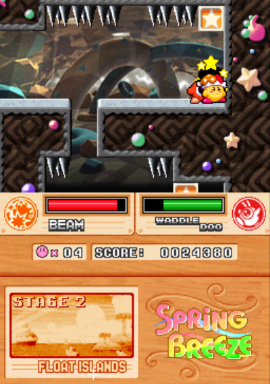
Kirby Super Star Ultra (USA)
0 443 50
Kirby Super Star Ultra (USA) is a classic Nintendo DS game that fits into the platformer and action genres. It offers a collection of Kirby adventures, with various game modes and levels that highlight the charm and flexibility of the franchise. As a Nintendo DS title, it makes good use of the handheld’s dual screens and stylus control, creating an engaging experience for both longtime fans and newcomers. This game runs directly in your browser via a verified emulator, so there’s no need to download or install anything.
Kirby Super Star Ultra: Gameplay Overview
The game stays true to Kirby’s core mechanic of inhaling enemies and copying their abilities, but it adds multiple game modes and challenges. Players move through side-scrolling levels, battling enemies, solving puzzles, and collecting items to move forward. The design emphasizes precise movement and timing, so mastering Kirby’s jumps and special moves is key to overcoming obstacles and enemies. The levels blend platforming with exploration, often rewarding players for experimenting with different copy abilities to find the best approach. The difficulty ramps up gradually, introducing new mechanics along the way to keep things interesting across all levels and modes.
Modes, Levels and Progression
Kirby Super Star Ultra includes a range of modes, such as traditional platform levels, boss battles, and mini-games. Each mode introduces different gameplay mechanics, keeping things varied and engaging. The levels are arranged to encourage replay, with multiple paths and secrets to discover — often prompting players to revisit earlier levels with new abilities. Progress depends on completing levels and challenges, with some modes unlocking extra content or higher difficulty settings. The structure lets players enjoy short sessions or spend hours exploring everything the game has to offer, making it suitable for quick plays or longer gaming sessions.
Winning Strategies
To do well in Kirby Super Star Ultra, it’s helpful to experiment with different copy abilities to find what works best for each level. Timing jumps and attacks carefully can help avoid damage and save health. Keep an eye out for hidden items and secret passages that can give extra points or power-ups. Knowing how to use special moves tied to various abilities can turn the tide during boss fights and tricky platform sections. Replaying levels with new abilities can uncover hidden secrets and unlock extra rewards, encouraging thorough exploration.
Common Questions About Kirby Super Star Ultra
How does the difficulty change as you progress?
The game gradually ramps up in difficulty, introducing new mechanics and tougher enemies over time. Different modes present their own challenges, with some mini-games being quick fun and others demanding more skill.
Are there many levels or modes to try?
Yes, there’s a good variety of levels, boss fights, and mini-games. Each offers a different gameplay experience, which helps keep things fresh and motivates players to revisit content with new abilities.
How long does it usually take to finish a session or game?
The time varies depending on how you play; completing all levels and unlocking extra content can take several hours. Quick playthroughs of individual levels work well for shorter sessions, making the game accessible for both casual players and dedicated fans.
Kirby Super Star Ultra offers a well-crafted collection of Kirby’s adventures that still feels fun on this browser-based emulator. Its mix of accessible gameplay and layered content makes it enjoyable for fans of platformers and classic Nintendo titles.
Related games: you can also try Iron Man 2 – The Video Game (Europe) (En,Fr,De,Es,It) and Bakushow – Challenge Your Friends! (Europe) (En,Fr,De,Es,It), or browse all other games in the Nintendo DS category.
How to Play Kirby Super Star Ultra (USA)?
Move Kirby through side-scrolling levels, inhale enemies to copy abilities, and solve puzzles to progress. Use different powers and explore hidden paths to complete challenges and unlock extra content.
Game Controls
Arrow keys control movement; action keys are used for jumping, inhaling, and using abilities.
You may be interested in:
-
 Nintendo DS
♥ 1
Casper’s Scare School – Classroom Capers (USA)
Nintendo DS
♥ 1
Casper’s Scare School – Classroom Capers (USA) -
 Nintendo DS
♥ 1
Zunou Nouryoku Koujou Machine – Touch de Zunoo DS (Japan)
Nintendo DS
♥ 1
Zunou Nouryoku Koujou Machine – Touch de Zunoo DS (Japan) -
 Nintendo DS
♥ 1
Zunou ni Asekaku Game Series! Vol. 1 – Cool 104 Joker & Setline (Japan)
Nintendo DS
♥ 1
Zunou ni Asekaku Game Series! Vol. 1 – Cool 104 Joker & Setline (Japan) -
 Nintendo DS
♥ 9
Zuma’s Revenge (USA)
Nintendo DS
♥ 9
Zuma’s Revenge (USA) -
 Nintendo DS
♥ 1
Zubo (USA) (En,Fr,Es)
Nintendo DS
♥ 1
Zubo (USA) (En,Fr,Es) -
 Nintendo DS
♥ 1
Zubo (Europe) (En,Fr,De,Es,It,Nl,Sv)
Nintendo DS
♥ 1
Zubo (Europe) (En,Fr,De,Es,It,Nl,Sv) -
 Nintendo DS
♥ 1
Zorro – Quest for Justice (USA) (En,Fr,De,Es,It)
Nintendo DS
♥ 1
Zorro – Quest for Justice (USA) (En,Fr,De,Es,It) -
 Nintendo DS
♥ 1
Zorro – Quest for Justice (Europe) (En,Fr,De,Es,It)
Nintendo DS
♥ 1
Zorro – Quest for Justice (Europe) (En,Fr,De,Es,It)
Comments (0)
No comments yet. Be the first to comment!