Kirby’s Pinball Land (USA, Europe)
0 22 9
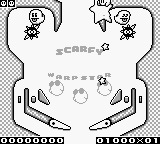
Kirby’s Pinball Land (USA, Europe) is a classic Game Boy game that mixes fast-paced pinball action with the lovable charm of Kirby. It’s designed for those who enjoy arcade-style gameplay with a touch of puzzle-solving, offering a straightforward experience that’s easy to pick up and enjoy. Perfect for fans of vintage handheld games or anyone who likes quick, skill-based challenges. The game runs right in your browser, so you can start playing without any fuss.
Getting Into Kirby’s Pinball Land
At its heart, Kirby’s Pinball Land is a pinball game with a twist: instead of a regular table, each level is a different pinball course filled with Kirby-themed obstacles and enemies. Your main goal is to launch the ball and use the flippers to keep it in play, hitting targets and completing various objectives. Each stage has its own layout and challenges, encouraging players to improve their scores or finish levels efficiently.
Playing usually means learning each level’s layout, timing your flipper hits just right, and avoiding hazards that can end your run early. While it’s mostly a game for solo play, it rewards precise control and quick reflexes. There are no complicated modes or multiplayer options—just a straightforward pinball challenge you can enjoy in short bursts or longer sessions. As you progress, the difficulty ramps up gradually, encouraging you to sharpen your skills along the way.
Standout Features
The visuals stay true to the Game Boy’s pixel art style, with colorful Kirby characters and environments that feel lively and inviting. Each level has a different theme, like grassy fields or icy landscapes, adding variety to the look of the game. The animations are simple but effective, with smooth flipper movements and clear hit responses that help you time your shots accurately.
Progress depends on completing levels and beating your high scores, which makes replaying rewarding. You can try to top your previous best or find hidden scoring opportunities in each stage. The design makes it easy to jump in for quick sessions, but mastering all the levels and scoring well can keep you coming back. Its simple setup and charming style make it accessible, yet challenging enough to stay interesting over time.
Strategy and Tips
If you’re just starting out, spend some time learning each level’s layout and practicing your flipper timing. Being precise is more important than hitting hard.
- Try to hit targets that give bonus points or move you to the next level—don’t just keep the ball in play for its own sake.
- Pay attention to the ball’s trajectory and anticipate where it will go. Position your flippers to catch it at the right moment.
- Bounce the ball into tricky spots to rack up higher scores and unlock special features.
- Control the ball’s speed—sometimes a gentle tap works better than a forceful hit to keep steady control.
- Memorize each level’s layout so you can plan your shots and avoid hazards more easily.
Quick Questions
How do I start playing Kirby’s Pinball Land?
The game is simple—launch the ball and use the flippers to hit targets and move through levels. Just jump in and try out the controls.
What’s a common mistake beginners make?
Many focus only on keeping the ball in play and forget to aim for targets and objectives, which can limit scoring and progress.
Can I play Kirby’s Pinball Land on mobile or touch devices?
Yes, since the game runs in your browser, it works well on mobile devices with touch controls, letting you play anywhere without extra setup.
Kirby’s Pinball Land offers a simple, fun pinball challenge on the Game Boy. Its visual style and focus on skill make it a good pick for quick sessions or a nostalgic look back at classic handheld gaming.
Related games: you can also try Dead Heat Scramble (USA) and Jankenman (Japan), or browse all other games in the Game Boy category.
How to Play Kirby’s Pinball Land (USA, Europe)?
Launch the ball and use the flippers to hit targets, complete objectives, and keep the ball in play. Clear levels or beat high scores by mastering each course's layout and timing your shots carefully.
Game Controls
Arrow keys control flippers; other keys handle launching and nudging.








Comments (0)
No comments yet. Be the first to comment!