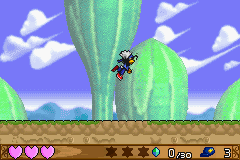
Klonoa – Empire of Dreams (U)(Mode7)
0 5 0
Klonoa – Empire of Dreams (U)(Mode7) is a classic Game Boy Advance game that brings the charming platformer experience straight to your browser. It offers a nostalgic feel for fans of action and platforming titles, combining simple gameplay with colorful visuals. If you like exploring whimsical worlds and solving straightforward puzzles, this game works well for quick play sessions or longer adventures—no download required.
Getting Into Klonoa – Empire of Dreams
This game has you guiding a character through side-scrolling levels filled with enemies, obstacles, and platform challenges. The main gameplay involves jumping, dodging, and collecting items while moving through each stage. You progress by finishing levels, grabbing items, and opening up new areas. It’s designed for quick, engaging play sessions, fitting nicely into the handheld style of the GBA but playable right in your browser. There are no complicated mechanics or multiple modes—just a straightforward, linear experience that relies on timing, precision, and recognizing patterns. As you go, the levels get trickier, testing your reflexes and strategic thinking, but the difficulty stays manageable for players of all skill levels.
Standout Features
Visually, the game captures the bright, cartoon-like style typical of the GBA era, with colorful sprites and lively backgrounds. Its simple design makes it easy to follow and fun to watch, especially on larger screens in the browser emulator. Moving through levels feels smooth, with each stage offering a new environment to explore. While it’s not heavily focused on high scores or secrets, replaying earlier levels to improve timing or find different routes can be satisfying. This makes it a good pick-up-and-play game that rewards practice and patience.
Strategy and Tips
Getting started is easy, but a few tips can help you avoid common mistakes and enjoy the game more. Precise timing and knowing when to jump or dodge enemies are key. Patience and observing enemy patterns make progress smoother. Here are some pointers:
- Learn enemy movement patterns; rushing often leads to mistakes.
- Gather all items in each level to unlock hidden paths or secrets.
- Use small jumps to control your landings and avoid obstacles.
- Take your time in tricky spots—speed isn’t always the best approach.
- Try different routes to find the safest or fastest way through levels.
- If you get stuck, go back to earlier levels to practice timing and reaction speed.
Quick Questions
How do I get started with this game?
Just click on the game to start playing right in your browser. No setup needed—just a compatible browser with JavaScript enabled. It’s ready to go whenever you are.
What’s a common mistake beginners make?
Many players rush through levels without paying attention to enemy patterns, which can lead to unnecessary hits or falls. Taking the time to observe and plan helps a lot.
Can I play this on mobile or touch devices?
Yes, the browser emulator works on most devices, including smartphones and tablets. Touch controls might be available, but for the best experience, a mouse or keyboard usually works better.
Klonoa – Empire of Dreams offers a straightforward, fun action-platformer experience inspired by the Game Boy Advance. Its colorful visuals and simple mechanics make it accessible to players of different skill levels. Playing it in your browser offers a hassle-free way to enjoy this classic whenever you want, whether for quick breaks or longer sessions. Explore charming levels and improve your skills along the way—all without leaving your browser window.
Related games: you can also try Baldurs Gate – Dark Alliance (U)(Hyperion) and FIFA Soccer 07 (U)(Rising Sun), or browse all other games in the Game Boy Advance category.
How to Play Klonoa – Empire of Dreams (U)(Mode7)?
Guide Klonoa through side-scrolling levels by jumping, dodging enemies, and collecting items to complete each stage. Progress unlocks new areas; timing and pattern recognition are key to success.
Game Controls
Arrow keys control movement; action buttons are mapped to specific keys for jumping and interacting.
You may be interested in:
-
 Game Boy Advance
♥ 2
Zooo (J)(Rising Sun)
Game Boy Advance
♥ 2
Zooo (J)(Rising Sun) -
 Game Boy Advance
♥ 4
Zooo (E)(Trashman)
Game Boy Advance
♥ 4
Zooo (E)(Trashman) -
 Game Boy Advance
♥ 2
ZooCube (U)(Mode7)
Game Boy Advance
♥ 2
ZooCube (U)(Mode7) -
 Game Boy Advance
♥ 1
ZooCube (E)(Blizzard)
Game Boy Advance
♥ 1
ZooCube (E)(Blizzard) -
 Game Boy Advance
♥ 1
Zone of the Enders – The Fist of Mars (U)(Mode7)
Game Boy Advance
♥ 1
Zone of the Enders – The Fist of Mars (U)(Mode7) -
 Game Boy Advance
♥ 1
Zone of the Enders – The Fist of Mars (E)(Cezar)
Game Boy Advance
♥ 1
Zone of the Enders – The Fist of Mars (E)(Cezar) -
 Game Boy Advance
♥ 1
Zoku Bokura no Taiyou – Taiyou Shounen Django (J)(Independent)
Game Boy Advance
♥ 1
Zoku Bokura no Taiyou – Taiyou Shounen Django (J)(Independent) -
 Game Boy Advance
♥ 7
Zoku Bokura no Taiyou – Taiyou Shounen Django (J)(Caravan)
Game Boy Advance
♥ 7
Zoku Bokura no Taiyou – Taiyou Shounen Django (J)(Caravan)
Comments (0)
No comments yet. Be the first to comment!