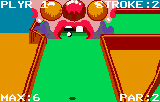
Krazy Ace – Miniature Golf (USA, Europe)
0 2 0
Krazy Ace – Miniature Golf (USA, Europe) is a classic Atari Lynx game that combines straightforward mechanics with the handheld console’s portability. It offers an accessible yet engaging experience focused on precision and timing. The design is simple enough for players of all ages, but the real challenge lies in mastering the different courses and dealing with obstacles. Thanks to the crisp, monochrome graphics and smooth scrolling, it still holds up well when played through browser emulation.
Krazy Ace – Miniature Golf: Gameplay Overview
The main idea is to complete each hole using as few strokes as possible. The controls let you aim and control the shot’s power with simple inputs. Like real miniature golf, you need to account for slopes, curves, and obstacles that influence the ball’s path. The physics are predictable, but timing and shot choice are key to doing well.
The game cycles through a series of holes, each with its own challenges. Your goal is to sink the ball while avoiding hazards like ramps, walls, and moving objects. The difficulty gradually ramps up, with tighter angles and more complex layouts. After finishing a hole, the game immediately moves to the next, creating a steady rhythm that works well for quick sessions or focused attempts to improve your score.
Modes, Levels and Progression
This version offers a single-player mode where you move through a sequence of increasingly tricky courses. Each one has different layouts and obstacles, making the game progressively harder. While there aren’t multiple modes or multiplayer options, the variety comes from the different holes within each course, which require different strategies.
The progression is simple: you go from hole to hole, trying to keep your strokes low. There are no unlockable levels or branching paths, but replayability comes from trying to beat your previous scores or complete courses with fewer shots. The limited variety encourages players to sharpen their skills and experiment with different shot angles and power levels.
Winning Strategies
Accuracy and planning are key to doing well at Krazy Ace – Miniature Golf. Here are some tips:
- Take a good look at each hole before shooting to pick the best angle and power.
- Use gentle, controlled shots on slopes to avoid overshooting or bouncing out of bounds.
- Watch out for obstacles that can deflect or block your shot; plan your approach accordingly.
- Practice your shot timing to get a good sense of the right strength, especially on curved surfaces.
- If your first shot doesn’t work out, try approaching from a different angle.
- Focus on minimizing strokes per hole instead of rushing through; it helps keep your score low.
Common Questions About Krazy Ace – Miniature Golf
How does the difficulty change as I progress?
The game gets more challenging as courses become more complex and obstacles harder to navigate. The physics stay consistent, but each new layout requires adjustments and a new approach.
Are there multiple modes or just the one course?
This game is all about single-player progress through a series of holes. There aren’t additional modes or multiplayer options. Trying to beat your best scores keeps it interesting.
How long does a typical session last?
A quick round might only take a few minutes, but if you’re trying for better scores or want to complete multiple courses, it can take longer. Playing in the browser makes it easy to jump in and out whenever you have a few minutes.
Krazy Ace – Miniature Golf remains a simple but fun game, with enough challenge to keep you coming back. Its nostalgic feel from the Atari Lynx still makes it a charming choice for casual play today.
Related games: you can also try Eye of the Beholder (USA) (Proto) and Gates of Zendocon, The (USA, Europe), or browse all other games in the Atari Lynx category.
How to Play Krazy Ace – Miniature Golf (USA, Europe)?
Aim and control your shot to sink the ball in as few strokes as possible, navigating slopes and obstacles across a series of progressively challenging holes.
Game Controls
Arrow keys move the aiming cursor; space or a designated key set shot power and release to hit.
You may be interested in:
-
 Atari Lynx
♥ 4
Lemmings (USA, Europe)
Atari Lynx
♥ 4
Lemmings (USA, Europe) -
 Atari Lynx
♥ 2
Kung Food (USA, Europe)
Atari Lynx
♥ 2
Kung Food (USA, Europe) -
 Atari Lynx
♥ 2
Klax (USA, Europe)
Atari Lynx
♥ 2
Klax (USA, Europe) -
 Atari Lynx
♥ 4
Joust (USA, Europe)
Atari Lynx
♥ 4
Joust (USA, Europe) -
 Atari Lynx
♥ 3
Jimmy Connors’ Tennis (USA, Europe)
Atari Lynx
♥ 3
Jimmy Connors’ Tennis (USA, Europe) -
 Atari Lynx
♥ 2
Ishido – The Way of Stones (USA, Europe)
Atari Lynx
♥ 2
Ishido – The Way of Stones (USA, Europe) -
 Atari Lynx
♥ 2
Hydra (USA, Europe)
Atari Lynx
♥ 2
Hydra (USA, Europe) -
 Atari Lynx
♥ 1
Hockey (USA, Europe)
Atari Lynx
♥ 1
Hockey (USA, Europe)
Comments (0)
No comments yet. Be the first to comment!