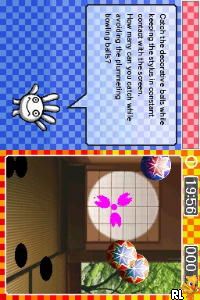
Left Brain, Right Brain 2 (USA)
0 1 0
Left Brain, Right Brain 2 (USA) is a classic Nintendo DS game that tests your mental agility with a range of puzzles. It’s perfect for players who enjoy quick thinking, pattern recognition, and logic puzzles, all wrapped up in a simple handheld format. If you grew up with the DS or want a brain workout you can do in your browser, this game offers a nostalgic yet engaging experience every time you play.
Getting Into Left Brain, Right Brain 2
The core of the game involves solving puzzles that challenge different parts of your mind. It offers a series of mini-games and challenges designed to activate either the logical, analytical left side or the creative, intuitive right side of your brain. Players choose puzzles from a menu and try to complete them within a time limit or with a limited number of attempts.
As you go along, the difficulty ramps up gradually, encouraging you to adapt your approach or switch between different kinds of challenges. There aren’t complex storylines or modes here—just short puzzles that you can tackle one after another. You can pause and pick up where you left off, making it easy to fit quick mental exercises into your day or spend longer sessions sharpening your thinking.
Standout Features
This Nintendo DS classic sports simple, colorful visuals that keep the focus on the puzzles. Its interface is clean and easy to navigate, so players of all ages and skill levels can jump right in. The game rewards steady performance, encouraging you to improve your scores and complete puzzles faster. While there’s no deep story, the variety of mini-games keeps things fresh across multiple sessions.
Replayability comes from trying to beat your best times or scores and experimenting with different puzzle types. Since the puzzles are quick to finish, you can revisit the game for a few minutes of mental exercise, making it a good choice for short breaks or casual play. Playing via an in-browser emulator means you can access it instantly without downloads—just open the page and start puzzling.
Strategy and Tips
Keeping an open mind helps you solve puzzles more efficiently. Take a moment to understand the pattern or logic before rushing ahead.
- Begin with easier puzzles to get a feel for how they work before moving on to tougher levels.
- Look for visual clues and hints—they often point toward the right answer.
- If you’re stuck, taking a quick break or switching to a different puzzle can help reset your focus.
- Completing puzzles within the time limit boosts your score and unlocks more challenges.
- If available, use the pause button to plan your approach or rest without losing progress.
- Revisit puzzles to improve your speed and accuracy, aiming for higher scores and greater mastery.
Quick Questions
Can I start playing Left Brain, Right Brain 2 right now?
Absolutely. The game runs directly in your browser, so there’s no need to download anything—just load the page and go.
What’s a common mistake beginners make?
Many try to rush through puzzles without taking enough time to analyze the clues, which often leads to errors. Spending a moment to observe can make a big difference.
Is it playable on mobile or touch screens?
Yes, since it’s browser-based, it generally supports touch controls, so you can play on tablets and smartphones without any trouble.
Left Brain, Right Brain 2 offers a simple, accessible way to challenge your mental skills with classic puzzles. Its variety and quick sessions make it a good option for anyone looking to give their brain a quick boost in a browser format.
Related games: you can also try Bibliothek der Klassischen Buecher (Germany) and Biz Nouryoku DS Series – Wagokoro no Moto (Japan), or browse all other games in the Nintendo DS category.
How to Play Left Brain, Right Brain 2 (USA)?
Solve quick puzzles that test your logic and creativity, switching between different types to improve your scores and challenge your brain in short, timed sessions.
Game Controls
Arrow keys for navigation; Enter or space to select and confirm.
You may be interested in:
-
 Nintendo DS
♥ 1
Casper’s Scare School – Classroom Capers (USA)
Nintendo DS
♥ 1
Casper’s Scare School – Classroom Capers (USA) -
 Nintendo DS
♥ 1
Zunou Nouryoku Koujou Machine – Touch de Zunoo DS (Japan)
Nintendo DS
♥ 1
Zunou Nouryoku Koujou Machine – Touch de Zunoo DS (Japan) -
 Nintendo DS
♥ 1
Zunou ni Asekaku Game Series! Vol. 1 – Cool 104 Joker & Setline (Japan)
Nintendo DS
♥ 1
Zunou ni Asekaku Game Series! Vol. 1 – Cool 104 Joker & Setline (Japan) -
 Nintendo DS
♥ 9
Zuma’s Revenge (USA)
Nintendo DS
♥ 9
Zuma’s Revenge (USA) -
 Nintendo DS
♥ 1
Zubo (USA) (En,Fr,Es)
Nintendo DS
♥ 1
Zubo (USA) (En,Fr,Es) -
 Nintendo DS
♥ 1
Zubo (Europe) (En,Fr,De,Es,It,Nl,Sv)
Nintendo DS
♥ 1
Zubo (Europe) (En,Fr,De,Es,It,Nl,Sv) -
 Nintendo DS
♥ 1
Zorro – Quest for Justice (USA) (En,Fr,De,Es,It)
Nintendo DS
♥ 1
Zorro – Quest for Justice (USA) (En,Fr,De,Es,It) -
 Nintendo DS
♥ 1
Zorro – Quest for Justice (Europe) (En,Fr,De,Es,It)
Nintendo DS
♥ 1
Zorro – Quest for Justice (Europe) (En,Fr,De,Es,It)
Comments (0)
No comments yet. Be the first to comment!