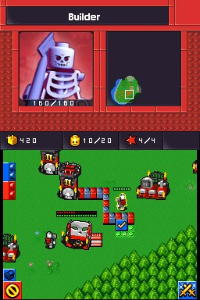
LEGO Battles (Europe) (En,Fr,De,Es,It,Da)
0 2 0
LEGO Battles (Europe) (En,Fr,De,Es,It,Da) is a classic Nintendo DS game that mixes real-time strategy with the playful look of LEGO bricks. Fans of tactical gameplay who enjoy building, commanding units, and exploring LEGO-themed worlds will find plenty to enjoy. Its portable format makes it easy to jump into quick sessions or longer playthroughs, all within the familiar handheld experience.
Getting Into LEGO Battles
The main gameplay involves managing and deploying LEGO units across different missions and scenarios. Players control various LEGO armies, each with unique units and structures, trying to complete objectives like taking over enemy bases or defending their own. The game progresses through levels that get more challenging, requiring strategic thinking and resource management.
Most sessions start with choosing a mission, then deploying units on a grid-based map. Building structures such as resource collectors or defensive towers is essential for gaining an advantage. During battles, quick decisions about where to place units matter, as the game blends real-time combat with planning. There’s also a multiplayer mode, letting players challenge friends or AI for more variety and replay value.
Standout Features
Visually, LEGO Battles captures the look of LEGO sets with bright, colorful sprites and detailed environments that evoke the playful LEGO universe. Animations are simple but clear, making it easy to follow unit movements and fights. Progression involves completing levels and unlocking new units and structures, encouraging players to try different strategies and armies as they move forward.
Replay value comes from the variety of missions, the strategic depth of deploying units, and the multiplayer options. Players can go back to levels to improve scores or test new tactics, and the different armies and units add variety. The mechanics are straightforward enough for newcomers to get started quickly, but there’s enough depth for more strategic players to enjoy multiple playthroughs.
Strategy and Tips
Getting started with LEGO Battles is pretty simple, but mastering its mechanics takes some practice. Focus on balancing resource collection and unit creation early on to keep a steady flow of troops. Trying out different unit combinations can help find what works best against various enemies.
- Build resource collectors early to support longer missions.
- Use defensive structures wisely to protect your base from attacks.
- Mix different units to counter specific enemy types and adapt as needed.
- Watch the minimap to anticipate enemy movements and plan your attacks.
- Remember to save after big wins or when unlocking new units for easier progress.
Quick Questions
How do I start a new game in LEGO Battles?
Just pick a new mission from the main menu, and the game will guide you through the tutorial and setup.
What is a common mistake for beginners?
Many new players overextend their units without enough resources or defenses, leaving their base open to counterattacks.
Can I play LEGO Battles comfortably on a mobile device?
This version runs directly in your browser, so it works well on touchscreens and mobile devices, making it easy to enjoy wherever you are.
LEGO Battles offers engaging strategy gameplay with charming visuals and a satisfying progression system. Its straightforward mechanics and multiplayer options make it a good choice for fans of LEGO and tactical games, all accessible right in your browser for quick and easy fun.
Related games: you can also try Gakken DS – Shin TOEIC Test Kanzen Kouryaku (Japan) and Animaniacs – Lights, Camera, Action! (Europe) (En,Fr,De,Es,It) (Rev 1), or browse all other games in the Nintendo DS category.
How to Play LEGO Battles (Europe) (En,Fr,De,Es,It,Da)?
Choose a mission, deploy LEGO units on the map, build structures, and defeat enemies or defend your base using strategic unit placement and resource management.
Game Controls
Arrow keys or WASD move; space or Enter confirms actions; keyboard buttons simulate the original controller.
You may be interested in:
-
 Nintendo DS
♥ 1
Casper’s Scare School – Classroom Capers (USA)
Nintendo DS
♥ 1
Casper’s Scare School – Classroom Capers (USA) -
 Nintendo DS
♥ 1
Zunou Nouryoku Koujou Machine – Touch de Zunoo DS (Japan)
Nintendo DS
♥ 1
Zunou Nouryoku Koujou Machine – Touch de Zunoo DS (Japan) -
 Nintendo DS
♥ 1
Zunou ni Asekaku Game Series! Vol. 1 – Cool 104 Joker & Setline (Japan)
Nintendo DS
♥ 1
Zunou ni Asekaku Game Series! Vol. 1 – Cool 104 Joker & Setline (Japan) -
 Nintendo DS
♥ 9
Zuma’s Revenge (USA)
Nintendo DS
♥ 9
Zuma’s Revenge (USA) -
 Nintendo DS
♥ 1
Zubo (USA) (En,Fr,Es)
Nintendo DS
♥ 1
Zubo (USA) (En,Fr,Es) -
 Nintendo DS
♥ 1
Zubo (Europe) (En,Fr,De,Es,It,Nl,Sv)
Nintendo DS
♥ 1
Zubo (Europe) (En,Fr,De,Es,It,Nl,Sv) -
 Nintendo DS
♥ 1
Zorro – Quest for Justice (USA) (En,Fr,De,Es,It)
Nintendo DS
♥ 1
Zorro – Quest for Justice (USA) (En,Fr,De,Es,It) -
 Nintendo DS
♥ 1
Zorro – Quest for Justice (Europe) (En,Fr,De,Es,It)
Nintendo DS
♥ 1
Zorro – Quest for Justice (Europe) (En,Fr,De,Es,It)
Comments (0)
No comments yet. Be the first to comment!