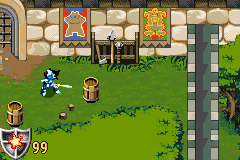
Lego Knights’ Kingdom (U)(Venom)
0 7 0
Lego Knights’ Kingdom (U)(Venom) is a classic Game Boy Advance game that offers a straightforward action-adventure experience set in the LEGO universe. Its simple controls and clear goals make it easy for players of all ages, especially those craving a nostalgic handheld adventure. The game runs right in your browser, so you can jump in without any downloads or setup. Perfect for quick sessions or longer playthroughs, it’s always ready to go.
What Is Lego Knights’ Kingdom?
At its core, Lego Knights’ Kingdom is an action-adventure game set in a medieval-themed LEGO world. You play as a hero completing various missions and tackling obstacles with basic combat and exploration mechanics. The game focuses on collecting LEGO pieces, solving simple puzzles, and battling enemies—all within a colorful, blocky universe that captures the charm of LEGO toys.
The gameplay involves moving through different levels or areas, fighting enemies, and finishing objectives that push the story forward. Its design strikes a balance between action and exploration, enough to keep things interesting without feeling overwhelming. The straightforward approach makes it a great pick-up-and-play adventure for those using a Game Boy Advance or browser emulation.
What Keeps You Coming Back
The appeal of the game lies in its accessible gameplay and nostalgic LEGO style, which appeals to both young players and collectors. Levels are relatively short, encouraging casual play, but the challenge comes from timing your attacks and exploring every corner for hidden LEGO pieces and secrets.
Replaying Lego Knights’ Kingdom gives you a chance to sharpen your skills, find all collectibles, and complete objectives more efficiently. Its simple mechanics allow for experimentation, and the variety of enemies and environments helps keep things fresh. The game’s design offers a sense of progress without complicated mechanics, making it fun for players who enjoy light exploration and action.
Handy Tips
Start by exploring each level thoroughly to find hidden LEGO pieces and secret paths. Keep an eye out for items that can boost your health or abilities. Practice timing your attacks and blocks to defeat enemies more easily. If you get stuck, go back to earlier sections to gather more resources or try different routes. Remember to save your progress whenever possible, especially after completing key objectives or collecting important items.
- Explore to find hidden LEGO pieces that unlock bonus content or upgrades.
- Watch enemy patterns to improve your combat skills.
- Try different routes to discover secrets and shortcuts.
- Manage your health carefully; avoid unnecessary fights when low on life points.
- Take breaks during longer sessions to stay focused and enjoy the game at a relaxed pace.
Player FAQ
Is Lego Knights’ Kingdom easy for beginners?
Yes, the controls are simple, and objectives are straightforward, making it accessible for new players and younger audiences.
Can I play Lego Knights’ Kingdom offline or without an internet connection?
This version runs directly in your browser, so no internet is needed once it loads. You can play offline within your browser window.
Is Lego Knights’ Kingdom suitable for kids?
Definitely. Its cartoonish visuals and uncomplicated gameplay make it a good choice for children, with no complex mechanics or mature content.
Playing Lego Knights’ Kingdom here offers a nostalgic trip to a familiar handheld classic. Its simple yet engaging gameplay makes it a solid pick for fans of LEGO-themed adventures. You can enjoy it free in your browser anytime you want to revisit that medieval LEGO world.
Related games: you can also try Crash Bandicoot Advance 2 – Gurugurusaimin Dai Panic (J)(Rising Sun) and Jurassic Park III – Dino Attack (E)(Lightforce), or browse all other games in the Game Boy Advance category.
How to Play Lego Knights’ Kingdom (U)(Venom)?
Move through levels, fight enemies, collect LEGO pieces, and complete objectives to progress. Explore thoroughly, solve simple puzzles, and find hidden items to unlock bonuses.
Game Controls
Arrow keys move; attack and interact with designated keys; pause with another key.
You may be interested in:
-
 Game Boy Advance
♥ 2
Zooo (J)(Rising Sun)
Game Boy Advance
♥ 2
Zooo (J)(Rising Sun) -
 Game Boy Advance
♥ 4
Zooo (E)(Trashman)
Game Boy Advance
♥ 4
Zooo (E)(Trashman) -
 Game Boy Advance
♥ 2
ZooCube (U)(Mode7)
Game Boy Advance
♥ 2
ZooCube (U)(Mode7) -
 Game Boy Advance
♥ 1
ZooCube (E)(Blizzard)
Game Boy Advance
♥ 1
ZooCube (E)(Blizzard) -
 Game Boy Advance
♥ 1
Zone of the Enders – The Fist of Mars (U)(Mode7)
Game Boy Advance
♥ 1
Zone of the Enders – The Fist of Mars (U)(Mode7) -
 Game Boy Advance
♥ 1
Zone of the Enders – The Fist of Mars (E)(Cezar)
Game Boy Advance
♥ 1
Zone of the Enders – The Fist of Mars (E)(Cezar) -
 Game Boy Advance
♥ 1
Zoku Bokura no Taiyou – Taiyou Shounen Django (J)(Independent)
Game Boy Advance
♥ 1
Zoku Bokura no Taiyou – Taiyou Shounen Django (J)(Independent) -
 Game Boy Advance
♥ 7
Zoku Bokura no Taiyou – Taiyou Shounen Django (J)(Caravan)
Game Boy Advance
♥ 7
Zoku Bokura no Taiyou – Taiyou Shounen Django (J)(Caravan)
Comments (0)
No comments yet. Be the first to comment!