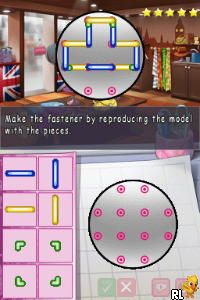
Let’s Play Fashion Designer (Europe) (En,Fr,De,Es,It)
0 1 0
Let’s Play Fashion Designer (Europe) (En,Fr,De,Es,It) is a charming Nintendo DS classic that puts you in the role of a fashion creator. Its straightforward gameplay makes it easy for newcomers to pick up and enjoy without a steep learning curve. Whether you’re into style or just looking for a relaxing creative outlet, this game offers a friendly entry point into fashion design on the portable console. Now, you can experience it directly in your browser, with no downloads needed.
What Is Let’s Play Fashion Designer?
This game belongs to the simulation genre, focusing on fashion design and style customization. Your main goal is to create outfits that appeal to various clients, following their specific requests and preferences. The game offers a simple interface that guides you through selecting fabrics, colors, and accessories to craft unique looks. It’s designed to be accessible, with a focus on creativity rather than complex mechanics.
Playing Let’s Play Fashion Designer means managing a virtual wardrobe and making quick decisions to satisfy clients in a timely manner. The core experience revolves around combining different clothing elements to produce fashionable ensembles. It’s a casual, low-pressure game that emphasizes fun over challenge, making it suitable for players of all ages and skill levels.
What Keeps You Coming Back
One of the game’s key features is its variety of customization options. You can experiment with countless fabric patterns, clothing styles, and accessories, which encourages replaying to discover new combinations. The game also tracks your previous designs, so you can revisit and refine your favorite outfits over time.
Additionally, the game offers a steady stream of client requests, each with its own style preferences. This variety keeps the gameplay fresh and prevents it from becoming repetitive. The simple mechanics allow for quick sessions, making it easy to jump in and out whenever you want. Its relaxed pace makes it perfect for casual play, while the creative freedom encourages players to try different looks repeatedly.
Handy Tips
If you’re starting out, keep these tips in mind to make the most of your design sessions:
- Pay attention to client preferences to ensure higher satisfaction scores.
- Mix and match fabric patterns to create more interesting outfits, but don’t overdo it—balance is key.
- Save your favorite designs to revisit and improve later.
- Experiment with accessories to add flair and complete your outfits.
- Use color combinations wisely; contrasting colors can make your designs stand out.
Player FAQ
Is Let’s Play Fashion Designer easy enough for younger players?
Yes, the game has a simple interface and straightforward mechanics, making it accessible for players of all ages. It’s a good choice for younger audiences interested in fashion or casual simulation games.
Can I play Let’s Play Fashion Designer offline or on different devices?
This version runs directly in your browser, so you can play it anywhere without needing an internet connection. It’s optimized for quick, browser-based sessions on your PC or mobile device.
Is the game suitable for players new to fashion design or simulation games?
Absolutely. Its uncomplicated gameplay and clear objectives make it perfect for beginners. You won’t need prior experience to start designing and enjoying the game.
Playing Let’s Play Fashion Designer offers a relaxed, creative experience that’s easy to pick up and enjoy. Its variety of customization options and accessible gameplay make it a good pick for casual fashion fans. Give it a try and see what stylish outfits you can come up with—let’s play fashion designer!
Related games: you can also try FIFA Street 3 (Europe) (En,Fr,De,Es,It) and Amici (Italy), or browse all other games in the Nintendo DS category.
How to Play Let’s Play Fashion Designer (Europe) (En,Fr,De,Es,It)?
Create outfits by choosing fabrics, colors, and accessories to meet client requests. Manage your wardrobe, satisfy clients quickly, and experiment with different styles to improve your designs.
Game Controls
Arrow keys control navigation; other keys select fabrics, colors, and accessories.
You may be interested in:
-
 Nintendo DS
♥ 1
Casper’s Scare School – Classroom Capers (USA)
Nintendo DS
♥ 1
Casper’s Scare School – Classroom Capers (USA) -
 Nintendo DS
♥ 1
Zunou Nouryoku Koujou Machine – Touch de Zunoo DS (Japan)
Nintendo DS
♥ 1
Zunou Nouryoku Koujou Machine – Touch de Zunoo DS (Japan) -
 Nintendo DS
♥ 1
Zunou ni Asekaku Game Series! Vol. 1 – Cool 104 Joker & Setline (Japan)
Nintendo DS
♥ 1
Zunou ni Asekaku Game Series! Vol. 1 – Cool 104 Joker & Setline (Japan) -
 Nintendo DS
♥ 9
Zuma’s Revenge (USA)
Nintendo DS
♥ 9
Zuma’s Revenge (USA) -
 Nintendo DS
♥ 1
Zubo (USA) (En,Fr,Es)
Nintendo DS
♥ 1
Zubo (USA) (En,Fr,Es) -
 Nintendo DS
♥ 1
Zubo (Europe) (En,Fr,De,Es,It,Nl,Sv)
Nintendo DS
♥ 1
Zubo (Europe) (En,Fr,De,Es,It,Nl,Sv) -
 Nintendo DS
♥ 1
Zorro – Quest for Justice (USA) (En,Fr,De,Es,It)
Nintendo DS
♥ 1
Zorro – Quest for Justice (USA) (En,Fr,De,Es,It) -
 Nintendo DS
♥ 1
Zorro – Quest for Justice (Europe) (En,Fr,De,Es,It)
Nintendo DS
♥ 1
Zorro – Quest for Justice (Europe) (En,Fr,De,Es,It)
Comments (0)
No comments yet. Be the first to comment!