Lionel Trains – On Track (USA)
0 1 0
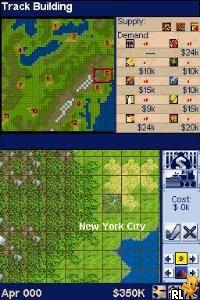
Lionel Trains – On Track (USA) is a classic Nintendo DS game that lets you simulate model train operation in a simple, approachable way. Whether you’re a train fan or just looking for a relaxing time, it offers a digital version of the hobby of model railroading that you can play directly in your browser. If you’ve ever enjoyed laying out tracks or watching trains chug along, this game offers a nostalgic feel rooted in the Nintendo DS era.
Getting Into Lionel Trains – On Track
The main activity in Lionel Trains – On Track involves laying tracks, controlling train movements, and managing schedules. You start with a basic setup and can expand it by adding straights, curves, switches, and stations. The game runs in real-time, so you can watch your trains travel, switch routes, or stop at stations. Most of the time, it’s about designing or tweaking layouts and then keeping trains running smoothly.
It’s a game about planning and timing. You set your train in motion and watch it follow its route, making adjustments to avoid accidents or delays. The controls are straightforward, making it easy for newcomers to get started, but there’s enough depth for those who want to experiment with more complex layouts. There aren’t any tricky objectives—just keeping everything running well, which makes it relaxing and simple enough to pick up for a quick session or a longer play.
Standout Features
The visuals in Lionel Trains – On Track are simple but clear, with bright, colorful track layouts and train sprites that remind you of classic model trains. The design is minimalistic, focusing on layout management rather than flashy graphics, fitting the nostalgic vibe. Its straightforward style makes it easy to see track pieces and train positions, so adjustments are quick and hassle-free.
The game’s progression comes from expanding your layout and fine-tuning train operation. There are no complicated levels, but you can keep playing to create larger, more detailed networks or try different track setups. Since the core mechanics are open-ended, you can experiment endlessly, making it a relaxing sandbox that’s fun to revisit without losing interest.
Strategy and Tips
To get the most out of Lionel Trains – On Track, plan your layout before placing tracks. Think about how trains will move and where you want stations or switches. Keep initial routes simple to avoid congestion or derailments.
- Start small and expand gradually to stay on top of train movements.
- Use switches carefully to create multiple routes and prevent trains from colliding or blocking each other.
- Test your layout by running trains several times to make sure everything runs smoothly before adding more complexity.
- If possible, save your layout or remember your design so you can come back later and improve it.
- Adjust train speeds and timing to prevent accidents or delays on busy tracks.
Quick Questions
How do I get started with Lionel Trains – On Track?
Just load the game in your browser, then start placing track pieces and adding trains to see them run on your layout.
What’s a common mistake beginners make?
Trying to build overly complicated layouts early on can cause congestion or derailments. Starting simple and expanding gradually works best.
Can I play on mobile or touch screens?
Yes, the game’s controls work well with touch input, making it easy to design layouts and control trains on portable devices.
Lionel Trains – On Track offers a straightforward, calming way to enjoy model train operation right in your browser. Its focus on layout design and train control gives rail fans and casual players alike a satisfying experience. This classic from the Nintendo DS era continues to have charm with its simple mechanics and nostalgic feel.
Related games: you can also try Hirameki Puzzle – Maxwell no Fushigi na Note (Japan) and Barbie as the Island Princess (USA), or browse all other games in the Nintendo DS category.
How to Play Lionel Trains – On Track (USA)?
Lay tracks, control train movements, and manage schedules to keep trains running smoothly and expand your layout. Adjust routes and switches for safe, continuous operation in a relaxing, open-ended environment.
Game Controls
Arrow keys or WASD move the cursor; Enter or Space select and place track pieces or switches.
You may be interested in:
-
 Nintendo DS
♥ 1
Casper’s Scare School – Classroom Capers (USA)
Nintendo DS
♥ 1
Casper’s Scare School – Classroom Capers (USA) -
 Nintendo DS
♥ 1
Zunou Nouryoku Koujou Machine – Touch de Zunoo DS (Japan)
Nintendo DS
♥ 1
Zunou Nouryoku Koujou Machine – Touch de Zunoo DS (Japan) -
 Nintendo DS
♥ 1
Zunou ni Asekaku Game Series! Vol. 1 – Cool 104 Joker & Setline (Japan)
Nintendo DS
♥ 1
Zunou ni Asekaku Game Series! Vol. 1 – Cool 104 Joker & Setline (Japan) -
 Nintendo DS
♥ 9
Zuma’s Revenge (USA)
Nintendo DS
♥ 9
Zuma’s Revenge (USA) -
 Nintendo DS
♥ 1
Zubo (USA) (En,Fr,Es)
Nintendo DS
♥ 1
Zubo (USA) (En,Fr,Es) -
 Nintendo DS
♥ 1
Zubo (Europe) (En,Fr,De,Es,It,Nl,Sv)
Nintendo DS
♥ 1
Zubo (Europe) (En,Fr,De,Es,It,Nl,Sv) -
 Nintendo DS
♥ 1
Zorro – Quest for Justice (USA) (En,Fr,De,Es,It)
Nintendo DS
♥ 1
Zorro – Quest for Justice (USA) (En,Fr,De,Es,It) -
 Nintendo DS
♥ 1
Zorro – Quest for Justice (Europe) (En,Fr,De,Es,It)
Nintendo DS
♥ 1
Zorro – Quest for Justice (Europe) (En,Fr,De,Es,It)
Comments (0)
No comments yet. Be the first to comment!