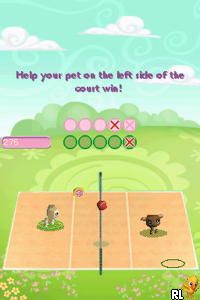
Littlest Pet Shop – Spring (USA) (En,Fr,Es)
0 2 0
Littlest Pet Shop – Spring (USA) (En,Fr,Es) is a classic Nintendo DS game that brings the beloved pet universe to your browser in a straightforward, accessible way. It keeps the charm of the original handheld version, making it simple for newcomers and nostalgic fans alike to jump right in and enjoy. As a game from the Nintendo DS era, it offers a straightforward yet engaging simulation focused on pet care and mini-games, all playable without any downloads or setups.
What Is Littlest Pet Shop – Spring?
This game is a simulation that revolves around caring for and interacting with a variety of cute pets. Its main goal is to complete tasks, mini-games, and activities that keep the pets happy and healthy. The gameplay features light, casual mechanics that encourage players to explore different areas, dress up pets, and take part in fun challenges. It’s designed for quick sessions, so you can pick it up and put it down without losing your place.
The experience is simple but charming, with colorful visuals and familiar pet characters that appeal to many age groups. The controls are straightforward, and the difficulty is gentle, making it accessible for younger players, while still offering enough variety to entertain older players. The focus stays on casual fun, emphasizing exploration and pet customization over complex mechanics.
What Keeps You Coming Back
The game features a variety of activities that encourage repeated play, such as dressing up pets, completing mini-games, and customizing environments. Each play session can reveal new outfits or pet accessories, which motivates players to experiment with different styles and combinations. The bright visuals and cheerful soundtrack help create a lively, inviting atmosphere that players enjoy revisiting.
Replayability comes from the open-ended nature of pet care and mini-game challenges. There’s no strict end goal, so players can focus on perfecting their pet’s look, trying different mini-games, or just relaxing with the game’s pace. Its casual style makes it suitable for short, frequent play sessions, perfect for those looking for light entertainment without a big time commitment.
Handy Tips
When starting out, try to complete daily activities to unlock new items and features. Use in-game currency wisely to buy accessories or new pets. Feel free to experiment with different outfits—variety adds to the fun. If you’re having trouble with mini-games, practicing the controls in free play mode can help boost your scores. Keep an eye on your pet’s mood and needs to keep them happy and engaged. And don’t forget to explore all areas—you might find hidden items or surprises along the way.
Player FAQ
Is Littlest Pet Shop – Spring easy for younger players?
Yes, it’s designed with simple controls and gentle gameplay, making it suitable for children and casual players.
Can I play Littlest Pet Shop – Spring offline on this site?
Since it runs directly in your browser, you can enjoy the game anytime without needing an internet connection.
Is Littlest Pet Shop – Spring suitable for players unfamiliar with the Nintendo DS style?
Definitely. The mechanics are straightforward and don’t require prior experience with DS games or complex controls, making it great for newcomers and young players.
Playing Littlest Pet Shop – Spring here offers a friendly, accessible experience that captures the spirit of the original Nintendo DS game. It’s a good choice for anyone wanting light pet-themed fun without any fuss. Its charm and casual gameplay make it a pleasant browser-based escape you can enjoy whenever you like.
Related games: you can also try Kaitou Wario the Seven (Japan) and Hello Kitty – Daily (Italy), or browse all other games in the Nintendo DS category.
How to Play Littlest Pet Shop – Spring (USA) (En,Fr,Es)?
Care for and customize cute pets by completing mini-games and daily activities to keep them happy and healthy, exploring different outfits and environments in short, casual sessions.
Game Controls
Arrow keys for navigation; Enter or space for selecting and interacting with items.
You may be interested in:
-
 Nintendo DS
♥ 1
Casper’s Scare School – Classroom Capers (USA)
Nintendo DS
♥ 1
Casper’s Scare School – Classroom Capers (USA) -
 Nintendo DS
♥ 1
Zunou Nouryoku Koujou Machine – Touch de Zunoo DS (Japan)
Nintendo DS
♥ 1
Zunou Nouryoku Koujou Machine – Touch de Zunoo DS (Japan) -
 Nintendo DS
♥ 1
Zunou ni Asekaku Game Series! Vol. 1 – Cool 104 Joker & Setline (Japan)
Nintendo DS
♥ 1
Zunou ni Asekaku Game Series! Vol. 1 – Cool 104 Joker & Setline (Japan) -
 Nintendo DS
♥ 9
Zuma’s Revenge (USA)
Nintendo DS
♥ 9
Zuma’s Revenge (USA) -
 Nintendo DS
♥ 1
Zubo (USA) (En,Fr,Es)
Nintendo DS
♥ 1
Zubo (USA) (En,Fr,Es) -
 Nintendo DS
♥ 1
Zubo (Europe) (En,Fr,De,Es,It,Nl,Sv)
Nintendo DS
♥ 1
Zubo (Europe) (En,Fr,De,Es,It,Nl,Sv) -
 Nintendo DS
♥ 1
Zorro – Quest for Justice (USA) (En,Fr,De,Es,It)
Nintendo DS
♥ 1
Zorro – Quest for Justice (USA) (En,Fr,De,Es,It) -
 Nintendo DS
♥ 1
Zorro – Quest for Justice (Europe) (En,Fr,De,Es,It)
Nintendo DS
♥ 1
Zorro – Quest for Justice (Europe) (En,Fr,De,Es,It)
Comments (0)
No comments yet. Be the first to comment!