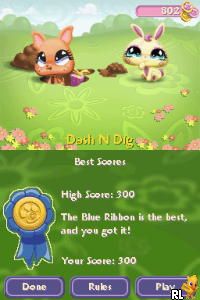
Littlest Pet Shop – Winter (Europe) (En,Fr,De,Es,It,Nl,Sv,No,Da,Fi,Pl,Cs)
0 3 0
Littlest Pet Shop – Winter (Europe) (En,Fr,De,Es,It,Nl,Sv,No,Da,Fi,Pl,Cs) is a Nintendo DS classic that offers a charming, pet-themed experience suitable for all ages. Based on the popular Littlest Pet Shop franchise, it provides a lighthearted, casual gameplay style perfect for those wanting a relaxing pet-care simulation on their handheld console. Its simple mechanics and colorful visuals make it accessible for newcomers and nostalgic for long-time fans of the series.
Getting Into Littlest Pet Shop – Winter
At its core, Littlest Pet Shop – Winter is about caring for and interacting with a variety of adorable virtual pets in a winter-themed setting. The game includes activities like feeding, playing, and customizing pets. Each session focuses on completing daily tasks or mini-games. Players can explore different areas, decorate pet spaces, and enjoy light puzzles that keep the gameplay interesting without feeling overwhelming.
The gameplay mainly involves choosing a pet, performing routine care tasks, and unlocking new items or pets through regular play. Its flow encourages casual, short play sessions, making it easy to pick up whenever you have a few minutes. The interface is designed to be intuitive, with menus that guide you smoothly through different activities. This makes it suitable for players of all ages, including children or those new to pet simulation games.
Standout Features
The visuals are bright and colorful, matching the playful style of the franchise. The art makes each pet and environment feel lively, helping keep your interest over multiple sessions. While the graphics aren’t demanding, their charm and smooth animations boost the overall experience, especially on the Nintendo DS’s dual screens.
Progression is simple: completing activities unlocks new customization options, pets, and mini-games. This ongoing discovery adds replay value, as you can keep expanding your virtual pet collection and decorate your spaces differently each time. The game doesn’t have complex levels or storylines, but the variety of activities and customization options means it stays fun over time without feeling repetitive.
Strategy and Tips
If you’re just starting out with Littlest Pet Shop – Winter, a few tips can help you enjoy it more:
- Complete daily tasks to unlock new items and pets more quickly.
- Try caring for different pets early on to see which ones you connect with most.
- Use the customization options to personalize your pet’s environment, which keeps things interesting.
- Balance activities like feeding and playing to keep your pets happy and healthy.
- Explore all areas to find hidden mini-games and bonus items.
- Take your time; the game is meant to be enjoyed casually, so don’t rush.
Quick Questions
How do I start playing Littlest Pet Shop – Winter?
The game runs directly in your browser, so once it loads, you can begin exploring the pet environments and activities right away without needing to download anything.
What is a common mistake beginners make?
Trying to do too much at once can be overwhelming. Focus on completing daily tasks and caring for a few pets at a time to build a steady routine.
Can I play Littlest Pet Shop – Winter on a mobile device or touchscreen?
Since it runs through a browser emulating the Nintendo DS, it can be played on devices with touchscreens, offering controls adapted for touch use that feel similar to handheld play.
Littlest Pet Shop – Winter is a simple, casual game that captures the cute, playful spirit of the franchise. Its easy mechanics and charming visuals make it a nice choice for anyone looking for a relaxing pet simulation you can play in your browser.
Related games: you can also try Gamebook DS – Aquarian Age – Perpetual Period (Japan) and Horrible Histories – Ruthless Romans (Europe) (En,Fr,De,Es,It), or browse all other games in the Nintendo DS category.
How to Play Littlest Pet Shop – Winter (Europe) (En,Fr,De,Es,It,Nl,Sv,No,Da,Fi,Pl,Cs)?
Choose a pet, care for it by feeding and playing, and unlock new items and pets through regular activities to enjoy a relaxing pet-care experience.
Game Controls
Arrow keys move; Enter or space to select and interact with pets and menus.
You may be interested in:
-
 Nintendo DS
♥ 1
Casper’s Scare School – Classroom Capers (USA)
Nintendo DS
♥ 1
Casper’s Scare School – Classroom Capers (USA) -
 Nintendo DS
♥ 1
Zunou Nouryoku Koujou Machine – Touch de Zunoo DS (Japan)
Nintendo DS
♥ 1
Zunou Nouryoku Koujou Machine – Touch de Zunoo DS (Japan) -
 Nintendo DS
♥ 1
Zunou ni Asekaku Game Series! Vol. 1 – Cool 104 Joker & Setline (Japan)
Nintendo DS
♥ 1
Zunou ni Asekaku Game Series! Vol. 1 – Cool 104 Joker & Setline (Japan) -
 Nintendo DS
♥ 9
Zuma’s Revenge (USA)
Nintendo DS
♥ 9
Zuma’s Revenge (USA) -
 Nintendo DS
♥ 1
Zubo (USA) (En,Fr,Es)
Nintendo DS
♥ 1
Zubo (USA) (En,Fr,Es) -
 Nintendo DS
♥ 1
Zubo (Europe) (En,Fr,De,Es,It,Nl,Sv)
Nintendo DS
♥ 1
Zubo (Europe) (En,Fr,De,Es,It,Nl,Sv) -
 Nintendo DS
♥ 1
Zorro – Quest for Justice (USA) (En,Fr,De,Es,It)
Nintendo DS
♥ 1
Zorro – Quest for Justice (USA) (En,Fr,De,Es,It) -
 Nintendo DS
♥ 1
Zorro – Quest for Justice (Europe) (En,Fr,De,Es,It)
Nintendo DS
♥ 1
Zorro – Quest for Justice (Europe) (En,Fr,De,Es,It)
Comments (0)
No comments yet. Be the first to comment!