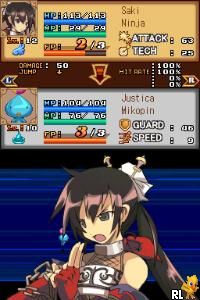
Luminous Arc (USA)
0 1 0
Luminous Arc (USA) is a classic Nintendo DS game that offers a tactical role-playing experience with straightforward mechanics, making it easy for newcomers to pick up and enjoy. Its turn-based battles and manageable story progression provide a satisfying challenge without feeling overwhelming. Played directly in your browser, this emulator preserves the charm of the original hardware, letting you enjoy the game instantly without downloads or setup.
What Is Luminous Arc?
As a tactical RPG, Luminous Arc focuses on grid-based combat where players control a team of characters with unique abilities. The game emphasizes strategic positioning and careful use of skills to defeat enemies and complete objectives. Its interface is designed to be accessible, with clear menus and visual cues that guide players through combat and exploration.
The story unfolds in a fantasy world threatened by conflict and mysterious forces. Players navigate through story missions that introduce new characters, enemies, and tactical challenges. The gameplay combines traditional turn-based battles with resource management, making each decision impactful. Overall, it offers a balanced mix of story-driven progression and engaging tactical combat.
What Keeps You Coming Back
The game’s replay value comes from its variety of character classes and strategic options. Different units can be customized with different equipment and abilities, encouraging experimentation. Additionally, the game includes multiple difficulty levels and optional side missions that add to its longevity.
Players often find themselves returning to optimize team compositions and explore alternative strategies. The branching story paths and character interactions deepen engagement, rewarding multiple playthroughs. The balance of accessible mechanics with enough depth makes each session fresh and satisfying.
Handy Tips
Getting the most out of Luminous Arc is easier with a few tips. Here are some quick pointers to help you succeed:
- Position characters to maximize attack range and defense coverage.
- Use special skills strategically, especially during tough enemy waves or boss fights.
- Manage resources like AP carefully so characters can act when needed.
- Try out different character classes to find effective team setups.
- Pay attention to enemy weaknesses—exploiting them can turn battles around.
- Save regularly before tough encounters to avoid losing progress if things go wrong.
Player FAQ
Is Luminous Arc easy for new players?
Yes, it features straightforward controls and a gentle learning curve, making it accessible for newcomers to tactical RPGs. It guides you through the basics without overwhelming complexity.
Can younger players enjoy Luminous Arc?
While suitable for most ages, the game has fantasy themes and combat scenarios typical of the genre. It’s generally fine for players who like strategic gameplay and story-driven experiences, though younger players might need some guidance on tactical choices.
Do I need an internet connection to play Luminous Arc?
No, the game runs locally in your browser on this site, so once it’s loaded, you don’t need an internet connection. That makes it easy to play whenever you like, whether for a quick session or a longer game.
Luminous Arc offers a clean, engaging tactical RPG experience that’s simple to start but deep enough to keep you coming back. Its mix of accessible mechanics and strategic depth makes it a good pick for fans of classic Nintendo DS titles. Playing it here in your browser keeps the nostalgic charm alive without any hassle.
Related games: you can also try Lernerfolg Grundschule – Deutsch – Der Rechtschreibtrainer (Europe) (De,Tr) and Incredibles, The – Rise of the Underminer (USA), or browse all other games in the Nintendo DS category.
How to Play Luminous Arc (USA)?
Move characters on the grid, use attacks and skills to defeat enemies, and complete story missions by strategic positioning and resource management.
Game Controls
Arrow keys for movement; action keys for selecting options and confirming choices.
You may be interested in:
-
 Nintendo DS
♥ 1
Casper’s Scare School – Classroom Capers (USA)
Nintendo DS
♥ 1
Casper’s Scare School – Classroom Capers (USA) -
 Nintendo DS
♥ 1
Zunou Nouryoku Koujou Machine – Touch de Zunoo DS (Japan)
Nintendo DS
♥ 1
Zunou Nouryoku Koujou Machine – Touch de Zunoo DS (Japan) -
 Nintendo DS
♥ 1
Zunou ni Asekaku Game Series! Vol. 1 – Cool 104 Joker & Setline (Japan)
Nintendo DS
♥ 1
Zunou ni Asekaku Game Series! Vol. 1 – Cool 104 Joker & Setline (Japan) -
 Nintendo DS
♥ 9
Zuma’s Revenge (USA)
Nintendo DS
♥ 9
Zuma’s Revenge (USA) -
 Nintendo DS
♥ 1
Zubo (USA) (En,Fr,Es)
Nintendo DS
♥ 1
Zubo (USA) (En,Fr,Es) -
 Nintendo DS
♥ 1
Zubo (Europe) (En,Fr,De,Es,It,Nl,Sv)
Nintendo DS
♥ 1
Zubo (Europe) (En,Fr,De,Es,It,Nl,Sv) -
 Nintendo DS
♥ 1
Zorro – Quest for Justice (USA) (En,Fr,De,Es,It)
Nintendo DS
♥ 1
Zorro – Quest for Justice (USA) (En,Fr,De,Es,It) -
 Nintendo DS
♥ 1
Zorro – Quest for Justice (Europe) (En,Fr,De,Es,It)
Nintendo DS
♥ 1
Zorro – Quest for Justice (Europe) (En,Fr,De,Es,It)
Comments (0)
No comments yet. Be the first to comment!