Madden NFL ’94 (Europe)
0 2 0
Madden NFL ’94 (Europe) is a classic SNES sports game that simulates American football with detailed gameplay and authentic rules. If you like sports simulations or are a football fan, this game offers a simple way to experience the gridiron directly in your browser, no downloads required. It’s a faithful port of a well-loved title from the SNES era, ideal for anyone wanting to revisit or try an older football game on modern hardware.
Getting Into Madden NFL ’94
Playing Madden NFL ’94 involves choosing teams and jumping into a game mode that mimics real football matches. The gameplay revolves around offensive and defensive plays, where you select offensive formations, pass, run, or kick, while the defense aims to read and counter these moves. Matches are usually quick, around 10-15 minutes, so you can easily start a single game or a series of matches.
The game includes a season mode for managing teams across multiple games, but most players start with quick matches against the AI. The controls are straightforward, focusing on strategic choices rather than complex inputs. The fast pace encourages quick thinking and adapting as the game progresses, with each possession offering chances to improve your tactics.
Standout Features
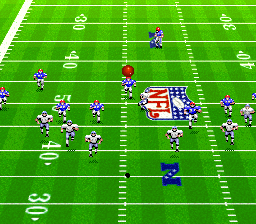
Madden NFL ’94 has a clean, sprite-based visual style typical of the SNES, with clear player animations and recognizable team logos. While it doesn’t aim for hyper-realism, it provides enough detail to identify key players and formations, making gameplay easy to follow and visually engaging. The presentation includes play diagrams and simple menus to help you set up each game quickly.
Progression mainly comes through playing more games, learning each team’s strengths and weaknesses, and trying different strategies. Its replay value comes from refining tactics, playing different teams, or competing in season mode. The mechanics are straightforward, and the quick matches make it accessible for newcomers, yet there’s enough depth for seasoned players to sharpen their skills over time.
Strategy and Tips
Getting the most out of Madden NFL ’94 means understanding basic football strategies and managing your plays effectively. Balance your offense between passing and running based on your opponent’s defense. Practice reading the AI’s defensive setups to find weaknesses.
- Use quick plays to keep the opponent guessing and avoid predictable patterns.
- Keep an eye on the clock and use your timeouts wisely, especially in tight games.
- Try different formations to see what best suits your team’s strengths.
- Adjust your defense to counter strong offensive plays; switching formations mid-game can help.
- Don’t forget special teams — kicking and punting are key for field position and scoring opportunities.
Quick Questions
How do I start a game if I’m new to Madden NFL ’94?
Select your team and pick a quick match to jump right into gameplay. The menus are simple to navigate.
What’s a common mistake beginners make?
Many focus too much on offense and neglect defense, which can lead to easy scores for the AI. Finding a balance on both sides helps.
Can I play Madden NFL ’94 on mobile or touch screens?
Since it runs in your browser, it works well on touch screens without extra controls, making it easy to play on tablets or smartphones.
Madden NFL ’94 is a solid choice for football fans and retro gamers. Its straightforward gameplay and authentic feel make it a good option for quick matches whenever you want to enjoy a football game right in your browser.
Related games: you can also try Addams Family Values (USA) (En,Fr,De) and Jikkyou Powerful Pro Yakyuu '94 (Japan), or browse all other games in the SNES category.
How to Play Madden NFL ’94 (Europe)?
Choose your team, then select offensive or defensive plays to score points or stop the opponent. Win by gaining more yards, scoring touchdowns, or preventing the other team from scoring within the game time.
Game Controls
Arrow keys act as the D-pad; Enter is Start; other keys handle the action buttons.








Comments (0)
No comments yet. Be the first to comment!