Magical Quest Starring Mickey Mouse, The (Italy)
0 2 0
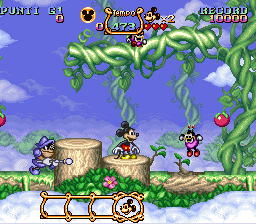
Magical Quest Starring Mickey Mouse, The (Italy) is a classic SNES platformer and action-adventure game that captures the charm of Disney’s beloved mouse. Thanks to its simple controls and clear goals, it’s easy to pick up. This title offers a nostalgic trip for fans of retro gaming and Disney classics alike, all playable directly in your browser without needing downloads or installations.
What Is Magical Quest Starring Mickey Mouse, The?
This game is a side-scrolling platformer where Mickey Mouse sets out to rescue his friends from an evil sorcerer. The gameplay involves jumping across levels, avoiding enemies, and collecting items to move forward. It focuses on navigating through different environments, each filled with obstacles and enemies that test your timing and agility. The game encourages exploration and precise platforming, making it approachable for players of all skill levels.
It combines action with light puzzle-solving, asking players to think quickly while keeping a fun, cartoonish look. Each level acts as a self-contained challenge, with a straightforward progression. Its design is rooted in classic platformer principles, giving fans of the genre a familiar experience while remaining accessible to newcomers and younger players.
What Keeps You Coming Back
The colorful visuals and familiar Disney characters make every game session inviting. Its simple yet challenging gameplay—completing levels, avoiding hazards, and defeating enemies—encourages replaying. Players often return to improve their timing, find hidden secrets, or enjoy the nostalgic charm of Mickey’s adventure.
The variety of levels and environments keeps things interesting, while clear goals and a gentle difficulty curve make it suitable for casual play. The game also rewards players who enjoy mastering each level’s layout or exploring for secrets. Overall, Magical Quest Starring Mickey Mouse, The is a fun and accessible game, whether you’re looking for quick fun or a longer adventure.
Handy Tips
If you want to get the most out of your play, keep these tips in mind:
- Watch enemy patterns carefully to time your jumps and avoid taking damage.
- Explore each level thoroughly; secret areas often hide extra lives or power-ups.
- Use your character’s abilities wisely to tackle tricky sections more easily.
- Take your time—rushing can lead to unnecessary hits.
- If you get stuck, replay sections to learn enemy placements and level layouts.
- Take breaks if you start feeling frustrated; the game is meant to be fun, not stressful.
Player FAQ
Is Magical Quest Starring Mickey Mouse, The easy to learn for new players?
Yes, its controls are simple, and the design makes it accessible for players of all ages, including kids.
Can I play Magical Quest Starring Mickey Mouse, The offline or on mobile devices?
This version runs right in your browser, so you can play anywhere with an internet connection—no downloads needed. It’s optimized for desktop, and there isn’t an official mobile version.
Is the game suitable for children or casual players?
Definitely. Its cartoon style and gentle difficulty make it a good pick for kids and casual gamers looking for a light, entertaining platformer.
Magical Quest Starring Mickey Mouse, The offers a charming adventure that stays true to the classic SNES style. It’s a fun choice for anyone looking for a nostalgic and straightforward game to enjoy right in their browser, bringing Mickey’s magical journey straight to your screen.
Related games: you can also try Madden NFL '95 (Europe) and Daibakushou Jinsei Gekijou – Ooedo Nikki (Japan), or browse all other games in the SNES category.
How to Play Magical Quest Starring Mickey Mouse, The (Italy)?
Guide Mickey through levels by jumping, avoiding enemies, and collecting items to rescue friends. Complete each stage by reaching the end while staying safe and exploring for secrets.
Game Controls
Arrow keys act as the D-pad; Enter is Start; on-screen mapped keys handle the action buttons








Comments (0)
No comments yet. Be the first to comment!