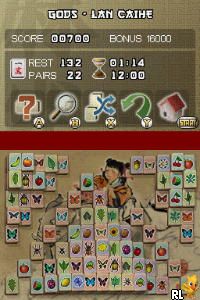
Mahjong (Europe) (En,Fr,De,Es,It)
0 1 0
Mahjong (Europe) (En,Fr,De,Es,It) is a classic Nintendo DS game that brings the timeless tile-matching puzzle into your hands with a simple, elegant design. Rooted in a long tradition, it offers a familiar feel while remaining fresh for fans of classic puzzles. You can play it directly in your browser without any downloads. The game’s polished interface and accessible mechanics make it perfect for quick sessions or longer, focused play. Its European region release includes multiple language options, making it suitable for players across the continent.
Step Into the World of Mahjong
This Nintendo DS classic features a clean, minimalist look reminiscent of traditional Mahjong sets, with crisp tiles and subtle background textures that don’t distract from gameplay. The soundscape includes gentle tunes that create a calming atmosphere, complemented by soft tile clicks and matching sounds that make each move satisfying. Playing it in your browser offers instant access, so you can jump into a game whenever you have a quiet moment. It feels like sitting at a cozy table, surrounded by the quiet hum of focused players, making it ideal for relaxing yet mentally engaging play.
How the Gameplay Hooks You
The main idea is simple: match pairs of identical tiles to clear the board. The game progresses steadily, with each level increasing in difficulty, encouraging careful observation and strategic thinking. Its straightforward mechanics mean you can get started quickly, but mastering tile patterns and managing limited moves keeps things interesting. The puzzles gradually build up without feeling overwhelming, making it perfect for quick sessions or longer focus when you want to improve your matching skills.
Pro Tips for Mahjong
When starting out, look for free tiles—those not blocked on either side—before making matches. Keeping track of tiles that will become available later helps you plan your moves. Focus on matching tiles that reveal new options, especially those that unlock more tiles or free up tricky sections. If you get stuck, take a moment to scan the board for better moves or matches that might open up a better sequence. Patience and careful observation go a long way; rushing can leave you at dead ends.
- Try to match tiles that open up the most new options for future moves.
- If available, use the undo feature to reconsider risky matches.
- Clear one side of the board first to reduce clutter.
- Watch for tiles that are blocked and plan moves to free them.
- Take breaks if you start making errors—fresh eyes can spot better moves.
Frequently Asked Questions
Can I play Mahjong for short sessions, or does it need long stretches?
This game works well for quick play; you can finish a puzzle in a few minutes or spend more time refining your strategy. It’s great for quick breaks or longer focused play.
Does the game get repetitive after a while?
Not really. Each puzzle is different, and the difficulty increases gradually. The varied layouts help keep things interesting, with a relaxing pace that stops it from feeling dull.
Is Mahjong good for casual players or those who prefer offline games?
Absolutely. The simple mechanics and calming atmosphere make it accessible for anyone looking for a relaxing puzzle experience without needing an internet connection or complex controls.
Playing Mahjong here offers a genuine browser-based version of a classic Nintendo DS game. Its straightforward gameplay makes it a timeless choice for puzzle enthusiasts and newcomers alike. Just click and start matching tiles—no fuss, just a nice way to enjoy a quiet mental challenge.
Related games: you can also try Final Fantasy – The 4 Heroes of Light (Europe) and Kouchuu Kakutou – Mushi-1 Grand-Prix (Japan), or browse all other games in the Nintendo DS category.
How to Play Mahjong (Europe) (En,Fr,De,Es,It)?
Match pairs of identical tiles to clear the board before running out of moves. Select tiles carefully, revealing new options and planning your moves to complete each level.
Game Controls
Use keyboard arrow keys or mouse to select and match tiles.
You may be interested in:
-
 Nintendo DS
♥ 1
Casper’s Scare School – Classroom Capers (USA)
Nintendo DS
♥ 1
Casper’s Scare School – Classroom Capers (USA) -
 Nintendo DS
♥ 1
Zunou Nouryoku Koujou Machine – Touch de Zunoo DS (Japan)
Nintendo DS
♥ 1
Zunou Nouryoku Koujou Machine – Touch de Zunoo DS (Japan) -
 Nintendo DS
♥ 1
Zunou ni Asekaku Game Series! Vol. 1 – Cool 104 Joker & Setline (Japan)
Nintendo DS
♥ 1
Zunou ni Asekaku Game Series! Vol. 1 – Cool 104 Joker & Setline (Japan) -
 Nintendo DS
♥ 9
Zuma’s Revenge (USA)
Nintendo DS
♥ 9
Zuma’s Revenge (USA) -
 Nintendo DS
♥ 1
Zubo (USA) (En,Fr,Es)
Nintendo DS
♥ 1
Zubo (USA) (En,Fr,Es) -
 Nintendo DS
♥ 1
Zubo (Europe) (En,Fr,De,Es,It,Nl,Sv)
Nintendo DS
♥ 1
Zubo (Europe) (En,Fr,De,Es,It,Nl,Sv) -
 Nintendo DS
♥ 1
Zorro – Quest for Justice (USA) (En,Fr,De,Es,It)
Nintendo DS
♥ 1
Zorro – Quest for Justice (USA) (En,Fr,De,Es,It) -
 Nintendo DS
♥ 1
Zorro – Quest for Justice (Europe) (En,Fr,De,Es,It)
Nintendo DS
♥ 1
Zorro – Quest for Justice (Europe) (En,Fr,De,Es,It)
Comments (0)
No comments yet. Be the first to comment!