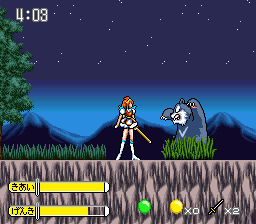
Makeruna! Makendou (Japan)
0 1 0
Makeruna! Makendou (Japan) is a classic SNES fighting game that takes players into a colorful, pixel-filled universe full of energetic battles and quirky charm. This SNES favorite embodies the feel of 16-bit arcade combat, combining fast-paced action with a playful, cartoon-like style that feels both nostalgic and fresh. Its simple mechanics make it easy to pick up, but the game’s depth rewards those who enjoy timing and spacing. As part of the SNES era, it offers solid competitive fighting amidst lively sprites and catchy tunes, all playable right in your browser without any downloads or setup.
Step Into the World of Makeruna! Makendou
The visuals of Makeruna! Makendou reflect the lively spirit of 16-bit arcade fighting, with bright, exaggerated character designs and backgrounds that shift from busy cityscapes to whimsical arenas. The art style leans into cartoonish caricatures, giving each fighter a lot of personality. The soundtrack matches this lively vibe with upbeat chiptunes that keep the tempo high and the energy flowing during matches. The overall atmosphere feels light-hearted yet competitive, inviting players to enjoy the clashes without the seriousness often seen in more realistic fighters. Playing in your browser keeps the pixel-perfect sprites and sound effects intact, offering a faithful slice of SNES history right on your screen.
How the Gameplay Hooks You
Fighting games like Makeruna! Makendou depend on quick reflexes and good timing. The game moves fast, encouraging players to learn patterns, punish mistakes, and adapt quickly. Its control scheme is simple enough to pick up but offers enough depth to master, with punch, kick, and special moves that can chain into combos or defensive moves. Matches are short and intense, perfect for quick sessions or longer battles with friends or AI opponents. The core of the game is about honing your timing and reading your opponent’s moves, making every fight a test of reflexes and tactical thinking.
Pro Tips for Makeruna! Makendou
Getting comfortable with this fighting game means understanding its rhythm and character choices. Here are some tips:
- Start by mastering a few basic moves before trying complex combos; timing beats flashiness every time.
- Use quick recovery times to stay aggressive—pressuring your opponent can lead to mistakes.
- Watch your opponent’s attack patterns to anticipate and counter their moves.
- Zoning with ranged or slower moves helps control space and keep opponents at a distance.
- Try different characters to see which one suits your style, especially considering their special moves and reach.
- Be patient; strategic play often beats frantic button-mashing, especially in close fights.
Frequently Asked Questions
Does Makeruna! Makendou have different game modes or just one-on-one fights?
It mainly focuses on head-to-head battles, typical of classic arcade fighting games.
Is it good for quick play sessions or longer tournaments?
Its fast matches make it perfect for quick play, but you can also spend more time practicing or challenging friends.
Does the game get repetitive after a while?
While it sticks to core fighting mechanics, the variety of characters and strategic options help keep things fresh. The pixel art and sound design also add to its charm, avoiding boredom too quickly.
Makeruna! Makendou offers a simple yet satisfying fighting experience that captures the spirit of SNES arcade fighters. Its easy-to-understand design and nostalgic pixel art make it great for quick sparring or casual play, all available for free in your browser.
Related games: you can also try Cal Ripken Jr. Baseball (USA) and Kouryuu Densetsu Villgust – Kieta Shoujo (Japan) [En by Magic Destiny v1.0], or browse all other games in the SNES category.
How to Play Makeruna! Makendou (Japan)?
Choose a character, learn basic moves, and defeat your opponent by timing punches, kicks, and special attacks. Win rounds by depleting their health bar faster than they do yours.
Game Controls
Arrow keys control movement; action buttons are mapped to keyboard keys for attacking and jumping.








Comments (0)
No comments yet. Be the first to comment!