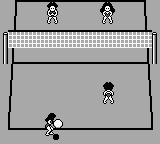
Malibu Beach Volleyball (USA)
0 1 1
Malibu Beach Volleyball (USA) is a classic Game Boy sports game that puts players on a sand court for some volleyball fun. Made during the Game Boy era, it features simple, competitive gameplay perfect for quick matches or casual play. If you like sports games with easy controls and a nostalgic pixel art style, Malibu Beach Volleyball is a solid choice you can enjoy right in your browser.
Getting Into Malibu Beach Volleyball
The game focuses on one-on-one volleyball matches set on a sunny beach. The basics are easy: serve, move your player to intercept the ball, and try to outscore your opponent within a set time or point limit. Matches are quick, usually just a few minutes, which makes it perfect for short gaming sessions. You can play against the AI or do single matches, making it flexible whether you’re after a quick challenge or some practice.
During play, you control your character to serve, bump, set, and spike the ball. Success depends on timing and positioning, with rallies ending when someone misses or the ball goes out of bounds. The game rewards quick reactions and smart placement, especially when the score is tight. Its simple mechanics mean you can jump right in without needing complicated tutorials or controls. Malibu Beach Volleyball is easy to pick up and enjoy, suitable for players of all skill levels.
Standout Features
The visuals use colorful pixel art that captures a lively, beachside vibe. They’re simple, but they do a good job of showing a fun, energetic setting that matches its arcade-style gameplay. Animations are minimal but clear, making it easy to follow the ball and your characters’ movements on the small screen.
Progression is straightforward—choose different opponents or keep playing just for fun. Since matches are quick, replay value comes from playing against different AI levels or trying to improve your timing and positioning. Its simplicity encourages repeated plays, with the challenge being to beat your high scores or perfect your rallies.
Strategy and Tips
Getting the most out of Malibu Beach Volleyball involves paying attention to timing and positioning. Focus on hitting your bumps and spikes at the right moments to keep rallies going. Playing defensively if you’re behind can help you regain control of the game.
- Watch your opponent’s moves to better prepare your returns.
- Use quick, small adjustments to position yourself instead of overcommitting.
- Practice your serve to start the rally with an advantage.
- Don’t rush your attacks; waiting for the right moment to spike can boost your success.
- Keep track of the ball’s path to avoid hitting out of bounds.
- If possible, tweak the difficulty to match your skill level and keep things interesting.
Quick Questions
How do I start a match in Malibu Beach Volleyball?
Just select the game mode from the main menu, pick your opponent or go against AI, and the match kicks off after you choose your team.
What’s a common mistake beginners make?
Many new players rush their spikes or don’t position well, which shortens rallies and lowers scoring chances. Good timing and positioning are key to winning.
Can I play Malibu Beach Volleyball on mobile or touch devices?
Since it runs in your browser, you can play it on any device with a compatible browser, including phones and tablets, so it’s easy to enjoy without extra setup.
Malibu Beach Volleyball offers a simple, enjoyable sports experience rooted in its Game Boy roots. Its easy gameplay and quick matches make it a good pick for anyone who wants casual volleyball fun in their browser.
Related games: you can also try Doraemon no Study Boy 3 – Ku Ku Master (Japan) and Game Boy Gallery 2 (Australia), or browse all other games in the Game Boy category.
How to Play Malibu Beach Volleyball (USA)?
Serve, move, and hit the ball to outscore your opponent in quick volleyball matches. Focus on timing and positioning to keep rallies going and win sets.
Game Controls
Arrow keys move your player; action buttons handle serving, bumping, setting, and spiking.








Comments (0)
No comments yet. Be the first to comment!