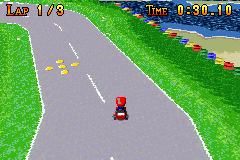
Mario Kart XXL (Tech Demo) (Apr 17th 2004)
0 15 1
Mario Kart XXL (Tech Demo) (Apr 17th 2004) is a compact racing game designed for the Game Boy Advance. This classic from the GBA era offers a straightforward kart racing experience that players of all ages can enjoy directly in their browser. Its simple controls and familiar gameplay make it perfect for quick sessions or casual competition, especially for those feeling nostalgic about early 2000s handheld gaming.
Getting Into Mario Kart XXL
The gameplay centers on racing through colorful, easy-to-navigate tracks filled with twists and obstacles. Players pick from a handful of characters and race against AI opponents or friends if multiplayer is available. The game rewards good timing and positioning, with the aim to finish first while avoiding hazards like puddles or track blockages. Races usually last a few minutes, so it’s easy to jump in and out without needing a big time commitment.
Progress typically involves winning races to improve your standing, unlocking new characters or vehicles if those features are included, and refining your racing lines. The controls are straightforward—accelerate, steer, and use items or power-ups as needed. The focus is on mastering the tracks and avoiding common pitfalls rather than dealing with complex mechanics or extensive customization.
Standout Features
Visually, Mario Kart XXL captures the bright, cartoonish style typical of the Game Boy Advance, with colorful sprites and clear track layouts. It doesn’t aim for realism but offers a charming, accessible look that fits its simple gameplay. The progression system is minimal but effective, encouraging players to improve their times and get comfortable with each track.
Replay value comes from the variety of tracks and the challenge of beating personal bests or competing against friends. Its straightforward design makes it easy to pick up, yet it provides enough depth to keep players trying for faster times or smarter routes. As a tech demo, it shows what GBA hardware could do for fun, arcade-style racing, even if it’s not a full Mario Kart game.
Strategy and Tips
Getting familiar with the tracks helps you avoid hazards and take better racing lines. Using items wisely can change the outcome of a race, so keep an eye on opponents’ positions.
- Learn the tracks well to anticipate turns and obstacles; memorization helps consistency.
- Prioritize smooth steering to keep your speed up—sharp turns at high speed tend to slow you down.
- Use items thoughtfully, saving defensive ones for when you’re in the lead or vulnerable.
- Practice drifting through corners to maintain momentum.
- Watch your opponents’ positions, especially in tight races, to block or defend when needed.
- Try different characters and vehicles to find the combo that suits your handling and speed preferences.
Quick Questions
How do I get started with Mario Kart XXL?
Just pick a race and character, then press start—controls are simple and quick to learn.
What’s a common mistake for beginners?
Many players oversteer or take turns too sharply, losing precious speed. Gentle, controlled steering makes a big difference.
Can I play Mario Kart XXL on a mobile device or touchscreen?
Yes, since it runs straight in your browser, you can play on mobile devices with touch controls, making it easy to race anywhere.
Mario Kart XXL offers a quick, accessible racing experience rooted in the GBA’s handheld gaming era. Its straightforward mechanics and colorful visuals make it a fun choice for casual players or anyone seeking a bit of nostalgic racing right in their browser.
Related games: you can also try Initial D – Another Stage (Japan) and Dragon Ball Z – Taiketsu (U)(Rising Sun), or browse all other games in the Game Boy Advance category.
How to Play Mario Kart XXL (Tech Demo) (Apr 17th 2004)?
Choose a character, race on colorful tracks, avoid obstacles, and use items to beat opponents and finish first. Practice turns and memorize tracks to improve your times.
Game Controls
Arrow keys control steering; other keys handle acceleration, items, and actions.
You may be interested in:
-
 Game Boy Advance
♥ 2
Zooo (J)(Rising Sun)
Game Boy Advance
♥ 2
Zooo (J)(Rising Sun) -
 Game Boy Advance
♥ 4
Zooo (E)(Trashman)
Game Boy Advance
♥ 4
Zooo (E)(Trashman) -
 Game Boy Advance
♥ 2
ZooCube (U)(Mode7)
Game Boy Advance
♥ 2
ZooCube (U)(Mode7) -
 Game Boy Advance
♥ 1
ZooCube (E)(Blizzard)
Game Boy Advance
♥ 1
ZooCube (E)(Blizzard) -
 Game Boy Advance
♥ 1
Zone of the Enders – The Fist of Mars (U)(Mode7)
Game Boy Advance
♥ 1
Zone of the Enders – The Fist of Mars (U)(Mode7) -
 Game Boy Advance
♥ 1
Zone of the Enders – The Fist of Mars (E)(Cezar)
Game Boy Advance
♥ 1
Zone of the Enders – The Fist of Mars (E)(Cezar) -
 Game Boy Advance
♥ 1
Zoku Bokura no Taiyou – Taiyou Shounen Django (J)(Independent)
Game Boy Advance
♥ 1
Zoku Bokura no Taiyou – Taiyou Shounen Django (J)(Independent) -
 Game Boy Advance
♥ 7
Zoku Bokura no Taiyou – Taiyou Shounen Django (J)(Caravan)
Game Boy Advance
♥ 7
Zoku Bokura no Taiyou – Taiyou Shounen Django (J)(Caravan)
Comments (0)
No comments yet. Be the first to comment!