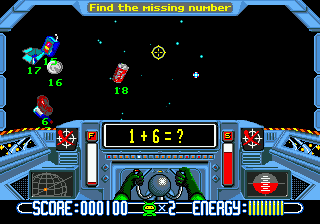
Math Blaster – Episode 1 (USA)
0 3 0
Math Blaster – Episode 1 (USA) is a classic Genesis game that mixes educational content with adventure elements, designed to keep young players engaged as they practice math skills through interactive gameplay. It’s rooted in the early days of the Genesis, giving it a nostalgic feel, and offers a straightforward experience that stands out among other educational titles from that era.
Math Blaster – Episode 1: Gameplay Overview
The main idea is guiding a character through different scenarios that involve solving math puzzles. These puzzles are part of the game’s adventure, where players complete tasks or move through environments by answering questions correctly. The game promotes quick thinking and accuracy, rewarding right answers while penalizing mistakes with time penalties or setbacks.
While it’s focused on teaching, the game also includes adventure mechanics that make practicing arithmetic more fun. Players might face different types of problems, like addition, subtraction, multiplication, or division, depending on the level. The interface is simple and easy to use, with controls suitable for younger audiences. Since it runs directly in your browser, you can start playing immediately without needing extra downloads or software, making it perfect for quick, casual sessions.
Modes, Levels and Progression
Math Blaster – Episode 1 has a progression system that slowly ramps up the difficulty, introducing new math concepts and more complicated problems as players move forward. It doesn’t have multiple modes but offers a series of levels or stages that are completed one after another. Each stage presents different puzzles, gradually increasing in complexity to test and develop arithmetic skills.
The variety comes from different scenarios or environments, each with its own set of challenges. As players advance, they unlock new areas or levels, encouraging repeated play to improve scores and understanding of math concepts. The structure makes it suitable both for initial learning and ongoing practice, with enough variety to keep things interesting over multiple sessions.
Winning Strategies
Focus on accuracy over speed, as rushing often leads to mistakes that slow progress. Look for patterns or shortcuts in common problem types to solve them more quickly. Keep an eye on the clock but don’t sacrifice correctness just to beat the timer. If there are areas you find tricky, practicing those separately can help build confidence. Using elimination—ruling out obviously wrong answers—can improve your chances when guessing. Staying calm and methodical really helps when facing tougher puzzles.
Common Questions About Math Blaster – Episode 1
What is the difficulty progression like in the game?
The challenges get tougher as you go, with more complex problems and faster puzzles, suitable for a range of skills from beginners to more advanced players.
Are there multiple modes or just one continuous campaign?
The game mainly follows a sequence of levels, without separate modes. Its replay value comes from trying to improve your scores and master the levels.
How long does a typical session last, and is it good for quick play?
Most sessions last between 10 and 30 minutes, depending on how quickly you work through the puzzles. It’s great for quick practice or longer play, with the option to replay levels to get better at them.
Math Blaster – Episode 1 remains a simple, effective way to combine learning and adventure. Its browser-based setup means you can jump right in without hassle, making it a good choice for casual practice or revisiting childhood memories.
Related games: you can also try Double Dragon 3 – The Arcade Game (USA, Europe) and Doctor Robotnik's Creature Capture, or browse all other games in the Genesis category.
How to Play Math Blaster – Episode 1 (USA)?
Guide your character through levels by solving math puzzles like addition, subtraction, multiplication, and division to progress and unlock new areas. Focus on accuracy to complete stages and improve your score.
Game Controls
Arrow keys control movement; other keys are used for selecting answers and confirming choices.
You may be interested in:
-
 Genesis
♥ 1
Metal Fangs (Japan)
Genesis
♥ 1
Metal Fangs (Japan) -
 Genesis
♥ 1
Menghuan Shuiguo Pan – 777 Casino (China) (Unl)
Genesis
♥ 1
Menghuan Shuiguo Pan – 777 Casino (China) (Unl) -
 Genesis
♥ 1
Menacer 6-Game Cartridge (USA, Europe)
Genesis
♥ 1
Menacer 6-Game Cartridge (USA, Europe) -
 Genesis
♥ 1
MegaTrax (Japan)
Genesis
♥ 1
MegaTrax (Japan) -
 Genesis
♥ 2
MegaPanel (Japan)
Genesis
♥ 2
MegaPanel (Japan) -
 Genesis
♥ 11
Megaman: The Wily Wars randomizer
Genesis
♥ 11
Megaman: The Wily Wars randomizer -
 Genesis
♥ 58
Megaman X in Sonic 2
Genesis
♥ 58
Megaman X in Sonic 2 -
 Genesis
♥ 2
Megaman – The Wily Wars Fixer Upper
Genesis
♥ 2
Megaman – The Wily Wars Fixer Upper
Comments (0)
No comments yet. Be the first to comment!