Mega Moemon FireRed v1.1.11e
0 47 8
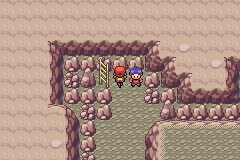
Mega Moemon FireRed v1.1.11e is a fan-made twist on the classic Game Boy Advance game, mixing the familiar Pokémon FireRed experience with a cute, moe-inspired visual style. Originally a GBA title loved for its straightforward turn-based battles and exploration, this version reimagines the game with adorable, anime-style characters that catch the eye. It runs straight in your browser, giving you a nostalgic feeling with a fresh look, all without needing to download or install anything. It’s a simple way to revisit a favorite genre with a splash of modern color.
Why Mega Moemon FireRed v1.1.11e Is Worth Playing
The main thing that stands out is its visual transformation. Instead of the usual pixel sprites, all Pokémon and trainers are replaced with cute, moe-style characters, which creates a cheerful, lighthearted mood. The gameplay stays true to Pokémon’s core—turn-based battles, exploration, catching Pokémon—but the new art adds a playful touch that makes familiar routes feel a little different. The mechanics are the same, but the look offers a fresh perspective. It’s great for anyone who enjoyed the original but wants a more colorful, fun version you can enjoy right from your browser.
The interface and battle animations also match the cute theme, making encounters more lively and less serious for casual players. Bright visuals and a cheerful soundtrack help set a relaxed, fun tone compared to typical Pokémon games. If you’re interested in a lighthearted take on a classic RPG, this version offers quick sessions or longer adventures that keep things interesting with its quirky charm and familiar gameplay.
Tips to Get Ahead
If you’re starting out with Mega Moemon FireRed v1.1.11e, here are some helpful hints:
- Try to catch different kinds of Pokémon early on to create a well-rounded team.
- Balance your training; don’t forget weaker Pokémon—they can turn the tide in tough fights.
- Pay attention to type advantages; knowing which Pokémon to use can save you trouble.
- Visit Pokémon centers often to heal up and organize your team, especially before big battles.
- Explore every area carefully; hidden items and encounters can give you an edge later on.
- Save your progress regularly, especially before challenging fights or story moments, so you don’t lose progress.
What to Know Before You Play
Is Mega Moemon FireRed v1.1.11e hard for new players?
It keeps the challenge of the original Pokémon FireRed, but its cute style and pacing can make battles seem more approachable. Expect some difficulty, but it’s designed to be enjoyable for a wide range of players.
How long does a typical session last?
A single playthrough can take anywhere from a few hours to longer, depending on how much you explore and how many battles you take on. It’s flexible for quick sessions or longer explorations.
Is Mega Moemon FireRed v1.1.11e good for casual or dedicated players?
This version works well for casual players thanks to its charming visuals and straightforward gameplay. At the same time, dedicated fans who want to explore every corner and catch rare Pokémon will find it rewarding. It suits different play styles without any hassle.
Jump into the fun with Mega Moemon FireRed v1.1.11e
Playing Mega Moemon FireRed v1.1.11e is a simple way to revisit a beloved classic with a cute, playful look. Its easygoing design and adorable visuals make it a fun experience, whether you’re a Pokémon veteran or new to the series. Since it runs right in your browser, you can jump in whenever you want and start exploring this moe-inspired version of a familiar adventure.
Related games: you can also try Luigi is hard T-posed and has no kart by Neweegee and Mario in Sonic Battle, or browse all other games in the Game Boy Advance category.
How to Play Mega Moemon FireRed v1.1.11e?
Explore the world, catch Pokémon, and battle other trainers to become the champion. Manage your team, train Pokémon, and progress through the story by winning battles and collecting badges.
Game Controls
Arrow keys move; Enter is select; Z and X are action buttons; spacebar is pause.
You may be interested in:
-
 Game Boy Advance
♥ 2
Zooo (J)(Rising Sun)
Game Boy Advance
♥ 2
Zooo (J)(Rising Sun) -
 Game Boy Advance
♥ 4
Zooo (E)(Trashman)
Game Boy Advance
♥ 4
Zooo (E)(Trashman) -
 Game Boy Advance
♥ 2
ZooCube (U)(Mode7)
Game Boy Advance
♥ 2
ZooCube (U)(Mode7) -
 Game Boy Advance
♥ 1
ZooCube (E)(Blizzard)
Game Boy Advance
♥ 1
ZooCube (E)(Blizzard) -
 Game Boy Advance
♥ 1
Zone of the Enders – The Fist of Mars (U)(Mode7)
Game Boy Advance
♥ 1
Zone of the Enders – The Fist of Mars (U)(Mode7) -
 Game Boy Advance
♥ 1
Zone of the Enders – The Fist of Mars (E)(Cezar)
Game Boy Advance
♥ 1
Zone of the Enders – The Fist of Mars (E)(Cezar) -
 Game Boy Advance
♥ 1
Zoku Bokura no Taiyou – Taiyou Shounen Django (J)(Independent)
Game Boy Advance
♥ 1
Zoku Bokura no Taiyou – Taiyou Shounen Django (J)(Independent) -
 Game Boy Advance
♥ 7
Zoku Bokura no Taiyou – Taiyou Shounen Django (J)(Caravan)
Game Boy Advance
♥ 7
Zoku Bokura no Taiyou – Taiyou Shounen Django (J)(Caravan)
Comments (0)
No comments yet. Be the first to comment!