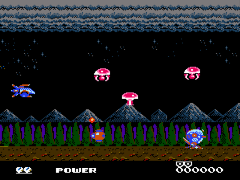
Metal Fighter (USA) (Unl)
0 1 0
Metal Fighter (USA) (Unl) is a classic NES-style action game that offers simple, combat-focused gameplay for fans of retro titles. If you enjoy pixelated brawls and quick battles, this game provides a good challenge wrapped in nostalgic charm. It’s a solid choice for players wanting to experience a vintage NES action game directly in their browser without any hassle.
Getting Into Metal Fighter
The main gameplay of Metal Fighter involves fighting through waves of enemies in side-scrolling stages. You control a fighter with basic moves, aiming to defeat enemies to move forward. The game relies on fast reflexes and recognizing attack patterns, similar to other NES titles. During each session, you move through levels, fight enemies, and dodge hazards, with gameplay looping until you run out of lives or clear the stage.
You’ll fight using simple attack buttons, often combining jumps and punches to take down foes. There are no fancy mechanics like power-ups or character customization; instead, success depends on mastering enemy patterns and timing your attacks well. The difficulty stays consistent with other NES games, asking for patience and precise timing. Expect short play sessions that test your skills, with the option to try again as many times as needed to improve your score or finish the game.
Standout Features
Graphically, Metal Fighter sticks to the NES style with clear pixel art. Enemies are easy to distinguish, and the backgrounds change enough to keep stages visually interesting without distracting from the action. Progression is straightforward: clear each stage to move on, with enemies getting faster and more aggressive as you go.
Replay value comes from trying to master the combat and improve your scores. Since there are no branching paths or hidden secrets, the main goal is to get better at the game and beat your previous best. Its simple design makes it easy to pick up again after a break, encouraging players to keep trying until they succeed or set new high scores.
Strategy and Tips
If you’re new to Metal Fighter, focus on timing your attacks carefully and learning enemy behaviors. Patience and accuracy will help you go further.
- Use jump attacks to avoid ground enemies and reach enemies at different heights.
- Watch enemy movements and attack when they’re vulnerable.
- Take your time with stages to avoid unnecessary hits.
- Try to dodge attacks instead of blocking, since blocking isn’t part of the game.
- Practice each stage to memorize enemy placements and improve reactions.
- Clear each level without losing all your lives to boost your score.
Quick Questions
How do I get started with Metal Fighter?
The game begins as soon as it loads, so just use your keyboard to control your fighter and start battling enemies right away.
What’s a common mistake for beginners?
Many new players rush into fights without paying attention to enemy patterns, which can lead to taking unnecessary hits and losing lives early on.
Can I play Metal Fighter on mobile or touch devices?
Yes, since it runs directly in your browser, you can play on mobile devices with a touchscreen, though precise controls might be a bit tricky compared to a keyboard.
Metal Fighter offers a straightforward, action-packed experience rooted in NES classics. Its simplicity makes it accessible for new players, while the challenge keeps seasoned gamers coming back to improve their scores. This vintage-style game remains a satisfying way for fans of classic action titles to enjoy directly in their browser.
Related games: you can also try Hanafuda Yuukyou Den – Nagarebana Oryuu (Japan) (Unl) and Duck Tales (USA) (Beta), or browse all other games in the NES category.
How to Play Metal Fighter (USA) (Unl)?
Move through levels by fighting enemies with punches and jumps, avoiding hazards, and defeating all foes to progress. Practice timing and learn enemy patterns to improve your score and clear stages.
Game Controls
Arrow keys control movement; attack and jump are mapped to keyboard keys.
You may be interested in:
-
![Zombie Hunter (Japan) [En by KingMike v1.01]](https://www.playf2p.com/wp-content/uploads/zombie-hunter-japan-en-by-kingmike-v1-01-200x120.png) NES
♥ 2
Zombie Hunter (Japan) [En by KingMike v1.01]
NES
♥ 2
Zombie Hunter (Japan) [En by KingMike v1.01] -
 NES
♥ 1
Zombie Hunter (Japan)
NES
♥ 1
Zombie Hunter (Japan) -
 NES
♥ 1
Zoids Mokushiroku (Japan)
NES
♥ 1
Zoids Mokushiroku (Japan) -
 NES
♥ 2
Zoids 2 – Zenebas no Gyakushuu (Japan)
NES
♥ 2
Zoids 2 – Zenebas no Gyakushuu (Japan) -
 NES
♥ 1
Zoids – Chuuou Tairiku no Tatakai (Japan)
NES
♥ 1
Zoids – Chuuou Tairiku no Tatakai (Japan) -
 NES
♥ 11
Zippy Race (Japan)
NES
♥ 11
Zippy Race (Japan) -
 NES
♥ 1
Zhen Ben Xi You Ji (Asia) (Unl)
NES
♥ 1
Zhen Ben Xi You Ji (Asia) (Unl) -
 NES
♥ 1
Zenbei!! Pro Basket (Japan)
NES
♥ 1
Zenbei!! Pro Basket (Japan)
Comments (0)
No comments yet. Be the first to comment!