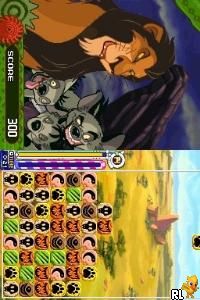
Meteos – Disney Magic (USA)
0 4 0
Meteos – Disney Magic (USA) is a Nintendo DS classic that blends the puzzle mechanics of the original Meteos with a Disney-themed look. The game offers simple yet engaging gameplay suitable for players of all ages who enjoy quick, strategic puzzles. Whether you’re familiar with the genre or trying it out for the first time, this title adds a colorful, family-friendly twist on a well-loved formula that you can play easily in your browser without needing to download anything.
Getting Into Meteos – Disney Magic
The main gameplay involves matching and launching colored blocks called “meteos” to clear screens and move through levels. You control a cursor that moves across the grid, selecting groups of blocks to launch upward. The aim is to match three or more of the same color, causing them to explode and free up space. As blocks are cleared, new meteos fall from the top, making the game feel fast and lively.
There are different modes, including a story campaign and free play, so you can choose to follow a set path or jump into quick matches. Sessions often require careful planning to prevent the screen from filling up, as the game ends if meteos reach the top of the play area. It’s a test of quick thinking and pattern recognition, with each play demanding both speed and strategy.
Standout Features
The look of Meteos – Disney Magic is bright and lively, with animations that appeal to younger players and Disney fans alike. Characters and themes are woven into the gameplay, with familiar Disney motifs enhancing the overall style without taking away from the core puzzle mechanics. Progression unlocks new characters and backgrounds, encouraging continued play and skill improvement.
Replay value stays high thanks to different difficulty levels and modes. Each game session can be short or longer depending on your skill and goals. The simple mechanics, along with increasing challenges as you advance, keep bringing players back to improve scores or unlock new content. Since it’s accessible here, you can enjoy it anytime without any setup or installation—perfect for a quick puzzle fix.
Strategy and Tips
To do well in Meteos – Disney Magic, aim to create larger groups of meteos before launching them. Bigger matches lead to bigger explosions and more space to work with. Managing the rising meteos efficiently is essential to avoid losing the game. Planning a few moves ahead can help keep the screen from filling up unexpectedly.
- Clear the bottom rows when possible to make room for new meteos to fall.
- Look for chances to trigger chain reactions by setting up matches that cause multiple clears quickly.
- Use special characters or power-ups wisely to handle tricky clusters or clear large sections faster.
- Stay calm during hectic moments; rushing can cause mistakes that fill the screen.
- Quickly recognize color patterns to speed up your decisions during intense parts of the game.
Quick Questions
How do I start a game in Meteos – Disney Magic?
Just select the game on this page, and it will load instantly in your browser, ready to play without any setup.
What’s a common mistake beginners make?
Many new players try to clear meteos with single matches instead of building larger groups for bigger explosions, which can quickly cause the screen to fill up.
Can I play Meteos – Disney Magic on mobile or touch devices?
Yes, the game works on touch screens through this browser emulator, making it easy to play on smartphones and tablets without downloading extra apps.
Meteos – Disney Magic offers a colorful, accessible puzzle experience rooted in the Nintendo DS era. Its simple mechanics and Disney charm make it a fun choice for casual players looking for quick, satisfying gameplay right in your browser.
Related games: you can also try Mawasundaa!! (Japan) and Imagine – Beauty Stylist (Europe) (En,Fr,De,Es,It,Nl,Sv,No,Da), or browse all other games in the Nintendo DS category.
How to Play Meteos – Disney Magic (USA)?
Match three or more colored meteos to clear them and prevent the screen from filling up. Launch groups of blocks upward to make explosions and clear space while planning your moves carefully.
Game Controls
Arrow keys move the cursor; space or enter selects and launches meteos.
You may be interested in:
-
 Nintendo DS
♥ 1
Casper’s Scare School – Classroom Capers (USA)
Nintendo DS
♥ 1
Casper’s Scare School – Classroom Capers (USA) -
 Nintendo DS
♥ 1
Zunou Nouryoku Koujou Machine – Touch de Zunoo DS (Japan)
Nintendo DS
♥ 1
Zunou Nouryoku Koujou Machine – Touch de Zunoo DS (Japan) -
 Nintendo DS
♥ 1
Zunou ni Asekaku Game Series! Vol. 1 – Cool 104 Joker & Setline (Japan)
Nintendo DS
♥ 1
Zunou ni Asekaku Game Series! Vol. 1 – Cool 104 Joker & Setline (Japan) -
 Nintendo DS
♥ 9
Zuma’s Revenge (USA)
Nintendo DS
♥ 9
Zuma’s Revenge (USA) -
 Nintendo DS
♥ 1
Zubo (USA) (En,Fr,Es)
Nintendo DS
♥ 1
Zubo (USA) (En,Fr,Es) -
 Nintendo DS
♥ 1
Zubo (Europe) (En,Fr,De,Es,It,Nl,Sv)
Nintendo DS
♥ 1
Zubo (Europe) (En,Fr,De,Es,It,Nl,Sv) -
 Nintendo DS
♥ 1
Zorro – Quest for Justice (USA) (En,Fr,De,Es,It)
Nintendo DS
♥ 1
Zorro – Quest for Justice (USA) (En,Fr,De,Es,It) -
 Nintendo DS
♥ 1
Zorro – Quest for Justice (Europe) (En,Fr,De,Es,It)
Nintendo DS
♥ 1
Zorro – Quest for Justice (Europe) (En,Fr,De,Es,It)
Comments (0)
No comments yet. Be the first to comment!