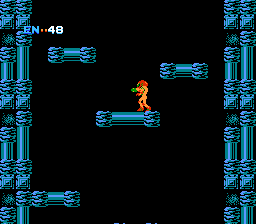
Metroid (Japan) (Rev 1)
0 1 0
Metroid (Japan) (Rev 1) is a classic FDS game that brings the action-adventure experience to your browser. If you enjoy exploring mysterious worlds, collecting power-ups, and facing tough enemies, this game offers a nostalgic trip back to the Famicom Disk System era. It’s perfect for anyone wanting to experience an early title in the series without needing downloads or installations.
Getting Into Metroid
The gameplay focuses on exploration and gathering items. You control a lone hero moving through a series of connected areas filled with enemies, obstacles, and secrets. The main idea is to find upgrades, defeat foes, and open new paths to move further into the game. Usually, you start by getting familiar with the map, then explore each section carefully, pick up items, and deal with tougher enemies along the way.
This FDS classic encourages a careful approach. You’ll often need to backtrack once you find new equipment, opening doors that were previously blocked. The game doesn’t hold your hand, so you get to experiment with different routes and strategies. Save points are limited, and managing resources like energy and ammunition adds to the challenge. The difficulty level reflects its time, asking for patience and thoughtful planning, especially in the later stages.
Standout Features
The pixel art graphics are typical of the FDS era, with detailed sprites that still look good today. The visuals clearly show the environment and enemies, helping you spot threats and items. Its atmosphere mixes dark, mysterious corridors with bright, colorful upgrades, creating a sense of discovery as you go forward.
Progress depends on finding upgrades that boost your abilities, like better weapons or new movement options. The interconnected map promotes exploration, and uncovering secrets rewards thoroughness. Replayability comes from trying different routes, optimizing upgrade paths, or challenging yourself with fewer saves. No two playthroughs have to be the same, especially if you aim to finish quickly or with fewer resources.
Strategy and Tips
If you’re new to Metroid, take your time exploring each area before moving on. Upgrades are vital for survival and advancing, so focus on finding and using new items wisely.
- Look out for hidden passages and secret rooms that might hide upgrades or health restorations.
- Save your ammunition and energy, especially in the later parts when enemies become tougher.
- Backtrack once you find new gear, since many areas only become accessible after certain upgrades.
- Plan your route to avoid unnecessary backtracking—use a map if you can.
- Revisit earlier sections to gather resources or find missed secrets.
Quick Questions
How should I start if I’ve never played it before?
Take your time exploring, getting familiar with the map, and collecting upgrades as they appear. Patience helps with understanding how everything fits together.
What mistakes do beginners often make?
Trying to rush through areas without exploring thoroughly can leave you stuck or low on resources. It’s best to look around every corner.
Can I play this on mobile or touch devices?
Yes, you can play it in your browser on mobile devices, with touch controls. However, using a keyboard makes navigation and combat easier.
Metroid is a key part of the action-adventure genre, and this browser version keeps its exploration and upgrade mechanics intact. Playing it offers a glimpse into the roots of the series, where careful planning and thorough exploration lead to progress and discovery.
Related games: you can also try Clu Clu Land (Japan) (En) (Disk Writer) and BurgerTime (Japan) (Disk Writer), or browse all other games in the FDS category.
How to Play Metroid (Japan) (Rev 1)?
Explore the interconnected areas, find upgrades, defeat enemies, and uncover secrets to progress through the map. Manage resources carefully and backtrack with new gear to unlock new paths and secrets.
Game Controls
Arrow keys for movement; action buttons mapped to keyboard keys for shooting and jumping.
You may be interested in:
-
 FDS
♥ 2
Zelda no Densetsu – The Hyrule Fantasy (Japan) (Virtual Console)
FDS
♥ 2
Zelda no Densetsu – The Hyrule Fantasy (Japan) (Virtual Console) -
 FDS
♥ 2
Zelda no Densetsu – The Hyrule Fantasy (Japan) (Rev 1)
FDS
♥ 2
Zelda no Densetsu – The Hyrule Fantasy (Japan) (Rev 1) -
 FDS
♥ 1
Zelda no Densetsu – The Hyrule Fantasy (Japan) (GameCube)
FDS
♥ 1
Zelda no Densetsu – The Hyrule Fantasy (Japan) (GameCube) -
 FDS
♥ 1
Zelda no Densetsu – The Hyrule Fantasy (Japan) (Collector’s Edition)
FDS
♥ 1
Zelda no Densetsu – The Hyrule Fantasy (Japan) (Collector’s Edition) -
 FDS
♥ 2
Zelda no Densetsu – The Hyrule Fantasy (Japan) (Beta) (1985-12-28)
FDS
♥ 2
Zelda no Densetsu – The Hyrule Fantasy (Japan) (Beta) (1985-12-28) -
 FDS
♥ 2
Zelda no Densetsu – The Hyrule Fantasy (Japan)
FDS
♥ 2
Zelda no Densetsu – The Hyrule Fantasy (Japan) -
 FDS
♥ 1
Zatsugaku Olympic Quiz Part II (Japan) (Unl)
FDS
♥ 1
Zatsugaku Olympic Quiz Part II (Japan) (Unl) -
 FDS
♥ 1
Zatsugaku Olympic Quiz – Watanabe Wataru Hen (Japan) (Unl)
FDS
♥ 1
Zatsugaku Olympic Quiz – Watanabe Wataru Hen (Japan) (Unl)
Comments (0)
No comments yet. Be the first to comment!