Metroid – Zero Mission (U)(TrashMan)
0 40 3
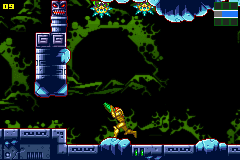
Metroid – Zero Mission (U)(TrashMan) is a well-loved Game Boy Advance game that updates the original Metroid with some modern touches while keeping the core action-adventure feel intact. It’s a game about exploration, combat, and solving puzzles—something that fans of the series will recognize. Now you can play it right in your browser, no downloads needed. If you enjoy retro games and sci-fi stories, this one hits the right notes, blending nostalgia with polished gameplay mechanics.
Why Metroid – Zero Mission Is Worth Playing
What makes it stand out is how the visuals stay true to the original but look sharper. The pixel art has been refined to give alien worlds and hostile zones a more immersive look. The sound design adds to the mood with eerie background music and sharp sound effects, creating a tense atmosphere that keeps you alert. The controls are tight, making it satisfying to move through tricky levels, whether you’re backtracking or searching for hidden items.
Beyond how it looks and sounds, the game offers a smooth experience rooted in action and adventure. It encourages exploring in a non-linear way, rewarding players who take their time to find secret areas and upgrades. The difficulty feels fair but can be challenging, often needing precise timing and strategic use of your weapons. These elements keep each session engaging, and the pacing makes it enjoyable whether you play in short bursts or longer stretches. Its status as a Game Boy Advance favorite comes from balancing accessibility with depth, appealing to casual players and dedicated fans alike.
Tips to Get Ahead
Start by exploring carefully instead of rushing through. Take your time to check each screen for hidden passages and upgrades.
- Focus on upgrading your weapons and suit so you can handle tougher enemies more easily.
- Plan your route with saved points in mind to avoid unnecessary backtracking.
- Keep an eye out for environmental clues and secret passages that might lead to useful items or shortcuts.
- Practice dodging attacks to save health and avoid taking damage during tough fights.
- Some areas are better tackled with specific weapons or gear, so try different setups to see what works best.
Things to Know Before You Start
Question?
How tough is Metroid – Zero Mission for newcomers?
It offers a fair challenge typical of the series, with a gradual increase in difficulty that helps new players learn the mechanics along the way.
Question?
How long does a typical session take?
Playing in-browser, you might play for about 30 minutes or more at a time, depending on how much you want to explore. Taking your time to find secrets makes the experience richer.
Question?
Is it good for casual players?
While you can enjoy it casually, its exploration and combat can be quite challenging, making it more suited for players who enjoy depth and a bit of a challenge in action-adventure games.
Metroid – Zero Mission is a standout among Game Boy Advance titles, with tight gameplay and an interesting sci-fi world. Jump in, explore, and see what secrets you can uncover. It’s a game that rewards patience, curiosity, and strategic thinking, and you can play it free right in your browser.
Related games: you can also try Hamtaro – Ham-Ham Heartbreak (U)(Venom) and 2 in 1 – Golden Nugget Casino & Texas Hold'em Poker (E)(Independent), or browse all other games in the Game Boy Advance category.
How to Play Metroid – Zero Mission (U)(TrashMan)?
Explore levels, defeat enemies, find upgrades, and solve puzzles to progress through the game. Collect items, avoid damage, and plan your route to reach new areas and defeat bosses.
Game Controls
Arrow keys move Samus; other keys handle actions like shooting, jumping, and switching weapons.
You may be interested in:
-
 Game Boy Advance
♥ 2
Zooo (J)(Rising Sun)
Game Boy Advance
♥ 2
Zooo (J)(Rising Sun) -
 Game Boy Advance
♥ 4
Zooo (E)(Trashman)
Game Boy Advance
♥ 4
Zooo (E)(Trashman) -
 Game Boy Advance
♥ 2
ZooCube (U)(Mode7)
Game Boy Advance
♥ 2
ZooCube (U)(Mode7) -
 Game Boy Advance
♥ 1
ZooCube (E)(Blizzard)
Game Boy Advance
♥ 1
ZooCube (E)(Blizzard) -
 Game Boy Advance
♥ 1
Zone of the Enders – The Fist of Mars (U)(Mode7)
Game Boy Advance
♥ 1
Zone of the Enders – The Fist of Mars (U)(Mode7) -
 Game Boy Advance
♥ 1
Zone of the Enders – The Fist of Mars (E)(Cezar)
Game Boy Advance
♥ 1
Zone of the Enders – The Fist of Mars (E)(Cezar) -
 Game Boy Advance
♥ 1
Zoku Bokura no Taiyou – Taiyou Shounen Django (J)(Independent)
Game Boy Advance
♥ 1
Zoku Bokura no Taiyou – Taiyou Shounen Django (J)(Independent) -
 Game Boy Advance
♥ 7
Zoku Bokura no Taiyou – Taiyou Shounen Django (J)(Caravan)
Game Boy Advance
♥ 7
Zoku Bokura no Taiyou – Taiyou Shounen Django (J)(Caravan)
Comments (0)
No comments yet. Be the first to comment!