Mi Experto en Vocabulario (Spain)
0 1 0
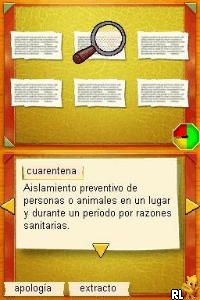
Mi Experto en Vocabulario (Spain) is a classic Nintendo DS game designed to help players improve their Spanish vocabulary through engaging exercises and interactive activities. Perfect for language learners or anyone wanting to expand their word bank, this game offers a straightforward approach that makes learning both fun and accessible. Since it’s a Nintendo DS title from the early 2000s, it carries a nostalgic charm that appeals to players familiar with the console and newcomers alike.
Getting Into Mi Experto en Vocabulario
The core gameplay involves completing various vocabulary exercises, including matching words to definitions, filling in missing words, or choosing synonyms and antonyms. The game structures these activities into different modes, often starting with easier tasks and gradually increasing in difficulty as players improve. Sessions usually start with a brief review or tutorial, then move into timed or scored exercises designed to keep focus and encourage accuracy.
Players use the stylus and touchscreen to select options, drag items, or type answers when needed. The interface is simple and clear, making it easy to navigate. Many players find themselves returning regularly to practice, aiming to beat their previous scores or learn new words. Its design is suited for quick, bite-sized sessions, perfect for short breaks or dedicated study time.
Standout Features
Visually, Mi Experto en Vocabulario keeps things straightforward with clean, easy-to-read text and minimalistic graphics. The focus remains on the educational content, with colorful icons and simple animations that add a bit of liveliness without distracting from the core activities. As players progress, they unlock new levels or categories, which adds a sense of achievement and motivation to keep going.
Replay value comes from the variety of exercises and the chance to improve scores over time. The game encourages repeated practice, helping to reinforce vocabulary. Since it covers multiple difficulty levels, players can revisit earlier sections to review or challenge themselves with more advanced exercises. It’s a compact experience, ideal for learners who want manageable doses of vocabulary training.
Strategy and Tips
Starting with the easier levels can build confidence, especially if you’re new to the game or learning Spanish. Focus on understanding what words mean rather than just guessing answers.
- Use the review and hint features to strengthen your understanding when stuck on a word or exercise.
- Try to complete sessions within a set time to improve your speed and recall under pressure.
- Repeat exercises to memorize words and reduce mistakes on later attempts.
- Notice common word patterns and roots, which can make similar exercises faster in future sessions.
- Set personal goals, like mastering a certain number of words each day, to keep your practice consistent.
Quick Questions
How do I get started with Mi Experto en Vocabulario?
Select the activity or mode you want from the main menu and follow the prompts to begin practicing vocabulary.
What is a common beginner mistake?
Guessing answers without understanding the meaning of the words often leads to errors. Take a moment to review or recall the vocabulary if unsure.
Can I play this game on mobile or touch devices?
Yes, since it runs in your browser emulating the Nintendo DS, you can play Mi Experto en Vocabulario on any device with a touchscreen or mouse, including tablets and smartphones.
Playing Mi Experto en Vocabulario can be a practical way to strengthen your Spanish vocabulary using a familiar, intuitive platform. Its simple design and focus on core learning make it useful for both casual practice and more structured study sessions. The game’s straightforward approach and replayability mean you can keep improving at your own pace, making it a handy addition to your language learning routine.
Related games: you can also try Imagine – Champion Rider (Europe) (En,Fr,De,Es,It) (NDSi Enhanced) and Gekitou! Custom Robo (Japan), or browse all other games in the Nintendo DS category.
How to Play Mi Experto en Vocabulario (Spain)?
Complete vocabulary exercises by matching words to definitions, filling in missing words, or choosing synonyms and antonyms to improve your Spanish vocabulary.
Game Controls
Arrow keys move; Enter selects; use keyboard for all actions.
You may be interested in:
-
 Nintendo DS
♥ 1
Casper’s Scare School – Classroom Capers (USA)
Nintendo DS
♥ 1
Casper’s Scare School – Classroom Capers (USA) -
 Nintendo DS
♥ 1
Zunou Nouryoku Koujou Machine – Touch de Zunoo DS (Japan)
Nintendo DS
♥ 1
Zunou Nouryoku Koujou Machine – Touch de Zunoo DS (Japan) -
 Nintendo DS
♥ 1
Zunou ni Asekaku Game Series! Vol. 1 – Cool 104 Joker & Setline (Japan)
Nintendo DS
♥ 1
Zunou ni Asekaku Game Series! Vol. 1 – Cool 104 Joker & Setline (Japan) -
 Nintendo DS
♥ 9
Zuma’s Revenge (USA)
Nintendo DS
♥ 9
Zuma’s Revenge (USA) -
 Nintendo DS
♥ 1
Zubo (USA) (En,Fr,Es)
Nintendo DS
♥ 1
Zubo (USA) (En,Fr,Es) -
 Nintendo DS
♥ 1
Zubo (Europe) (En,Fr,De,Es,It,Nl,Sv)
Nintendo DS
♥ 1
Zubo (Europe) (En,Fr,De,Es,It,Nl,Sv) -
 Nintendo DS
♥ 1
Zorro – Quest for Justice (USA) (En,Fr,De,Es,It)
Nintendo DS
♥ 1
Zorro – Quest for Justice (USA) (En,Fr,De,Es,It) -
 Nintendo DS
♥ 1
Zorro – Quest for Justice (Europe) (En,Fr,De,Es,It)
Nintendo DS
♥ 1
Zorro – Quest for Justice (Europe) (En,Fr,De,Es,It)
Comments (0)
No comments yet. Be the first to comment!